- Products
- Learn
- Local User Groups
- Partners
- More

Call For Papers
Your Expertise, Our Stage
Ink Dragon: A Major Nation-State Campaign
Watch HereAI Security Masters E5:
Powering Prevention: The AI Driving Check Point’s ThreatCloud
The Great Exposure Reset
AI Security Masters E4:
Introducing Cyata, Securing the Agentic AI Era
CheckMates Go:
CheckMates Fest
Hello!
I have a problem with the CVPND daemon on a VSX R80.40 cluster after updating JHF Take from 77 to 78.
The VS4 has Mobile Access blade enabled and SNX portal configured, which is not available after update.
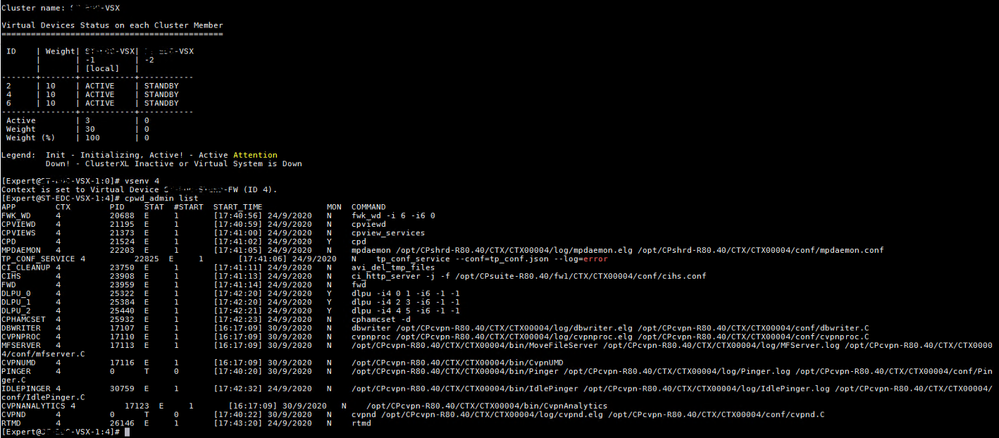
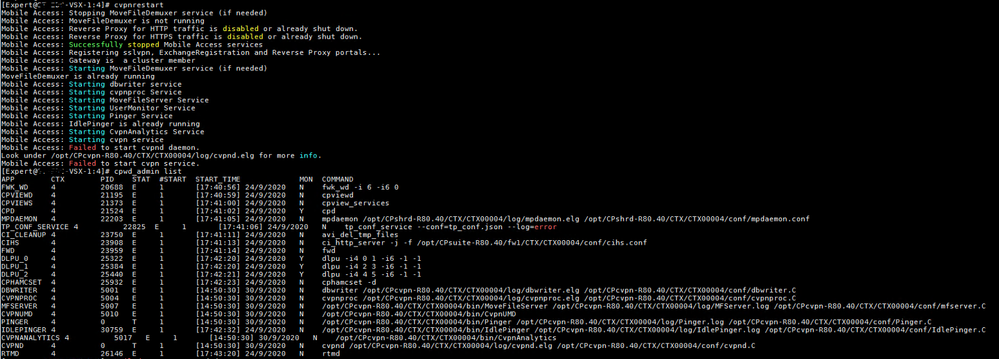
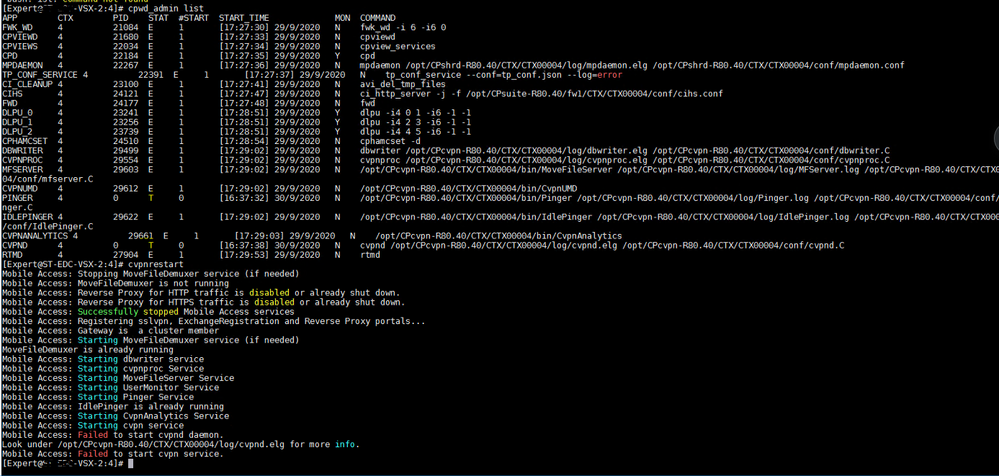
1.On both nodes of the VSX cluster, the cpwd_admin list command shows the following outputs:
VSX-1:
VSX-2:
2.After starting the debug of CVPND daemon, the following logs are displayed in cvpnd.elg:
Line 14197: [30 Sep 15:44:06][CONF_READ] [CVPN_INFO] CvpnIS::SetDataReader::getField: Obtain the field: 'citrixStrictTicketEnforcement'
Line 14198: [30 Sep 15:44:06][CONF_READ] [CVPN_ERROR] CvpnIS::SetDataReader::getField: Could not obtain the field: citrixStrictTicketEnforcement
Line 14199: [30 Sep 15:44:06][ANY] Exception: SetDataReader::getField: Could not obtain the requested field - field name is: citrixStrictTicketEnforcement
Line 14200: [30 Sep 15:44:06] Exception: SetDataReader::getField: Could not obtain the requested field - field name is: citrixStrictTicketEnforcement - CVPND aborting
'
3.What is the reason for these messages?
Hello Ardenvil,
Fix for this issue will be part of the next jumbo release.
In the meantime please test if the following procedure help resolve the issue:
---
1. Connect to command line on VSX Gateway.
2. Log in to Expert mode.
3. For each involved Virtual System:
4. Backup the current cvpnd_internal_settings.C file in the context of the involved Virtual System:
[Expert@HostName:0]# vsenv <VSID>
[Expert@HostName:<VSID>]# cp $CVPNDIR/conf/cvpnd_internal_settings.C $CVPNDIR/conf/cvpnd_internal_settings.C_bck
5. Copy the cvpnd_internal_settings.C file from the context of VS0 (VSX Gateway itself) to the context of the involved Virtual System:
[Expert@HostName:<VSID>]# cp $CVPNDIR/conf/cvpnd_internal_settings.C $CVPNDIR/CTX/CTX<VSID>/conf/cvpnd_internal_settings.C
for example: cp $CVPNDIR/conf/cvpnd_internal_settings.C $CVPNDIR/CTX/CTX00002>/conf/cvpnd_internal_settings.C
Assign the required permissions to the copied file in the context of the involved Virtual System:
[Expert@HostName:<VSID>]# chmod 640 $CVPNDIR/CTX/CTX<VSID>/conf/cvpnd_internal_settings.C
Restart Mobile Access services:
[Expert@HostName:<VSID>]# cvpnrestart
This fix is included in R80.40 Jumbo Ongoing take 83.
Do you have a Citrix application published in Mobile portal?
No.
I've got exactly the same issue since Take 78 on VSX, and opened a TAC case for some days but no news for now.
The same issue at our customers - Take 78 kills MAB, it seems. Also TAC case open but no solution yet...
Hello Ardenvil,
Fix for this issue will be part of the next jumbo release.
In the meantime please test if the following procedure help resolve the issue:
---
1. Connect to command line on VSX Gateway.
2. Log in to Expert mode.
3. For each involved Virtual System:
4. Backup the current cvpnd_internal_settings.C file in the context of the involved Virtual System:
[Expert@HostName:0]# vsenv <VSID>
[Expert@HostName:<VSID>]# cp $CVPNDIR/conf/cvpnd_internal_settings.C $CVPNDIR/conf/cvpnd_internal_settings.C_bck
5. Copy the cvpnd_internal_settings.C file from the context of VS0 (VSX Gateway itself) to the context of the involved Virtual System:
[Expert@HostName:<VSID>]# cp $CVPNDIR/conf/cvpnd_internal_settings.C $CVPNDIR/CTX/CTX<VSID>/conf/cvpnd_internal_settings.C
for example: cp $CVPNDIR/conf/cvpnd_internal_settings.C $CVPNDIR/CTX/CTX00002>/conf/cvpnd_internal_settings.C
Assign the required permissions to the copied file in the context of the involved Virtual System:
[Expert@HostName:<VSID>]# chmod 640 $CVPNDIR/CTX/CTX<VSID>/conf/cvpnd_internal_settings.C
Restart Mobile Access services:
[Expert@HostName:<VSID>]# cvpnrestart
Hello, Eakselrod!
Thanks for your help, but unfortunately I cannot test your suggested procedure. Because I already reverted the VSX cluster using the snapshot taken before the JHF Take 78 update and now the MAB blade is working again.
This fix is included in R80.40 Jumbo Ongoing take 83.
sk169877 was published about this issue.
Leaderboard
Epsum factorial non deposit quid pro quo hic escorol.
| User | Count |
|---|---|
| 35 | |
| 21 | |
| 18 | |
| 12 | |
| 9 | |
| 9 | |
| 8 | |
| 8 | |
| 8 | |
| 7 |
Tue 17 Mar 2026 @ 03:00 PM (CET)
From SASE to Hybrid Mesh: Securing Enterprise AI at Scale - EMEATue 17 Mar 2026 @ 02:00 PM (EDT)
From SASE to Hybrid Mesh: Securing Enterprise AI at Scale - AMERWed 18 Mar 2026 @ 10:00 AM (CET)
The Cloud Architects Series: An introduction to Check Point Hybrid Mesh in 2026 - In Seven LanguagesThu 19 Mar 2026 @ 11:00 AM (EDT)
Tips and Tricks 2026 #2: AI Security Challenges and SolutionsTue 17 Mar 2026 @ 03:00 PM (CET)
From SASE to Hybrid Mesh: Securing Enterprise AI at Scale - EMEATue 17 Mar 2026 @ 02:00 PM (EDT)
From SASE to Hybrid Mesh: Securing Enterprise AI at Scale - AMERWed 18 Mar 2026 @ 10:00 AM (CET)
The Cloud Architects Series: An introduction to Check Point Hybrid Mesh in 2026 - In Seven LanguagesThu 19 Mar 2026 @ 11:00 AM (EDT)
Tips and Tricks 2026 #2: AI Security Challenges and SolutionsTue 24 Mar 2026 @ 04:00 PM (CET)
Maestro Masters EMEA: Hyperscale Firewall Architectures and OptimizationTue 24 Mar 2026 @ 06:00 PM (COT)
San Pedro Sula: Spark Firewall y AI-Powered Security ManagementThu 26 Mar 2026 @ 06:00 PM (COT)
Tegucigalpa: Spark Firewall y AI-Powered Security ManagementAbout CheckMates
Learn Check Point
Advanced Learning
YOU DESERVE THE BEST SECURITY