- Products
- Learn
- Local User Groups
- Partners
- More
MVP 2026: Submissions
Are Now Open!
What's New in R82.10?
10 December @ 5pm CET / 11am ET
Announcing Quantum R82.10!
Learn MoreOverlap in Security Validation
Help us to understand your needs better
CheckMates Go:
Maestro Madness
Hello,
i have a strange issue on Gaia R80.40_T125. I can't find an entry for a specific connection in the connection table nor in the secureXL table. The traffic is passing the firewall and there is a log for that connection on the SMS. Also i cant find the entry in the NAT table for that connection. In the attachement you can see the cppcap output for that flow,the log in the SMS and the outputs from searching the connection and the secureXL table. I searched the connection and secureXL tables after a minute from searching the SMS and finding the log and because it's a TCP connection the timeout should be 3600 seconds so the connection is not timed out and should be in the table.
Where are the information for the connections stored? 🙄
Can you please post "fw tab -t connections | grep..." output? It may not be accelerated at all
Hello Val,
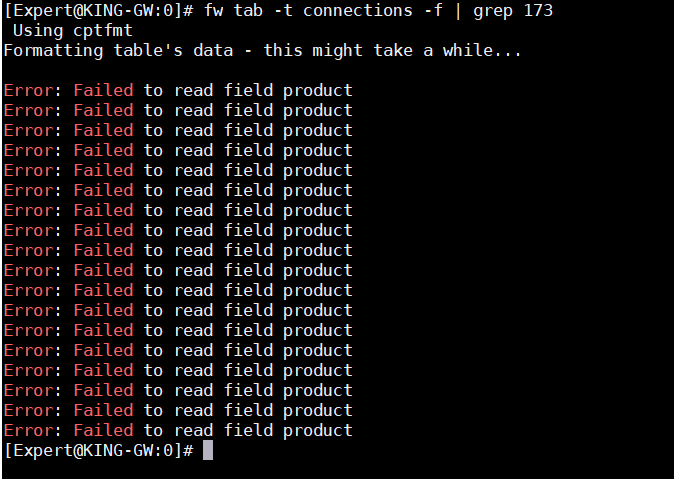
in the attached photo 2.jpg there is the output of that command and it's empty.
You are right, missed that one. Can you try grepping just on the first octet? Also, fw monitor, does it show anything for this host?
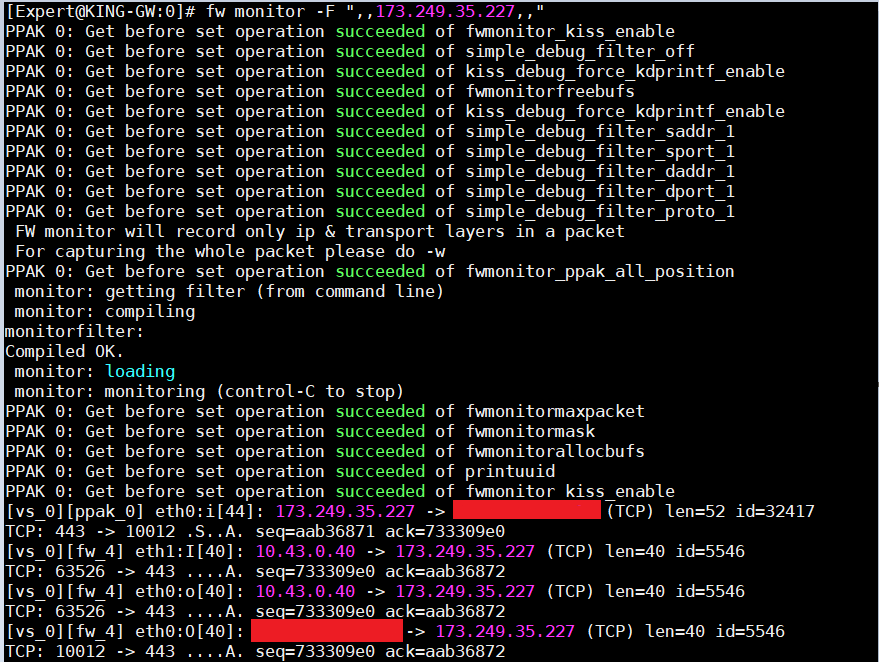
In the attachement 4.png i greped for only the first octet but with no result.This error:failed to read field product started to apper after i installed JHF 125 yesterday. The fw monitor does see the connections and based on the output it is handled by the fw worker 4 (5.png) so it should be in the connection table and not in the secureXL but as you can see i cant find it.
First off, you need to pass the -u option to your fw tab -t connections -f command or it will only display the first 50 entries or so.
Also the correct command to view the SecureXL connections table is fwaccel conns, not fwaccel conn. Note that if a connection is not partially or fully accelerated (i.e. in the F2F path) it will not appear in the output of fwaccel conns at all with a f/F flag marking, this behavior changed in R80.30.
As far as not seeing the connection with fw ctl conntab, you may be running afoul of this: sk126573: Incorrect output of "fw ctl conntab" when CoreXL is enabled
If even with these corrections you still can't find the connection, try looking at the global dispatcher connection table with fw ctl multik gconn. If you can't find it there something is seriously wrong. You can also try the undocumented command fw_mux all to look at the connections table from the perspective of the multiplexer/pipeline-based paths.
I checked the connection table with the parametar -u and also the global dispatcher connection table and the fw_mux all but i cant find my connection.
Leaderboard
Epsum factorial non deposit quid pro quo hic escorol.
| User | Count |
|---|---|
| 21 | |
| 20 | |
| 16 | |
| 8 | |
| 7 | |
| 3 | |
| 3 | |
| 3 | |
| 3 | |
| 3 |
Fri 12 Dec 2025 @ 10:00 AM (CET)
Check Mates Live Netherlands: #41 AI & Multi Context ProtocolTue 16 Dec 2025 @ 05:00 PM (CET)
Under the Hood: CloudGuard Network Security for Oracle Cloud - Config and Autoscaling!Fri 12 Dec 2025 @ 10:00 AM (CET)
Check Mates Live Netherlands: #41 AI & Multi Context ProtocolTue 16 Dec 2025 @ 05:00 PM (CET)
Under the Hood: CloudGuard Network Security for Oracle Cloud - Config and Autoscaling!About CheckMates
Learn Check Point
Advanced Learning
YOU DESERVE THE BEST SECURITY