- Products
- Learn
- Local User Groups
- Partners
- More
Call For Papers
Your Expertise, Our Stage
The Great Exposure Reset
AI Security Masters E4:
Introducing Cyata - Securing the Agenic AI Era
AI Security Masters E3:
AI-Generated Malware
CheckMates Go:
CheckMates Fest
Hi,
Am trying to install som MUH2 clients on jumpgates.
The GW is using VSX on R80.30 HFA 236
I get an error saying
"An error was detected while trying to authenticate against the AD server.
It may be a problem of bad configuration or connectivity.
Please refer to the troubleshooting guide for more help"
So checked the installation guide again.
"
To configure Terminal Servers Identity Agents Authentication Settings with all Active Directories:
"
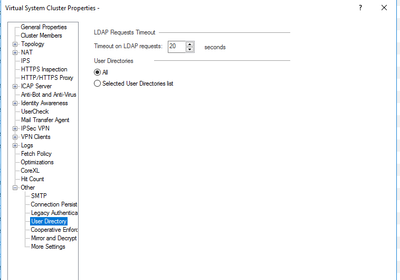
But i honestly dont see the account units query. is the guide incorrect and it should be "user Directories"
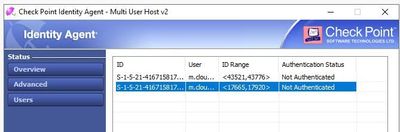
the agent itself says connected but the users loged in says not authenticated.
For other identitys we uses the identity collector. so there is ldap account units within the CMA
Regards,
Magnus
just to answer my own question: My Problem is solved in https://support.checkpoint.com/results/sk/sk87200
The issue happened for accounts, where sAMA and UPN do not match.
I have a somewhat similar issue with the MuHv2 agent, R80.40 Take 118 VSX.
The agent shows connected and using pdp commands on the VS the VM's are seen, but it doesn't show any authenticated user.
I have an SR open. Some things that were tried was making sure the agent was installed with admin rights and disable secure boot on the image but it didn't help.
Greetings Magnus,
What OS are the servers running and what software version is the MDS on?
The MDS must have R80.30 JHF T210 or higher installed and the servers must either be running Windows Server 2016 or Windows Server 2019.
MDS running R81 HFA36
Server running Windows Server 2019 standard
Hey @Magnus-Holmberg,
Firstly, big fan of your YouTube content! It's been a great resource for me - so thank you!
Secondly, did you ever find a resolution for this issue? I'm not running VSX, but I am hitting a similar issue. The machine authentication is working perfectly, but I am not getting any user-based authentication & I see the same error as your screenshot.
Any advise would be much appreciated.
Thanks,
Aaron.
Thank you 🙂
Yes its working now, but i dont remember what the issue was.
We are going to install it on more servers so i will see if i get the same issue, but so far its working correctly.
We are currently running R81 HFA44 on the MDS.
When it comes to VSX and IA in general, its important to think about how the traffic is going towards ia stuff.
If the traffic is generating from VS or VSX Cluster. (this is something that is easy to miss)
@AaronCP may I return the question to you? Could you find a solution for this?
just to answer my own question: My Problem is solved in https://support.checkpoint.com/results/sk/sk87200
The issue happened for accounts, where sAMA and UPN do not match.
Leaderboard
Epsum factorial non deposit quid pro quo hic escorol.
| User | Count |
|---|---|
| 42 | |
| 25 | |
| 14 | |
| 12 | |
| 8 | |
| 8 | |
| 7 | |
| 7 | |
| 6 | |
| 6 |
Thu 26 Feb 2026 @ 05:00 PM (CET)
AI Security Masters Session 4: Introducing Cyata, Securing the Agentic AI EraTue 03 Mar 2026 @ 04:00 PM (CET)
Maestro Masters EMEA: Introduction to Maestro Hyperscale FirewallsTue 03 Mar 2026 @ 03:00 PM (EST)
Maestro Masters Americas: Introduction to Maestro Hyperscale FirewallsThu 26 Feb 2026 @ 05:00 PM (CET)
AI Security Masters Session 4: Introducing Cyata, Securing the Agentic AI EraTue 03 Mar 2026 @ 04:00 PM (CET)
Maestro Masters EMEA: Introduction to Maestro Hyperscale FirewallsTue 03 Mar 2026 @ 03:00 PM (EST)
Maestro Masters Americas: Introduction to Maestro Hyperscale FirewallsFri 06 Mar 2026 @ 08:00 AM (COT)
Check Point R82 Hands‑On Bootcamp – Comunidad DOJO PanamáAbout CheckMates
Learn Check Point
Advanced Learning
YOU DESERVE THE BEST SECURITY
