- Products
- Learn
- Local User Groups
- Partners
- More

MVP 2026: Submissions
Are Now Open!
What's New in R82.10?
Watch NowOverlap in Security Validation
Help us to understand your needs better
CheckMates Go:
Maestro Madness
Hi all,
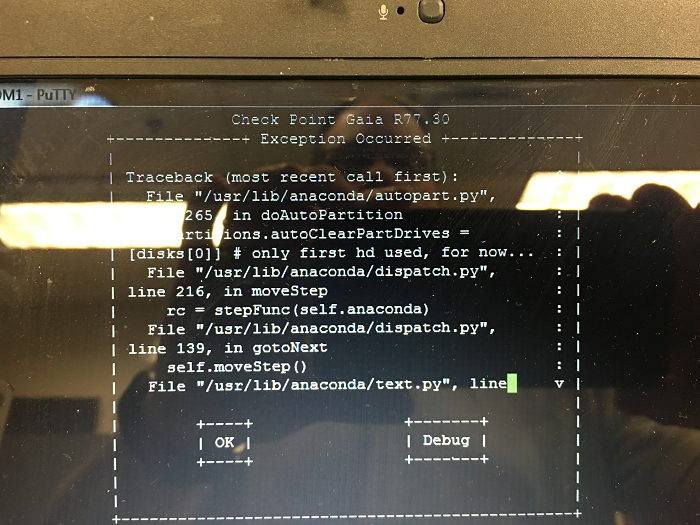
I have recently acquired a 12400 appliance that I am looking to use in a lab setting, but when it was pulled from production, the hard drives were pulled and destroyed. I picked up a new drive and popped it in, and then prepped a USB stick with R77.30 using the ISOmorphic tool, however I can't get Gaia to install. I keep getting some python script errors that seem to be about partitioning the drive; I am not sure if I am doing something wrong or maybe the HDD I am using is not compatible, or...?
Thanks in advance for any suggestions!
David
Can you consult sk112204 Gaia installation on Open Server/ESX fails with "IndexError: list index out of range" error ? Looks very similar...
As a rule, any HD or Memory in CP Appliances have to be bought from Checkpoint if Checkpoint should Support it (even if an identical part does work).
Hi - Thanks for the reply!
So, I did look at that SK the other day. Since I am trying to install on a 12400 appliance, I have no control over (AFAIK) hardware RAID config, so that rules solution 1 out, and the HDD I put in the appliance is a 1TB drive, so since solution 2 calls out reducing the HDD size to 1.8TB, I don't think this is it either. As for official support, I wasn't really seeking it as it would be used for lab only, but I guess I can talk with my SE about it...
Thanks!!
When I use the latest ISOmorphic (the one with all the device type in a menu) to try and install a 2012 appliance from a USB stick created with that version it will fail, whichever device type I use.
When I use the ISOmorphic that only gives you the options of the output serial/VGA/normal boot it installs just fine.
See if you can find the older version of ISOmorphic and give it a try. Latest of the older versions I could find was version 92.0 newer versions I found on disk was 152 and 160.
Hi Maarten,
Thank you for the reply! So, I downloaded and tried build 152 as that was the only other version of ISOMorphic that I could find in UserCenter so far (got the same results)... I will see if I can get my hands on build 92 as you suggest...
Thanks,
D
So, using build 152 of the ISOMorphic tool, and trying various USB sticks, I get a bit of a different message now, looking for a driver for the "type of installation requested".... I can choose to use a driver disk or to select a driver from the list. I assume that this is looking for a driver for the HDD controller... or maybe I am running into the fact that I am trying to use a regular old WD Black HDD in there...?
Leaderboard
Epsum factorial non deposit quid pro quo hic escorol.
| User | Count |
|---|---|
| 20 | |
| 19 | |
| 19 | |
| 8 | |
| 7 | |
| 3 | |
| 3 | |
| 3 | |
| 3 | |
| 3 |
Tue 16 Dec 2025 @ 05:00 PM (CET)
Under the Hood: CloudGuard Network Security for Oracle Cloud - Config and Autoscaling!Thu 18 Dec 2025 @ 10:00 AM (CET)
Cloud Architect Series - Building a Hybrid Mesh Security Strategy across cloudsTue 16 Dec 2025 @ 05:00 PM (CET)
Under the Hood: CloudGuard Network Security for Oracle Cloud - Config and Autoscaling!Thu 18 Dec 2025 @ 10:00 AM (CET)
Cloud Architect Series - Building a Hybrid Mesh Security Strategy across cloudsAbout CheckMates
Learn Check Point
Advanced Learning
YOU DESERVE THE BEST SECURITY