- Products
- Learn
- Local User Groups
- Partners
- More
MVP 2026: Submissions
Are Now Open!
What's New in R82.10?
10 December @ 5pm CET / 11am ET
Announcing Quantum R82.10!
Learn MoreOverlap in Security Validation
Help us to understand your needs better
CheckMates Go:
Maestro Madness

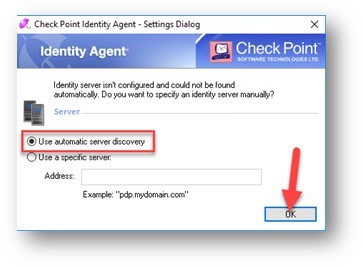
We are deploying the Identity Agent for a customer and have packaged a custom MSI install (minus Packet Tagging) for distribution via SCCM. We used the IAConfigTool.exe to customise and save a new MSI, including the setting "Copy configuration from this computer". While the agent installs correctly and Active Directory configuration (setup using the Distributed Configuration tool) works correctly after installation, the issue we have is to do with the agent's behavior immediately after the MSI installation has completed. The user is always prompted with the Settings Dialog and forced to accept "Use automatic server discovery"/change with OK. This is obviously not ideal and not desirable in a centrally managed deployment with software distribution - we don't want users to see or be able to change the configuration. We haven't found any way to disable this settings dialog prompt - we have tried dumping and importing registry keys prior to MSI installation, with no luck. Is this a bug? Or a new behavior, recently introduced?
We have tried including DNS records for discovery (just to get around this initial settings dialog error: "Identity Server isn't configured and could not be found automatically")
We have tried to use the cpmsi_tool.exe method with no luck - there's no useful documentation on how this is supposed to work.
We initially deployed/tested version R80.172 but also experienced the "Always open after startup" so are now using R80.174. Thanks Royi Priov and Tobias Karsbo
Hi!
Is there an SR with TAC for this?
Thanks,
Royi Priov.
Hi Royi,
I have a couple cases with issues for this particular build. A case was not created for the above issue because they decided to revert back to R77.10002. The other issues they were facing are frequent logouts of the agent, and being unable to connect again, with error "The Check Point Managed Asset Detection Service is not responding, please try again later or contact your system administrator."
Hi Royi
No, I thought it might be quicker posting here and someone else may have already found a fix for this particular issue. If you think that the behavior is not as expected then maybe I should raise a case for it, to get resolved?
Hi Royi
We have raised a case with Check Point support; 6-0001554147.
We also have seen the Managed Asset Detection service not responding fault. Is there a fix for this?
Hi Clint,
We are not familiar with the MAD service issue.
Regarding the Settings window issue - does it occur only when you work with the customized package or also with the original MSI of the agent?
Who is the SR owner in TAC? I will work with him to understand better the issues and review the info that was collected so far.
Thanks,
Adi
I have also hit this problem with R80.202.0000
Happens with both a custom installer (as I dont want packet tagging) and the full installer.
I have tried pre-populating a number of different registry keys, with no luck either including:
[HKEY_LOCAL_MACHINE\SOFTWARE\WOW6432Node\CheckPoint\IA]
"GlobalConfigEnabled"=dword:00000001
"IsFirstTimeActivation"=dword:00000000
"CurrentVersion"="1.0"
"DefaultGatewayEnabled"=dword:00000000
I think the reason for this is the agent installer disrupts network connectivity.
The installed agent fails to connect so the Settings Dialog pops up.
Meanwhile network connectivity returns and the agent connects via auto diescovery (AD LDAP keys, or DNS rekord).
But the dialog remains visible until user interaction.
Leaderboard
Epsum factorial non deposit quid pro quo hic escorol.
| User | Count |
|---|---|
| 21 | |
| 20 | |
| 16 | |
| 5 | |
| 4 | |
| 4 | |
| 3 | |
| 3 | |
| 3 | |
| 3 |
Fri 12 Dec 2025 @ 10:00 AM (CET)
Check Mates Live Netherlands: #41 AI & Multi Context ProtocolTue 16 Dec 2025 @ 05:00 PM (CET)
Under the Hood: CloudGuard Network Security for Oracle Cloud - Config and Autoscaling!Fri 12 Dec 2025 @ 10:00 AM (CET)
Check Mates Live Netherlands: #41 AI & Multi Context ProtocolTue 16 Dec 2025 @ 05:00 PM (CET)
Under the Hood: CloudGuard Network Security for Oracle Cloud - Config and Autoscaling!Thu 18 Dec 2025 @ 10:00 AM (CET)
Cloud Architect Series - Building a Hybrid Mesh Security Strategy across cloudsAbout CheckMates
Learn Check Point
Advanced Learning
YOU DESERVE THE BEST SECURITY