- Products
- Learn
- Local User Groups
- Partners
- More
What's New in R82.10?
10 December @ 5pm CET / 11am ET
Improve Your Security Posture with
Threat Prevention and Policy Insights
Overlap in Security Validation
Help us to understand your needs better
CheckMates Go:
Maestro Madness
Hi all,
I have a strange issue with Identity Collector where the users/ip are not actually collected by the gateway.
The IDC is correctly configured and working, all the gateways are directly connected to this IDC which is set as unique source in Identity Awareness.
I can see the events increasing, all is green.
Now the problem:
Access Roles rules are not applied since users are not seen by the gateway; The command "pdp m ip [ip address]" shows an empty record
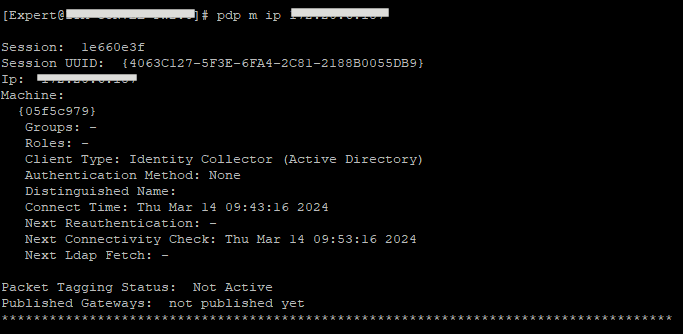
Note that this gateway is connected by VPN s2s, but the traffic is passing correctly (at least I guess... there is no info about specific rules).
What am I missing?
It looks like the IDC is not passing info at all.
Thanks

Will you be able to run test_ad_connectivity on the gateway to confirm the gateway is able to fetch required information.
More about it here: https://sc1.checkpoint.com/documents/R81/WebAdminGuides/EN/CP_R81_IdentityAwareness_AdminGuide/Topic...
Example
IPv4 of AD DC | 192.168.230.240 |
Domain | mydc.local |
Username | Administrator |
Password | aaaa |
Syntax | [Expert@GW:0]# $FWDIR/bin/test_ad_connectivity -u "Administrator" -c "aaaa" -D "CN=Administrator,CN=Users,DC=mydc,DC=local" -d mydc.local -i 192.168.230.240 -b "DC=mydc,DC=local" -o test.txt |
Output | [Expert@GW:0]# cat $FWDIR/tmp/test.txt
(
:status (SUCCESS_LDAP_WMI)
:err_msg ("WMI_SUCCESS;LDAP_SUCCESS")
:ldap_status (LDAP_SUCCESS)
:wmi_status (WMI_SUCCESS)
:timestamp ("Mon Feb 26 10:17:41 2018")
)
[Expert@GW:0]# |
| Note - In order to know the output is authentic, pay attention that the timestamp is the same as the local time. |
Maybe my assumption is wrong, but as I said I configured the gateway to get users and IP from Identity Collector, NOT the domain controllers.
This command should check the access to the Domain Controller.
Anyway the output is:
(
:status (COMM_ERR)
:err_msg ("ADLOG_ERROR_INTERNAL;LDAP_OPERATIONS_ERROR")
:ldap_status (LDAP_OPERATIONS_ERROR)
:wmi_status (ADLOG_ERROR_INTERNAL)
:timestamp ("Thu Mar 14 12:30:44 2024")
)
So on IDC side, you can see logs increasing every hour, correct? Can you send output of below (in my lab example)
Andy
[Expert@CP-gw:0]# pdp idc status
Identity Collector IP: 172.16.10.111
Identity Sources:
No information about identity sources
[Expert@CP-gw:0]#
Yes, the logs are increasing in real time; If I launch "pdp idc status" I get a list of the domain controllers divided by Identity Collectors (there are two IDC), all showing they are connected and with several events received in the last minute.
Do you still have a LDAP account unit in Smart Console? I think you still need it even if you use IDC.
Yes, still have the LDAP account unit.
What is really strange is that the user/machine/ip associations are different on different gateways and also change after some time.
We have two domains (trusted) and from the gateway of the domain "alpha.local" with "pdp m ip x.x.x.x" I can see the correct association with the machine name, but the user sometimes changes (I'm logged in with my domain user but I launch RDP sessions to servers with a domain admin).
From the gateway of the domain "beta.local" if I check the same IP, I get different or empty associations (I don't even know why, they should be the same).
Are you able to fetch the branches okay? This only would not work if its S1C instance (thats expected), but works on regular mgmt server.
Andy
Yes, I'm able to fetch the branches
Any output with adlog a dc ?
Also as a start follow this SK and make sure the user has enough rights:
https://support.checkpoint.com/results/sk/sk113747
Leaderboard
Epsum factorial non deposit quid pro quo hic escorol.
| User | Count |
|---|---|
| 22 | |
| 17 | |
| 7 | |
| 6 | |
| 6 | |
| 6 | |
| 6 | |
| 5 | |
| 5 | |
| 4 |
Wed 03 Dec 2025 @ 10:00 AM (COT)
Última Sesión del Año – CheckMates LATAM: ERM & TEM con ExpertosThu 04 Dec 2025 @ 12:30 PM (SGT)
End-of-Year Event: Securing AI Transformation in a Hyperconnected World - APACThu 04 Dec 2025 @ 03:00 PM (CET)
End-of-Year Event: Securing AI Transformation in a Hyperconnected World - EMEAThu 04 Dec 2025 @ 02:00 PM (EST)
End-of-Year Event: Securing AI Transformation in a Hyperconnected World - AmericasWed 03 Dec 2025 @ 10:00 AM (COT)
Última Sesión del Año – CheckMates LATAM: ERM & TEM con ExpertosThu 04 Dec 2025 @ 12:30 PM (SGT)
End-of-Year Event: Securing AI Transformation in a Hyperconnected World - APACThu 04 Dec 2025 @ 03:00 PM (CET)
End-of-Year Event: Securing AI Transformation in a Hyperconnected World - EMEAThu 04 Dec 2025 @ 02:00 PM (EST)
End-of-Year Event: Securing AI Transformation in a Hyperconnected World - AmericasAbout CheckMates
Learn Check Point
Advanced Learning
YOU DESERVE THE BEST SECURITY