- Products
- Learn
- Local User Groups
- Partners
- More
MVP 2026: Submissions
Are Now Open!
What's New in R82.10?
Watch NowOverlap in Security Validation
Help us to understand your needs better
CheckMates Go:
Maestro Madness
Hi all,
I'm trying to create a custom MSI file for a client, where we can do a silent install without any interaction required from the user itself.
However, when trying to run the MSI with silent installation, the package still gives a message that no server is configured. When I click "ok" - the IA agent directly connects and authenticates and status is OK.
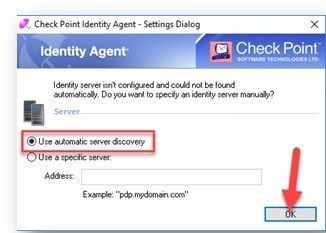
Does anybody know how to get rid of this message? (see below my configuration).
Configuration
Followed the instructions of Identity Awareness R80.10 Administration Guide on Autodiscovery DNS.
Nslookup for verification:
C:\Users\sean>nslookup -type=SRV CHECKPOINT_NAC_SERVER._tcp.mycompany
Server: dc13.mycompany
Address: x.x.x.x
CHECKPOINT_NAC_SERVER._tcp.mycompany SRV service location:
priority = 0
weight = 0
port = 443
svr hostname = cpia.mycompany
cpia.mycompany internet address = y.y.y.y
The certificate on the gateway has been replaced my a certificate of the company itself.
I've downloaded the most recent Identity Awareness Agent (Full - EXE + MSI) from: sk134312
Installed the EXE as a Full client with the MAD service and auto-discovery.
Trusted the gateway - status is authenticated (so OK).
Next, ran the IAConfigTool.exe with the following settings:
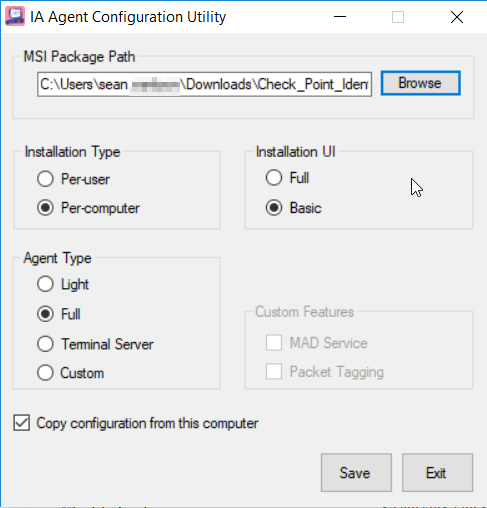
And used the created MSI to install on a fresh computer (with administrative privilege).
Installation done with: CMD.exe (run as admin):
msiexec.exe /i "Check_Point_Identity_Agent.msi" /quietBut I still get the message.
Does anybody know a solution?
Would the " remote registry option" be the solution?
Thanks!
Sean
I did a write up on how I solved it in another thread.
Maybe that can be of some help!
Patrik
@Royi_Priov what say you?
Hi!
Which agent version is it?
Thanks,
Royi.
Hi,
The version is: R80.180.0000 (Full Agent).
Perhaps interesting to know, we saw when the installation was being executed that the ethernet interface went down and came back up what seemed to be due to the installation.
Do you know if the Identity Awareness Agent has effect on the ethernet interfaces?
We can try it again and perhaps look at the Windows Event Messages to see what was logged, if that could help you.
Kind regards,
Sean
I did a write up on how I solved it in another thread.
Maybe that can be of some help!
Patrik
Leaderboard
Epsum factorial non deposit quid pro quo hic escorol.
| User | Count |
|---|---|
| 20 | |
| 19 | |
| 18 | |
| 8 | |
| 7 | |
| 3 | |
| 3 | |
| 3 | |
| 3 | |
| 3 |
Tue 16 Dec 2025 @ 05:00 PM (CET)
Under the Hood: CloudGuard Network Security for Oracle Cloud - Config and Autoscaling!Thu 18 Dec 2025 @ 10:00 AM (CET)
Cloud Architect Series - Building a Hybrid Mesh Security Strategy across cloudsTue 16 Dec 2025 @ 05:00 PM (CET)
Under the Hood: CloudGuard Network Security for Oracle Cloud - Config and Autoscaling!Thu 18 Dec 2025 @ 10:00 AM (CET)
Cloud Architect Series - Building a Hybrid Mesh Security Strategy across cloudsAbout CheckMates
Learn Check Point
Advanced Learning
YOU DESERVE THE BEST SECURITY