- Products
- Learn
- Local User Groups
- Partners
- More

MVP 2026: Submissions
Are Now Open!
What's New in R82.10?
Watch NowOverlap in Security Validation
Help us to understand your needs better
CheckMates Go:
Maestro Madness
Hello
I am using R80.10 on 23500 appliances.
I want use Identity Awareness Blade, actually almost everything working good expect Identity Agent SSL Certificate.
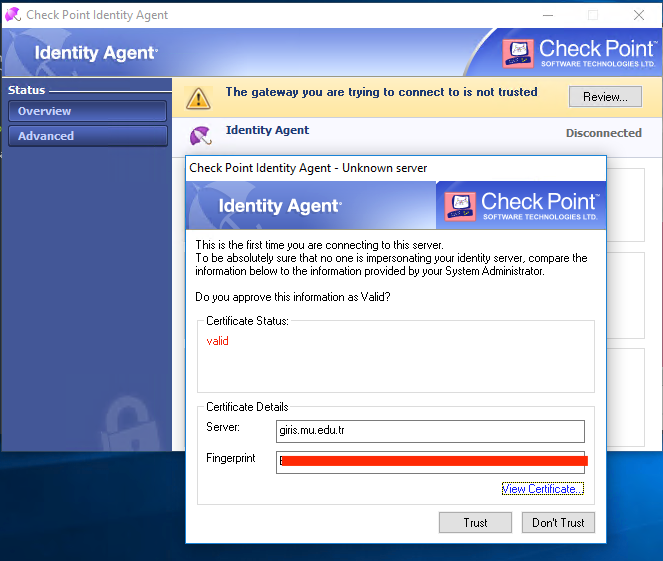
When I install identity agent on a Windows there is a Warning Message on status of agent.
My SSL certificate is looks like OK. If I click Trust everything working perfect. But while the installation like VPN is not sending any message to user for this trust relationship. It is just waiting in here, every user have to open up the status of agent and click Review after that click Trust. The users are do not know what is mouse so they can not do this clicking steps and we are talking about 20k active users.
Browser-Based Authentication works fine with same certificate.
My certificate is validated but I am still having this issue.
You can prevent this problem for your users by predeploying the trust.
There are multiple ways to do so and Identity Awareness Admin Guide is showing you how.
For a very quick workaround for your 20k users: Deploy the following registry key using you client software management plattform (SCCM or something like that):
HKEY_LOCAL_MACHINE\SOFTWARE\WOW6432Node\CheckPoint\IA\TrustedGateways\...
Just copy the needed content of this hive key from a client, where the trust button is already pressed.
For the future, just bundle the needed registry keys with the agent installer. You can manipulate the agent installer msi file do include this trust. Just patch it using the IA config tool. See Identity Awareness Admin Guide for details.
This is normal. Just press "Trust" and move on. Browser based CA trust is using a different repository. Agent's trust is relying on registry entry, which will be created when you press "Trust"
You can prevent this problem for your users by predeploying the trust.
There are multiple ways to do so and Identity Awareness Admin Guide is showing you how.
For a very quick workaround for your 20k users: Deploy the following registry key using you client software management plattform (SCCM or something like that):
HKEY_LOCAL_MACHINE\SOFTWARE\WOW6432Node\CheckPoint\IA\TrustedGateways\...
Just copy the needed content of this hive key from a client, where the trust button is already pressed.
For the future, just bundle the needed registry keys with the agent installer. You can manipulate the agent installer msi file do include this trust. Just patch it using the IA config tool. See Identity Awareness Admin Guide for details.
Hi,
I'm interested to get more feedback about this process.
We are also familiar with the Distributed Configuration which basically stored this info in the AD and avoid this Trust message
However when it's time to renew the certificate how do you proceed ?
We have about 65 GW where we need to change the certificate manually (no automation / api or script if I'm not wrong) ?
Also not able to add in advance the new Fingerprint (Not possible to have 2 registry key with same name) and same issue with the Distributed Configuratin. It doesn't allow to add a second certificate with the same FQDN and a different Fingerprint
Any idea ?
Thank you
Leaderboard
Epsum factorial non deposit quid pro quo hic escorol.
| User | Count |
|---|---|
| 20 | |
| 20 | |
| 16 | |
| 8 | |
| 7 | |
| 3 | |
| 3 | |
| 3 | |
| 3 | |
| 3 |
Fri 12 Dec 2025 @ 10:00 AM (CET)
Check Mates Live Netherlands: #41 AI & Multi Context ProtocolTue 16 Dec 2025 @ 05:00 PM (CET)
Under the Hood: CloudGuard Network Security for Oracle Cloud - Config and Autoscaling!Fri 12 Dec 2025 @ 10:00 AM (CET)
Check Mates Live Netherlands: #41 AI & Multi Context ProtocolTue 16 Dec 2025 @ 05:00 PM (CET)
Under the Hood: CloudGuard Network Security for Oracle Cloud - Config and Autoscaling!About CheckMates
Learn Check Point
Advanced Learning
YOU DESERVE THE BEST SECURITY