- Products
- Learn
- Local User Groups
- Partners
- More
MVP 2026: Submissions
Are Now Open!
What's New in R82.10?
Watch NowOverlap in Security Validation
Help us to understand your needs better
CheckMates Go:
Maestro Madness
I have noticed that SAM Rules do not work in a VSX environment, and so far, I have not found any alternative solutions. I would like to prevent port scanning on a specific Virtual System. While the Core Protection 'Host Port Scan' signature does exist and can be modified from 'Inactive' to 'Accept,' according to SK110873, a SAM Rule must be created for it to take effect. What other solutions exist to address this issue?
Topology:
-Maestro enviroment
-Security Group as VSX mode (4 Gateways)
-Many Virtual Systems is running
The only thing the "prevention" does is issue a block to the relevant IP address (why it needs a SAM rule).
You can do something similar with rate limiting: https://support.checkpoint.com/results/sk/sk112454
Granted, it's not tied to the specific Core Protection, though.
Can you share the SAM rule config? I am not aware this should not work on VSX. PS I am struggling with the same issue.
I am trying to get SAMv2 working for port scan.
Any more specifics you can share on the scans you're attempting to guard against?
https://community.checkpoint.com/t5/Security-Gateways/Block-all-Shodan-scanners/m-p/113338
I'm assuming this is a concern because VSX does not support automatically growing the connections table, and must be set to a fixed value that can be overflowed by a port scan's traffic that is accepted.
As already mentioned in the thread, you can use the fwaccel dos rate command to limit the number of new connections allowed per second, just make sure you execute this in the proper VS context (also check the new-conn-rate-ratio option to see if that would be more appropriate):
fwaccel dos rate add -a d -l a service any source X.X.X.X/24 destination any new-conn-rate 20
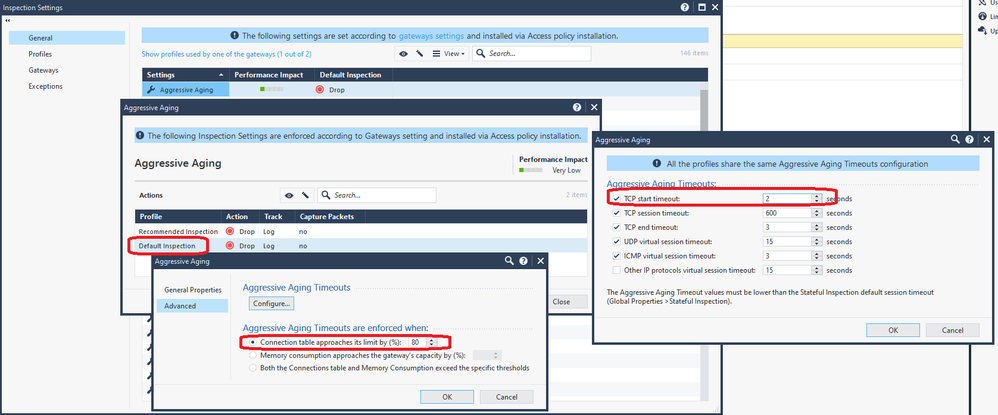
Another option is to ensure the Inspection Setting signature "Aggressive Aging" is enabled in the Inspection Settings profile your VS gateway is using, then configure it even more aggressively than the defaults like below. You could even drop the default trigger percentage from 80% to something like 50% if you want to get even more aggressive, doing so should keep port scans from causing a major disruption:
Leaderboard
Epsum factorial non deposit quid pro quo hic escorol.
| User | Count |
|---|---|
| 19 | |
| 17 | |
| 14 | |
| 8 | |
| 7 | |
| 3 | |
| 3 | |
| 3 | |
| 3 | |
| 2 |
Tue 16 Dec 2025 @ 05:00 PM (CET)
Under the Hood: CloudGuard Network Security for Oracle Cloud - Config and Autoscaling!Thu 18 Dec 2025 @ 10:00 AM (CET)
Cloud Architect Series - Building a Hybrid Mesh Security Strategy across cloudsTue 16 Dec 2025 @ 05:00 PM (CET)
Under the Hood: CloudGuard Network Security for Oracle Cloud - Config and Autoscaling!Thu 18 Dec 2025 @ 10:00 AM (CET)
Cloud Architect Series - Building a Hybrid Mesh Security Strategy across cloudsAbout CheckMates
Learn Check Point
Advanced Learning
YOU DESERVE THE BEST SECURITY
