- Products
- Learn
- Local User Groups
- Partners
- More

MVP 2026: Submissions
Are Now Open!
What's New in R82.10?
Watch NowOverlap in Security Validation
Help us to understand your needs better
CheckMates Go:
Maestro Madness
Hello Mates!
I was deploying Check Point in an environment where we were migrating the client's firewall solution. We were working on some rules and suddenly noticed that CPU usage became extremely high.
Can you help with any tips for troubleshooting high CPU usage?
Have any way to discover the exact moment that the high CPU usage starts to compare with some rule or something like that?
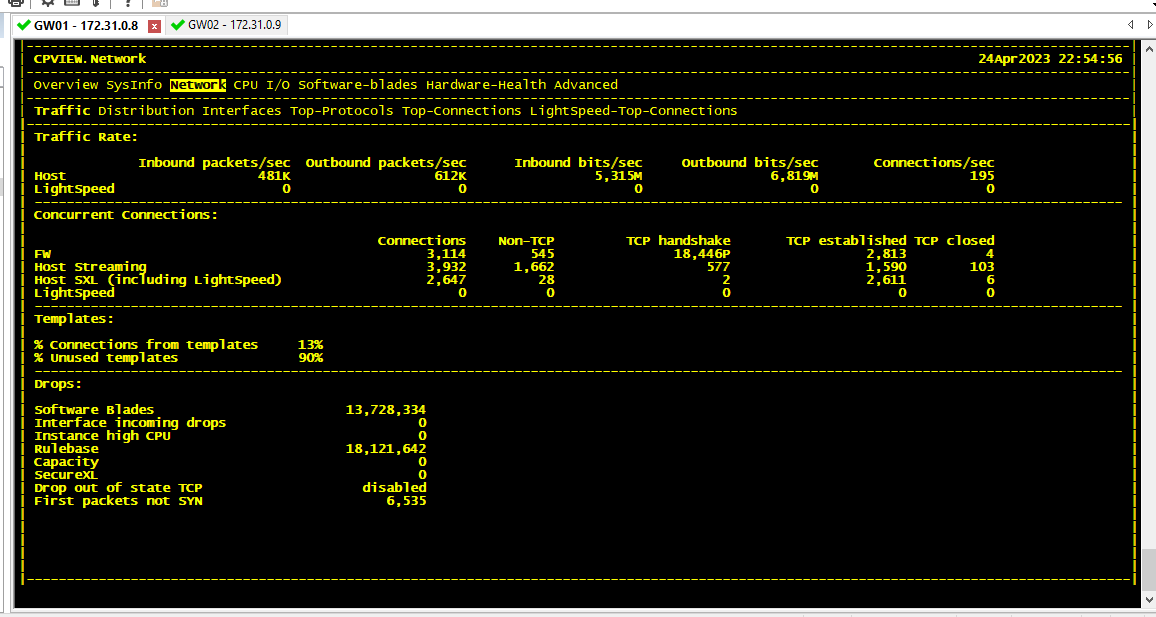
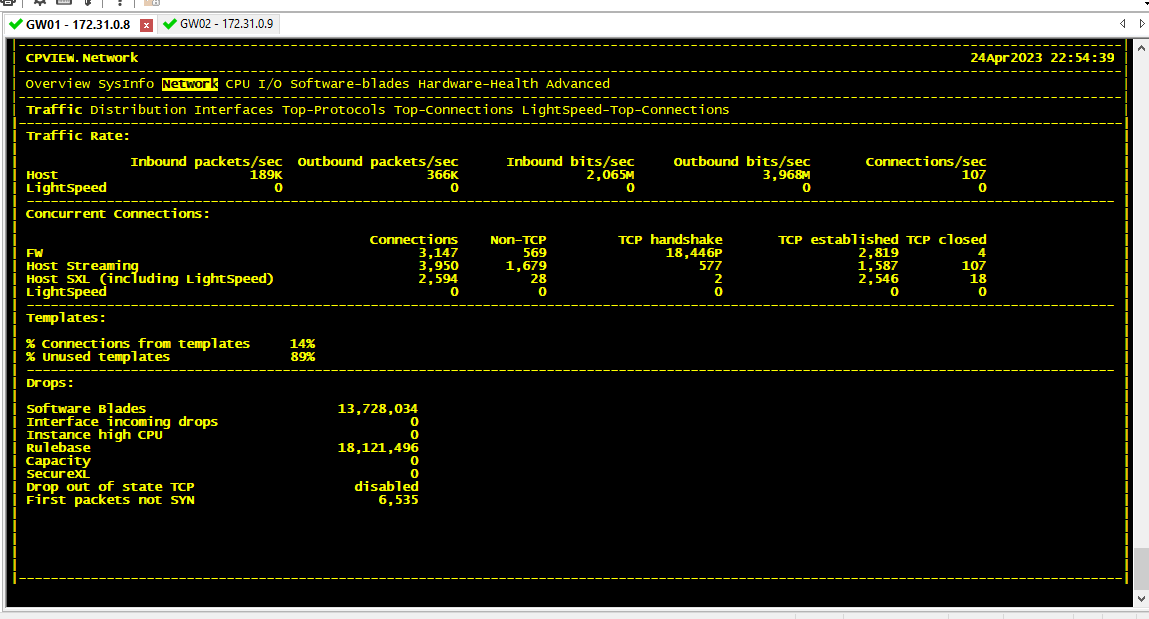
I attached some images.
Thank you!
Hello friends @Sorin_Gogean @the_rock thank you for your help!
The amount of traffic was not really normal for the environment, but I believe it was some kind of bug. After applying JHF take 94 and rebooting the appliances, everything went back to normal.
Hey @Bernardes ,
So, there is no such thing like "discover the exact moment that the high CPU usage starts to compare with some rule or something like that" .
From the pictures, I can say that the number of CPU's seems a bit low - for me at least - considering how much traffic you have there - like 3-5Gb one way and 300-600K packets .
Also you seem to have ALL POSSIBLE BLADES enabled, is that really needed .
For the access list installation, it's normal to fail, when the system is loaded - and in your case the CPU is HIGH on couple of processors out of 8.
You should provide more details on what you are trying to achieve, is the 5Gb sustained traffic normal for that environment? Is the box sized correctly ?
Thank you,
Maybe run below, see what you get:
https://support.checkpoint.com/results/sk/sk172229
Otherwise, we would need outputs of below commands:
top
free -m
free -g
ps -auxw
cpwd_admin list
cpview (look for cpu section)
fw ctl multik print_heavy_conn
Also, you can run below:
Andy
Hello friends @Sorin_Gogean @the_rock thank you for your help!
The amount of traffic was not really normal for the environment, but I believe it was some kind of bug. After applying JHF take 94 and rebooting the appliances, everything went back to normal.
Good job! 👍
Leaderboard
Epsum factorial non deposit quid pro quo hic escorol.
| User | Count |
|---|---|
| 21 | |
| 20 | |
| 19 | |
| 8 | |
| 7 | |
| 3 | |
| 3 | |
| 3 | |
| 3 | |
| 3 |
Fri 12 Dec 2025 @ 10:00 AM (CET)
Check Mates Live Netherlands: #41 AI & Multi Context ProtocolTue 16 Dec 2025 @ 05:00 PM (CET)
Under the Hood: CloudGuard Network Security for Oracle Cloud - Config and Autoscaling!Fri 12 Dec 2025 @ 10:00 AM (CET)
Check Mates Live Netherlands: #41 AI & Multi Context ProtocolTue 16 Dec 2025 @ 05:00 PM (CET)
Under the Hood: CloudGuard Network Security for Oracle Cloud - Config and Autoscaling!Thu 18 Dec 2025 @ 10:00 AM (CET)
Cloud Architect Series - Building a Hybrid Mesh Security Strategy across cloudsAbout CheckMates
Learn Check Point
Advanced Learning
YOU DESERVE THE BEST SECURITY