- Products
- Learn
- Local User Groups
- Partners
- More

MVP 2026: Submissions
Are Now Open!
What's New in R82.10?
Watch NowOverlap in Security Validation
Help us to understand your needs better
CheckMates Go:
Maestro Madness
We have the output of the top 265% cpu command on the fwk7_dev_0 process, CheckPoint VSX version 80.40, the output of the cpprod_utel FwIsUsermode command shows "1" after reading: https://community.checkpoint.com/t5/General-Topics/High-CPU-utilization-during-process-fwk0-dev-0-UM...
any questions, can I switch the firewall to kernel mode on my checkpoint?
As far as I understand the concept, VSX runs in user mode only.
The process running with more than 100 % is quite normal. You have to assign enough cores to this VS to handle this amount of CPU usage. With 265 % this VS needs a minimum(!) of 3 cores assigned in SmartConsole to handle this traffic correctly. I personally, would assign much more to have some CPU in reserve.
tell me how to do it in smart console?
the VS already has at least 3 cores assigned, otherwise it wouldn't be able to reach 265%
in top press shift + h to split the fwk_dev process into individual processes
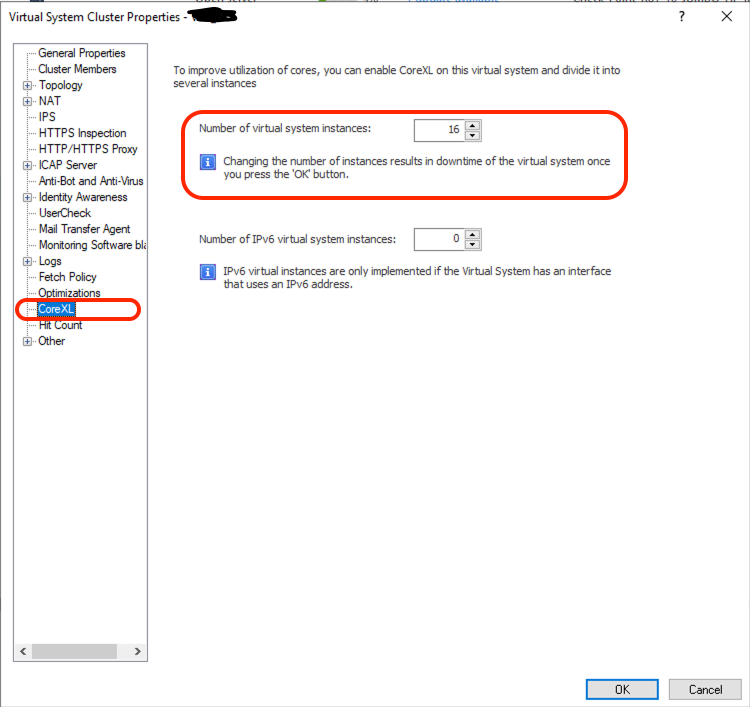
increasing the core count for a vs is done on the vs object properties in the smartconsole (watch out for downtime when changing this)
You are right. I just wanted to address that 265 is not a malfunction, but has to be seen in correlation to the assigned cores of the VS.
Select the VS in SmartConsole, select CoreXL from the menu and assign the cores for IPv4 (and IPv6 if needed). Please notice the informational remark that changing the number of cores will result in a downtime of the corresponding VS! Consider in maintenance window for that change.
The explicit settings for UserMode only apply in a non-VSX setting.
VSX only operates in UserMode.
Leaderboard
Epsum factorial non deposit quid pro quo hic escorol.
| User | Count |
|---|---|
| 20 | |
| 19 | |
| 18 | |
| 8 | |
| 7 | |
| 3 | |
| 3 | |
| 3 | |
| 3 | |
| 3 |
Tue 16 Dec 2025 @ 05:00 PM (CET)
Under the Hood: CloudGuard Network Security for Oracle Cloud - Config and Autoscaling!Thu 18 Dec 2025 @ 10:00 AM (CET)
Cloud Architect Series - Building a Hybrid Mesh Security Strategy across cloudsTue 16 Dec 2025 @ 05:00 PM (CET)
Under the Hood: CloudGuard Network Security for Oracle Cloud - Config and Autoscaling!Thu 18 Dec 2025 @ 10:00 AM (CET)
Cloud Architect Series - Building a Hybrid Mesh Security Strategy across cloudsAbout CheckMates
Learn Check Point
Advanced Learning
YOU DESERVE THE BEST SECURITY