- Products
- Learn
- Local User Groups
- Partners
- More

MVP 2026: Submissions
Are Now Open!
What's New in R82.10?
10 December @ 5pm CET / 11am ET
Announcing Quantum R82.10!
Learn MoreOverlap in Security Validation
Help us to understand your needs better
CheckMates Go:
Maestro Madness
Hi to all.
Im trying to setup a proxy on my R81.10.
I already followed this documentation:
How to configure Check Point Security Gateway as HTTP/HTTPS Proxy
And i have created an implied rule for a test machine with some categorys.
I dont know how to proceed on my test machine.
I already tryied to setup a manual Proxy and i dont have any navigation at all.
What can i do? Is there a client to install or something im missing?
I actually did this in the lab back before R80 and it did work. When you say no navigation, can you clarify what you mean by that exactly?
Andy
Remember that it is not a good idea to use a CP GW as a proxy - there are alternatives that run nearly everywhere, and as listed in sk110013, proxy use limits TP capabilities of the GW much, besides also having a large performance impact (see sk92482 for the reasons).
This is not what @fsanchezwtu is asking, respectfully 🙂
Please share your proxy setting on the FW object, your rulebase, and your client proxy settings here. Also, is your FW able to access internet?
Ok. So i manage to Make it work... kind off.
But now i have another issue.
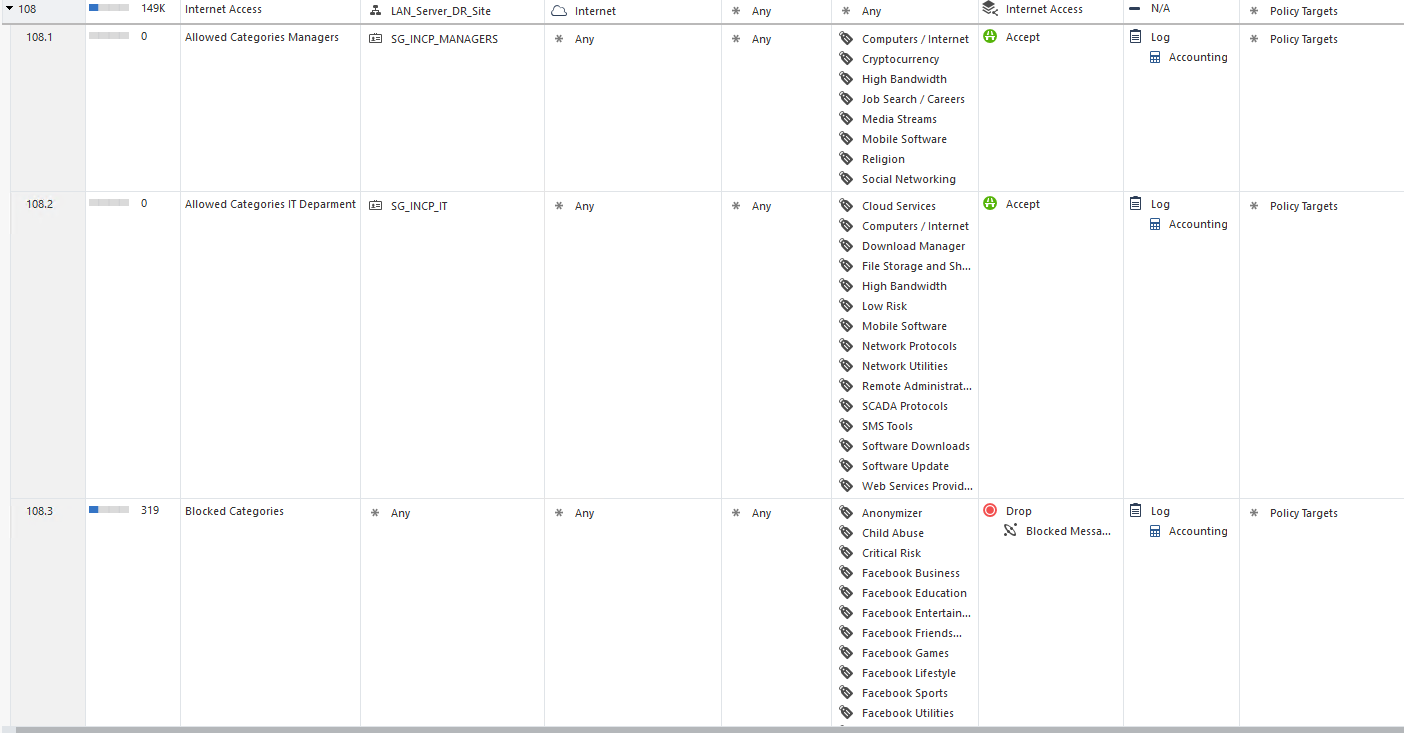
I have a rule with Internet to a whole network (Rule 108) and i have 3 more subrules.
In 2 of them i have an AD group with particular navigation policies (Rules 108.1 and 108.2)
The final Subrule (108.3) has a blocked categories such as Porn and Sex.
When i made some tests it doesnt allow me to access blocked websites but. is not showing the blocked message. It only shows the message "Hmmm... can´t reah this page"
I have attached an example of the Policy to understand more clarily my situation
Anyone has any idea how to solve this?
P.D: Sorry about my english
One cannot display a block page for an HTTPS website unless HTTPS Inspection is enabled.
Otherwise, what you're seeing is expected behavior.
My Blade of https inspection is enabled.
I dont uderstand why im some examples im receiving the block message and others dont.
Okay, fair enough...give example of ones failing to show block page, I can test them on my lab windows 10 with inspection enabled.
Andy
Hi,
So, first of all, I would recommend to get the Block first, then the allowed categories.
Now, try to run a test from an machine, to an Website using HTTP, and in FWL logs, you should see a Firewall log and then an Redirect log ; since the site is Blocked.
If all good with HTTP, try with and HTTPS and in FWL logs, you should see the same, an Firewall log, then an Inspection log and then an Redirect log.
Ty,
PS: can you show a screenshot of the browser error - with address-bar included.
Maybe it's saying that it can't reach the portal you redirected to ....
Sir @PhoneBoy is correct as always, you can NOT get block page if inspection blade is off, it will never work.
Leaderboard
Epsum factorial non deposit quid pro quo hic escorol.
| User | Count |
|---|---|
| 21 | |
| 20 | |
| 16 | |
| 8 | |
| 7 | |
| 3 | |
| 3 | |
| 3 | |
| 3 | |
| 3 |
Fri 12 Dec 2025 @ 10:00 AM (CET)
Check Mates Live Netherlands: #41 AI & Multi Context ProtocolTue 16 Dec 2025 @ 05:00 PM (CET)
Under the Hood: CloudGuard Network Security for Oracle Cloud - Config and Autoscaling!Fri 12 Dec 2025 @ 10:00 AM (CET)
Check Mates Live Netherlands: #41 AI & Multi Context ProtocolTue 16 Dec 2025 @ 05:00 PM (CET)
Under the Hood: CloudGuard Network Security for Oracle Cloud - Config and Autoscaling!About CheckMates
Learn Check Point
Advanced Learning
YOU DESERVE THE BEST SECURITY