- Products
- Learn
- Local User Groups
- Partners
- More

MVP 2026: Submissions
Are Now Open!
What's New in R82.10?
10 December @ 5pm CET / 11am ET
Announcing Quantum R82.10!
Learn MoreOverlap in Security Validation
Help us to understand your needs better
CheckMates Go:
Maestro Madness
I currently have a firewall with 8 virtual contexts (VSX).
On the VSX02 Firewall I have the Productive Client VPN service.
The Customer asks me to configure the other VPN Client service on other Firewall VSX07.
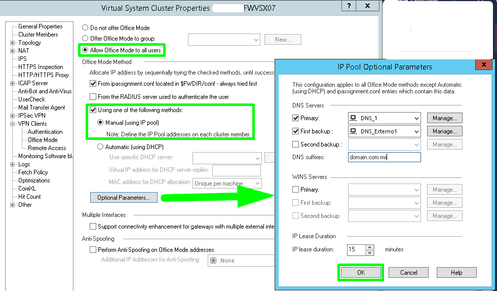
When I enter the Gateway VSX07, if I try to configure the Parameter of "VPN Clients >> Office Mode" in this point I can make modifications.
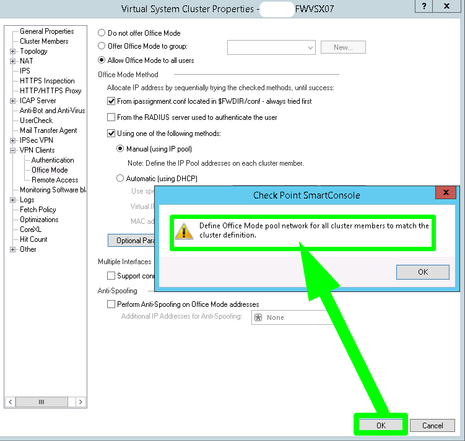
But when I click OK to save the changes, I get the following message "Define office mode pool network for all cluster members to match the cluster definition" and I can't move forward.
The configuration of the current pool of the VPN Client, is assigned in each member of the cluster.
Can I have the VPN Client service on the same firewall but different VSXs?
Can I use the same pool as the productive VPN Client, with the new service that I am trying to configure?
How can I fix the problem?
Hi @raquinog,
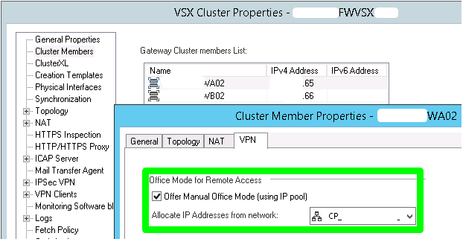
Follow these steps in SmartConsole:
- open Security Gateway Cluster Object
- go to Cluster Members pane - select cluster member and select Edit
- Cluster Member Properties window will open - Navigate to VPN tab
- under Office Mode for Remote Access - select or check the Box for Offer Manual Office Mode (using IP pool) option
- from the Drop down selection of Allocate IP Addresses from network select the relevant Network which is created for the purpose of Office Mode Pool
- close Cluster Member Properties window by hitting OK
>>> repeat Step for second cluster member <<<
>>> install the Security policy <<<
Hi Heiko:
Thanks for your advice, but I tried to do it, and is the same result. I get the following message "Define office mode pool network for all cluster members to match the cluster definition"
Any other suggestion?
Can I have the VPN Client service on the same firewall but different VSXs?
Hi @raquinog,
Follow these steps in SmartConsole:
- open Security Gateway Cluster Object
- go to Cluster Members pane - select cluster member and select Edit
- Cluster Member Properties window will open - Navigate to VPN tab
- under Office Mode for Remote Access - select or check the Box for Offer Manual Office Mode (using IP pool) option
- from the Drop down selection of Allocate IP Addresses from network select the relevant Network which is created for the purpose of Office Mode Pool
- close Cluster Member Properties window by hitting OK
>>> repeat Step for second cluster member <<<
>>> install the Security policy <<<
Hi Heiko:
Thanks for your advice, but I tried to do it, and is the same result. I get the following message "Define office mode pool network for all cluster members to match the cluster definition"
Any other suggestion?
Can I have the VPN Client service on the same firewall but different VSXs?
Did you try configuring the office mode pool on the cluster and then pressing OK to push the vsx configuration and only after that re-open the VS and then configure the VPN settings?
Hello @raquinog. I also have the same error as you on FW VSX. Have you found a solution to configure VPN Client to site on 2 different VSX?
Don't think you can use the same Office Mode pool on different VSes on the same VSX cluster.
But you should be able to configure Remote Access on multiple VSes.
I also have the same error as you on FW VSX. Have you found a solution to configure VPN Client to site on 2 different VSX?
Leaderboard
Epsum factorial non deposit quid pro quo hic escorol.
| User | Count |
|---|---|
| 24 | |
| 20 | |
| 8 | |
| 7 | |
| 6 | |
| 5 | |
| 5 | |
| 5 | |
| 4 | |
| 4 |
Fri 12 Dec 2025 @ 10:00 AM (CET)
Check Mates Live Netherlands: #41 AI & Multi Context ProtocolTue 16 Dec 2025 @ 05:00 PM (CET)
Under the Hood: CloudGuard Network Security for Oracle Cloud - Config and Autoscaling!Fri 12 Dec 2025 @ 10:00 AM (CET)
Check Mates Live Netherlands: #41 AI & Multi Context ProtocolTue 16 Dec 2025 @ 05:00 PM (CET)
Under the Hood: CloudGuard Network Security for Oracle Cloud - Config and Autoscaling!Thu 18 Dec 2025 @ 10:00 AM (CET)
Cloud Architect Series - Building a Hybrid Mesh Security Strategy across cloudsAbout CheckMates
Learn Check Point
Advanced Learning
YOU DESERVE THE BEST SECURITY