- Products
- Learn
- Local User Groups
- Partners
- More

Scaling Check Point Automation with Arodonata
7 October @ 5pm CET / 11am EDT
AI Security Masters
LGTM: Bypassing an LLM Build Gate
When Prompt Injection Fails
What's New in Check Point SASE
The State of Ransomware Q2 2026:
This Quarter's Trends, and Their Impact on Your Defenses
CheckMates Go:
Half is Not Enough
Hey guys,
I really hope someone might be able to give some sigguestion/opinion on this, as to me, it makes no logical sense why this fails...could be because of mdps, not really sure. Anyway, to make long story short, customer is replacing their existing 4 15000 fws with new 4 9700 devices (2 separate clusters). We did migrate export from existing mgmt, imported to new one, connected both new clusters, built basic policy after setting up mdps, with ONLY 2 interfaces active (mgmt and sync).
But, here is the problem. Though policy is fine, when installed, only fw1 sdhows as active and fw is down (same on both clusters). We just assigned 169.254.x.x IPs as sync, since customer wanted to give it IP from same mgmt subnet, but that cannot work.
Oddly enough, pings to sync IP work from both members, but fw2 always shows as down...we tried cphastop; start, cprestart, reboot,. disable/re-enable cluster, no dice.
Worked with TAC, they kept telling us its layer 2 iussue, but I cant really understand how that can be the problem. Client even verified everything on of their Fortigates as well, all is allowed and even he was surprised they were "forcing" layer 2 argument.
Thoughts?
Thanks as always!
Hey guys,
We got all this working by updating clusters to R82.10. Not sure how that worked, as R82.10 release notes dont mention anything about mdps, but either way, Im so happy it was fine, and customer was very relieved. Web UI is fine, as well as cluster state.
Tx for everyone's help!!
sorry for n00b like questions:
Both show themselves as active and mate as down?
Ping works and arp entry of mate present?
No drops in fw ctl zdebug + drop seen?
Those are valid questions, Vince. So, fw2 member ALWAYS shows as down, just fw1 as active and if you try failover, same thing. Ping works and arp is fine and yes, no zdebug drops seen.
Oddly enough, even policy itself allows all communication between clusters, as well as access from internal networks. Its 3 rules in network layer and 2 in urlf layer, thats it.
Maybe some cluster kernel debugs shows something interesting?
I should probably ask TAC about it. Problem is that since these are brand new fws, they are not in production yet, so I dont want customer to lose access to them via ssh, since they are located in another wing of the hospital and he does not have console access, so could be tough to reconnect if that happened.
@the_rock wrote:
... built basic policy after setting up mdps, with ONLY 2 interfaces active (mgmt and sync).
This sounds like a problem. Management and sync are both typically on the mplane namespace, so your dplane namespace has no interfaces to do CCP heartbeats. The dplane namespace isn't getting CCP from the peer, so I would expect it to want to be down.
Hey Bob,
Im not at all familiar with MDPS myself, but to me, logically anyway, seems that Sync would be on dplane, since thats how we did IP change from clish, since web UI is not available once we install policy.
This is what TAC gave us to configure initially.
set mdps interface Sync sync on
set mdps interface Mgmt management on
set mdps mgmt plane on
set mdps resource cpus 4
set mdps mgmt resource on
On all of my clusters with working MDPS, the management and sync interfaces are owned by the mplane namespace (like VSID 0). The dplane namespace (functionally VSID 1) has all the other interfaces.
The separation is whether the interface is for traffic the member should send/receive for itself, versus traffic the cluster should carry for other endpoints. The member sends/receives sync traffic for itself, so that goes in mplane.
In the meantime, with the config I sent, is there any way to make this work or you dont think so?
I don't think there's a way to get it to go Active/Standby like this, but with no data interfaces, the cluster state seems irrelevant. Could be considered a cosmetic issue for now.
Forgive me for my ignorance, as I dont know much about how mdps works, but itns technically Sync dplane in this case? I say that since ONLY way to change IP was to make sure we were in dplane, rather than mplane.
Thats where Im not clear, because to me, seems Sync would be on dplane...
Just researched the web and what you stated seems to be valid.
Seems like it, yes. But, here is my question...can we somehow make this work in the meantime with below config?
set mdps interface Sync sync on
set mdps interface Mgmt management on
set mdps mgmt plane on
set mdps resource cpus 4
set mdps mgmt resource on
I wonder if there might be a way to temporarily config an interface to have one active interface in the Dplane, even by configuring a temporary isolated VLAN on the attached switches?
I can ask them, though not sure that might be doable atm. Currently, sync is simply connected with straight thru cable, no switch involved.
I am not familiar with mdps as well but you may ask tac if you can start with standard cluster and later enable it again?
Let me see what TAC says. I gave them all the info I have.
Did you already perform fancy kernel debugging?
Not yet, just waiting on TAC to provide exact commands for it. Issue is I dont want the client to lose connection to the firewalls, since he cant sadly console into them.
Good day!
The one thing that draw my attention is the APIPA address used for the Sync interface. An intuition told me that most probably you cannot use APIPA as a static address for Sync.
Quick check in a Lab shows that indeed we have ACTIVE/DOWN only because of the IP-addresses.
I have changed eth4-1(used for Sync) IP-address from
172.16.18.1/24 (23800_1) and 172.16.16.2/24 (23800_2)
to
169.254.1.50/24 (23800_1) and 169.254.1.51 (23800_2)
As a result, I got Active/Down from both ends after cpstop/cpstart. Your problem is replicated successfully. There is no MPDS used at all.

RFC 3927 states that 169.254.0.0/16 network is for automatic IP-address configuration. I may guess that Checkpoint follows the guideline and doesn't allow to configure an IP-address from this range manually.
Similar point is stated in sk179028
These IP subnets are reserved (you cannot use them in the CIN IP ranges):
0.0.0.0 / 8
127.0.0.0 / 8
169.254.0.0 / 16
192.0.2.0 / 24
224.0.0.0 / 4
203.0.113.0 / 24
Please, send my best regards to TAC engineers and don't make any unnecessary actions until you try to assign non-APIPA address for the Sync!
I would have to disagee with that statement and here is why I say that. I had used 169.254.x.x range many times in the lab for sync, never had an issue. Had who knows how many customers do the same, always worked like a charm. As a matter of fact, we did try use different subnet for sync, had exact same problem, so Im fairly positive problem is something with mdps, I just cant figure out what exactly.
Hi!
It is time for me to troubleshoot my lab....
Thank for the clarification!
I will gladly send soon my lab setup, where I have R81.20 cluster with 169.254.x.x subnet IPs as sync and works without any issues.
Here is output from my lab.
master:
[Expert@CP-FW-01:0]# cphaprob state
Cluster Mode: High Availability (Active Up) with IGMP Membership
ID Unique Address Assigned Load State Name
1 (local) 169.254.0.248 100% ACTIVE CP-FW-01
2 169.254.0.247 0% STANDBY CP-FW-02
Active PNOTEs: None
Last member state change event:
Event Code: CLUS-114904
State change: ACTIVE(!) -> ACTIVE
Reason for state change: Reason for ACTIVE! alert has been resolved
Event time: Wed Jan 7 10:31:57 2026
Cluster failover count:
Failover counter: 0
Time of counter reset: Wed Jan 7 10:30:19 2026 (reboot)
[Expert@CP-FW-01:0]# cphaprob -a if
CCP mode: Manual (Unicast)
Required interfaces: 4
Required secured interfaces: 1
Interface Name: Status:
eth0 (LM) UP
eth1 (LM) UP
eth2 (LM) UP
eth3 (S-LM) UP
S - sync, HA/LS - bond type, LM - link monitor, P - probing
Virtual cluster interfaces: 3
eth0 172.16.10.246
eth1 192.168.10.246
eth2 172.31.10.246
[Expert@CP-FW-01:0]# cphaprob -i list
There are no pnotes in problem state
[Expert@CP-FW-01:0]# cphaprob -l list
Built-in Devices:
Device Name: Interface Active Check
Current state: OK
Device Name: Recovery Delay
Current state: OK
Device Name: CoreXL Configuration
Current state: OK
Registered Devices:
Device Name: Fullsync
Registration number: 0
Timeout: none
Current state: OK
Time since last report: 62082 sec
Device Name: Policy
Registration number: 1
Timeout: none
Current state: OK
Time since last report: 62080.4 sec
Device Name: routed
Registration number: 2
Timeout: none
Current state: OK
Time since last report: 767672 sec
Device Name: cxld
Registration number: 3
Timeout: 30 sec
Current state: OK
Time since last report: 767724 sec
Process Status: UP
Device Name: fwd
Registration number: 4
Timeout: 30 sec
Current state: OK
Time since last report: 767724 sec
Process Status: UP
Device Name: cphad
Registration number: 5
Timeout: 30 sec
Current state: OK
Time since last report: 767701 sec
Process Status: UP
Device Name: Init
Registration number: 6
Timeout: none
Current state: OK
Time since last report: 767696 sec
[Expert@CP-FW-01:0]# cphaprob syncstat
Delta Sync Statistics
Sync status: OK
Drops:
Lost updates................................. 0
Lost bulk update events...................... 0
Oversized updates not sent................... 0
Sync at risk:
Sent reject notifications.................... 0
Received reject notifications................ 0
Sent messages:
Total generated sync messages................ 7122561
Sent retransmission requests................. 0
Sent retransmission updates.................. 1
Peak fragments per update.................... 1
Received messages:
Total received updates....................... 832920
Received retransmission requests............. 1
Sync Interface:
Name......................................... eth3
Link speed................................... 1000Mb/s
Rate......................................... 121740[Bps]
Peak rate.................................... 1116 [KBps]
Link usage................................... 0%
Total........................................ 87391 [MB]
Queue sizes (num of updates):
Sending queue size........................... 512
Receiving queue size......................... 256
Fragments queue size......................... 50
Timers:
Delta Sync interval (ms)..................... 100
Reset on Wed Jan 7 10:31:57 2026 (triggered by fullsync).
[Expert@CP-FW-01:0]#
*******************************
backup:
[Expert@CP-FW-02:0]# cphaprob state
Cluster Mode: High Availability (Active Up) with IGMP Membership
ID Unique Address Assigned Load State Name
1 169.254.0.248 100% ACTIVE CP-FW-01
2 (local) 169.254.0.247 0% STANDBY CP-FW-02
Active PNOTEs: None
Last member state change event:
Event Code: CLUS-114802
State change: INIT -> STANDBY
Reason for state change: There is already an ACTIVE member in the cluster (member 1)
Event time: Wed Jan 7 10:50:08 2026
Cluster failover count:
Failover counter: 0
Time of counter reset: Wed Jan 7 10:30:19 2026 (reboot)
[Expert@CP-FW-02:0]# cphaprob -a if
CCP mode: Manual (Unicast)
Required interfaces: 4
Required secured interfaces: 1
Interface Name: Status:
eth0 (LM) UP
eth1 (LM) UP
eth2 (LM) UP
eth3 (S-LM) UP
S - sync, HA/LS - bond type, LM - link monitor, P - probing
Virtual cluster interfaces: 3
eth0 172.16.10.246
eth1 192.168.10.246
eth2 172.31.10.246
[Expert@CP-FW-02:0]# cphaprob -i list
There are no pnotes in problem state
[Expert@CP-FW-02:0]# cphaprob -l list
Built-in Devices:
Device Name: Interface Active Check
Current state: OK
Device Name: Recovery Delay
Current state: OK
Device Name: CoreXL Configuration
Current state: OK
Registered Devices:
Device Name: Fullsync
Registration number: 0
Timeout: none
Current state: OK
Time since last report: 62131.7 sec
Device Name: Policy
Registration number: 1
Timeout: none
Current state: OK
Time since last report: 62130.1 sec
Device Name: routed
Registration number: 2
Timeout: none
Current state: OK
Time since last report: 766615 sec
Device Name: cxld
Registration number: 3
Timeout: 30 sec
Current state: OK
Time since last report: 766667 sec
Process Status: UP
Device Name: fwd
Registration number: 4
Timeout: 30 sec
Current state: OK
Time since last report: 766666 sec
Process Status: UP
Device Name: cphad
Registration number: 5
Timeout: 30 sec
Current state: OK
Time since last report: 766644 sec
Process Status: UP
Device Name: Init
Registration number: 6
Timeout: none
Current state: OK
Time since last report: 766640 sec
[Expert@CP-FW-02:0]# cphaprob syncstat
Delta Sync Statistics
Sync status: OK
Drops:
Lost updates................................. 0
Lost bulk update events...................... 0
Oversized updates not sent................... 0
Sync at risk:
Sent reject notifications.................... 0
Received reject notifications................ 0
Sent messages:
Total generated sync messages................ 1078799
Sent retransmission requests................. 1
Sent retransmission updates.................. 0
Peak fragments per update.................... 1
Received messages:
Total received updates....................... 23585737
Received retransmission requests............. 0
Sync Interface:
Name......................................... eth3
Link speed................................... 1000Mb/s
Rate......................................... 123770[Bps]
Peak rate.................................... 985 [KBps]
Link usage................................... 0%
Total........................................ 87394 [MB]
Queue sizes (num of updates):
Sending queue size........................... 512
Receiving queue size......................... 256
Fragments queue size......................... 50
Timers:
Delta Sync interval (ms)..................... 100
Reset on Wed Jan 7 10:50:08 2026 (triggered by fullsync).
[Expert@CP-FW-02:0]#
Short video I took. Apologies if you hear any music in the background...
Holla Andy,
Did you checked Pnotes? What listed there?
Hey brother,
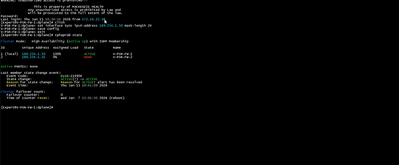
How you beeen? Happy New Yea! Yes, we did and shows sync is the issue, thats always the outcome. Mind you, we even tried different subnet with TAC on the phone, no change. I will see if I can find a screenshots I took and upload here.
Try to check that on both members the ccp configured as unicast and if it's encrypted on both.
Thanks,
Ilya
Yep, already verified that as well.

Leaderboard
Epsum factorial non deposit quid pro quo hic escorol.
| User | Count |
|---|---|
| 31 | |
| 9 | |
| 6 | |
| 5 | |
| 5 | |
| 4 | |
| 4 | |
| 4 | |
| 4 | |
| 3 |
Tue 06 Oct 2026 @ 12:00 PM (ACDT)
Rethinking Network Security for the AI Era : Session 2 - From User, to Branch and Campus APACTue 06 Oct 2026 @ 03:00 PM (CEST)
Rethinking Network Security for the AI Era : Session 2 - From User, to Branch and Campus EMEATue 06 Oct 2026 @ 02:00 PM (EDT)
Rethinking Network Security for the AI Era : Session 2 - From User, to Branch and Campus AMERTue 06 Oct 2026 @ 12:00 PM (ACDT)
Rethinking Network Security for the AI Era : Session 2 - From User, to Branch and Campus APACTue 06 Oct 2026 @ 03:00 PM (CEST)
Rethinking Network Security for the AI Era : Session 2 - From User, to Branch and Campus EMEATue 06 Oct 2026 @ 02:00 PM (EDT)
Rethinking Network Security for the AI Era : Session 2 - From User, to Branch and Campus AMERThu 08 Oct 2026 @ 11:00 AM (EDT)
Under the Hood: Check Point SASE | Zero Trust Network Access, Step by StepAbout CheckMates
Learn Check Point
Advanced Learning

YOU DESERVE THE BEST SECURITY