- Products
- Learn
- Local User Groups
- Partners
- More

MVP 2026: Submissions
Are Now Open!
What's New in R82.10?
Watch NowOverlap in Security Validation
Help us to understand your needs better
CheckMates Go:
Maestro Madness
Hi everyone we've restricted our Windows domain controllers from accessing the internet and I've been a sked to allow Windows Update to function. I tried creating a rule with the windows update and update optimization applications with the source of our domain controllers to destination internet (DNS such is a different rule) but no dice.
So I updated the rule and created a network group using this page from Microsoft and added http and https. Yet we still can't connect I just see random IP addresses from Microsoft dropping I know that checkpoints aren't great when it comes to resolving wildcard domain names.
Its unfortunate that more updateable objects are available for download in this situation but I'm kind of banging my head at this now and wanted to post something to see if anyone else had luck opening the required URLs and such for Windows update to function.
Thanks for reading.
Hi, couple comments:
1. FQDN Domain Objects won't work here since you need to resolve for all *.download.microsoft.com instead of just .download.microsoft.com.
2. Updatable Objects are dependent on the underlying vendor (in this case Microsoft) providing the relevant information in a programmatically readable way so it can be consumed by our gateways.
3. "Windows Update" and the services http/https are redundant insofar as they both include http/https.
You can include the relevant domains in a Custom Application/Site object, which will be used as a service.
This requires: R80.40+, Categorize HTTPS Inspection enabled (it is by default), and App Control.
Easiest way I always found to fix this issue is add custom url filtering group with *microsoft* and *windowsupdate* in it and dont even bother with updatable objects. Push policy, problem solved.
Reap the benefits : - )
Andy
Hi Rock,
I too have to disable an internet rule that will impact Windows updates. I need to find a solution to block all internet traffic and only allow Windows updates to continue.
When I tried to add the custom domain into the URL filtering, it kept saying the domain must start with a "."
Any pointers?
I'm new and learning.
Thanks,
A Domain object does not work in the way you are attempting to use it.
What we're discussing is a Custom Application/Sites object where this IS allowed.
However, doing it in a wildcard fashion like this will allow stuff you probably do not want to allow.
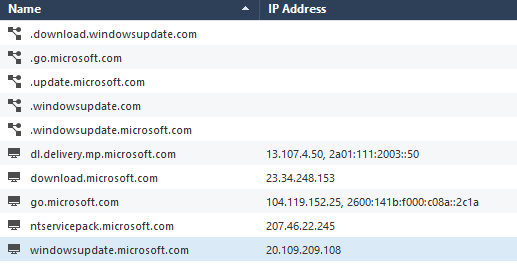
There are a couple of Updatable Objects that might be useful here:
Forgot to say, this is important, you do need blades @PhoneBoy mentioned enabled on the gateway.
Andy
Leaderboard
Epsum factorial non deposit quid pro quo hic escorol.
| User | Count |
|---|---|
| 20 | |
| 19 | |
| 19 | |
| 8 | |
| 7 | |
| 3 | |
| 3 | |
| 3 | |
| 3 | |
| 3 |
Tue 16 Dec 2025 @ 05:00 PM (CET)
Under the Hood: CloudGuard Network Security for Oracle Cloud - Config and Autoscaling!Thu 18 Dec 2025 @ 10:00 AM (CET)
Cloud Architect Series - Building a Hybrid Mesh Security Strategy across cloudsTue 16 Dec 2025 @ 05:00 PM (CET)
Under the Hood: CloudGuard Network Security for Oracle Cloud - Config and Autoscaling!Thu 18 Dec 2025 @ 10:00 AM (CET)
Cloud Architect Series - Building a Hybrid Mesh Security Strategy across cloudsAbout CheckMates
Learn Check Point
Advanced Learning
YOU DESERVE THE BEST SECURITY