- Products
- Learn
- Local User Groups
- Partners
- More
MVP 2026: Submissions
Are Now Open!
What's New in R82.10?
Watch NowOverlap in Security Validation
Help us to understand your needs better
CheckMates Go:
Maestro Madness
Checkmates
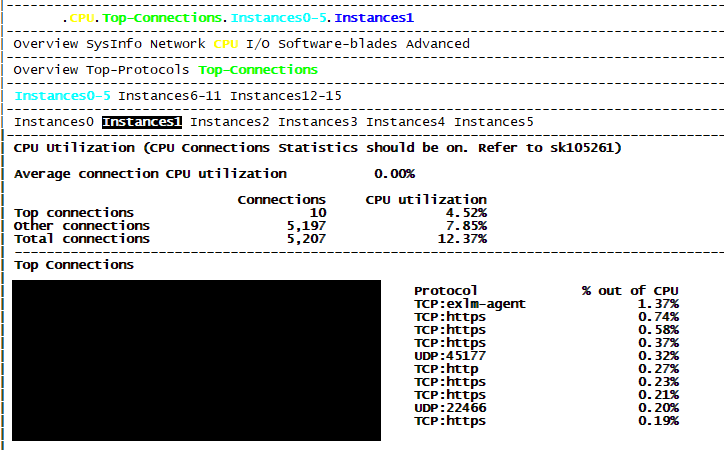
Why is it that on VSX, we receive less functionality when using CPview? More specific: on regular gateways, we can analyze the CPU load per instance and view the top connection or top service that goes along with it.
Example:
I'm sure that the architecture behind VSX mode is not quite the same as a regular gateway and poses a different set of challenges but this screenshot is from a R80.10 gateway and yet to my knowledge this feature is still not implemented in VSX on R81. Is this not incredible useful?
I have checked with TAC & my local office, I also checked the support center but no-one can give me a proper tool to investigate CPU load in correlation with a specific connection. Also I requested an improvement via a form on the CP website but that seems to end up in someone spam folder.
The functionality difference stems from the traditional kernel space mode for INSPECT vs. process space mode (fwk processes - called User Space Firewall). VSX has always used fwk processes to implement INSPECT and now the newer mainline gateways (including Quantums) are using USFW by default. Some of the feature differences between VSX/USFW and kernel mode got called out in my CPX 2020 speech, and since then the feature gap has almost been completely closed by R&D. Future development is likely to use USFW everywhere, so now we are starting to see some new features available exclusively in USFW mode but not kernel mode.
As far as the cpview screens you are missing you can get them back with the proper version/Jumbo HFA and by setting kernel variables sim_top_conns_enable=1 & sim_top_proto_enable=1 as mentioned here:
sk167903: CPview Top Connections and Protocols tabs show no data
Those screens are not available at all for VSX R80.10 and earlier due to the older implementation of SecureXL in that version.
Thanks for that interesting read. However please note that I'm referring to the Top-protocols and Top-connections within the CPU tab not the network tab. We really want to have the column "% out of CPU" as you can see in my initial screenshot.
We are also going to R80.30 for all our VSX clusters.
Hi,
You can use CPView today on VSX. But it is per VS, And the amount of statistics is currently very limited. Unfortunately, there is currently no way to monitor the statistics of the whole VSX appliance. There is a tab that’s collecting the information from all VSs and is storing them in one place. the new tab can be seen in the VS0 context only.
Is there a way to request an improvement of this functionality? Or do you know if something is in the works?
Currently we are stuck troubleshooting high CPU load on FWK instances and we have no clue what is causing it. Involving TAC each issue is very time consuming especially when the problem is not always present.
Hi,
I will pass your request to the relevant R&D owners, and they will try to incorporate it into their plans. Meanwhile, regarding your issue, please try to see if one of the following is giving you the info:
Thank you, that is appreciated. In regards to the commands, those are known by us and do not give good insight on which flows are triggering more CPU usage. We are quite capable of finding out that something is wrong but drilling down to what exactly and being able to report this to our customer is a different story, hence my feature request.
Leaderboard
Epsum factorial non deposit quid pro quo hic escorol.
| User | Count |
|---|---|
| 20 | |
| 19 | |
| 18 | |
| 8 | |
| 7 | |
| 3 | |
| 3 | |
| 3 | |
| 3 | |
| 3 |
Tue 16 Dec 2025 @ 05:00 PM (CET)
Under the Hood: CloudGuard Network Security for Oracle Cloud - Config and Autoscaling!Thu 18 Dec 2025 @ 10:00 AM (CET)
Cloud Architect Series - Building a Hybrid Mesh Security Strategy across cloudsTue 16 Dec 2025 @ 05:00 PM (CET)
Under the Hood: CloudGuard Network Security for Oracle Cloud - Config and Autoscaling!Thu 18 Dec 2025 @ 10:00 AM (CET)
Cloud Architect Series - Building a Hybrid Mesh Security Strategy across cloudsAbout CheckMates
Learn Check Point
Advanced Learning
YOU DESERVE THE BEST SECURITY