- Products
- Learn
- Local User Groups
- Partners
- More

MVP 2026: Submissions
Are Now Open!
What's New in R82.10?
Watch NowOverlap in Security Validation
Help us to understand your needs better
CheckMates Go:
Maestro Madness
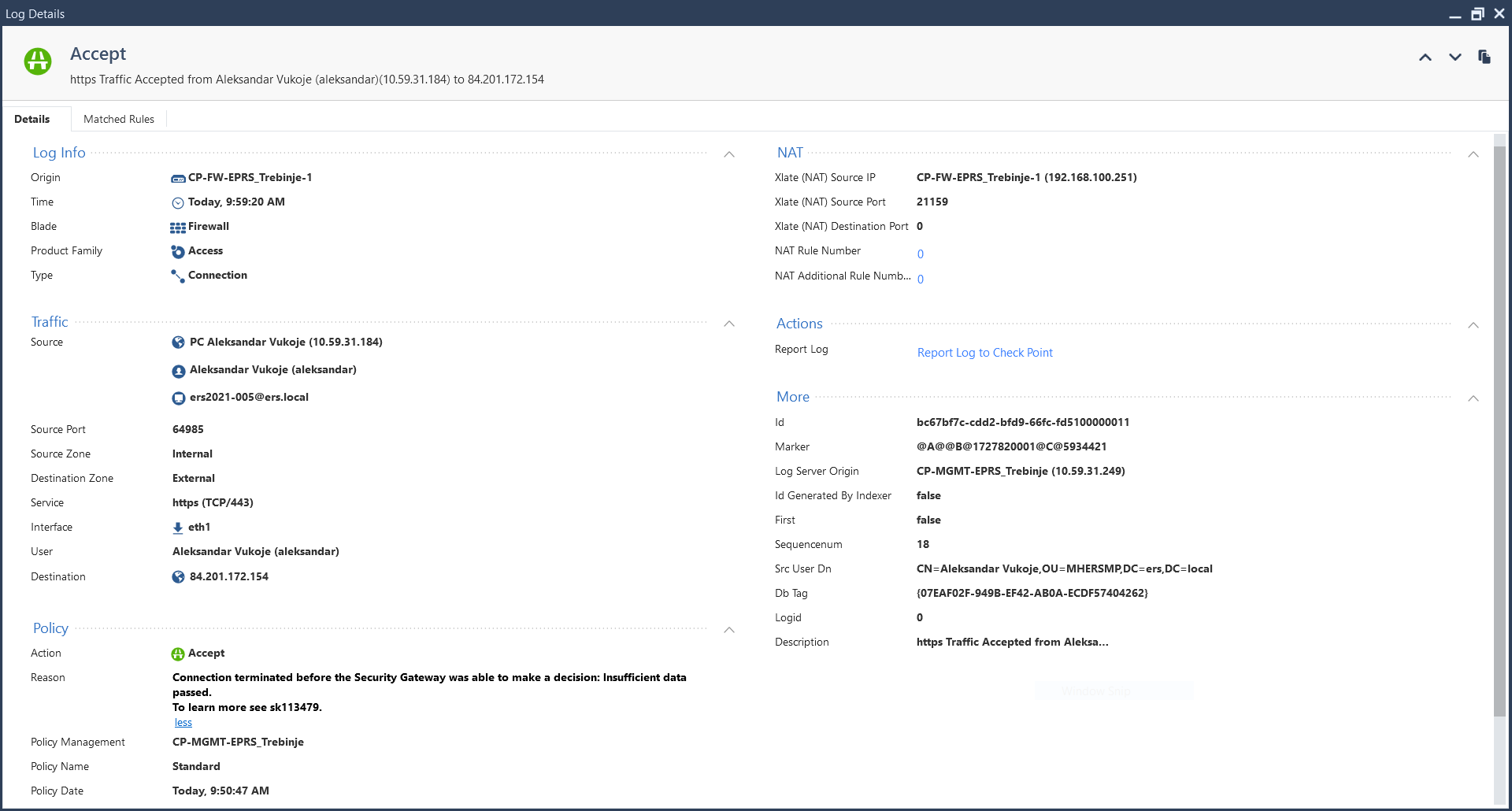
Hello, I have a version R81.20 Jumbo Hotfix Take 76 on my gateways in ClusterXL, but when I have upgraded it to a Take 84 (recommended version) I get some issues regarding internet access.
Connection terminated before the Security Gateway was able to make a decision: Insufficient data passed.
To learn more see sk113479.
It seems like issue with policy match.
I have inline layer created for internet access (rule ID: 79). Instead of connections match rule 79.15 they match rule 79.
I didn't find a cause of the problem and I have downgrade to Hotfix Take 76
How to resolve problem?
This error message is considered "normal" and a function of how modern application-aware firewalls operate.
In short:
Again, this is expected behavior and documented in the referenced SK: https://support.checkpoint.com/results/sk/sk113479
The fact you rolled back begs the question: were your users experiencing any actual issues as a result of these errors?
The way I always put it, that sk is literally a long way of saying 3 way handshake is not completing and firewall is not a problem. It simply does not have enough data to classify such a connection, and though you may see the actual drop in the log, thats not technically the case.
Andy
Look at this pictures. When problem occurs, nobody can access the internet. Policy say that rule 79 is matched (rule 79 is inline layer). It must be matched rule 79.11 to allow access the internet.
I don't know, maybe is something wrong with Gaia OS, I think to reinstall Gaia OS.
Vidio sam slike : - )
Trust me, its NOT the firewall issue mate. Just carefully read the sk itself.
Andy
The action on the log says "Accept."
When you say "nobody can access the Internet" what is the exact behavior? (i.e. what is seen by end users)
In any case, the error message itself isn't necessarily indicative of a problem.
However, if there is an actual issue that can be resolved by uninstalling the relevant JHF, then you'll need to consult with TAC.
Leaderboard
Epsum factorial non deposit quid pro quo hic escorol.
| User | Count |
|---|---|
| 20 | |
| 19 | |
| 18 | |
| 8 | |
| 7 | |
| 3 | |
| 3 | |
| 3 | |
| 3 | |
| 3 |
Tue 16 Dec 2025 @ 05:00 PM (CET)
Under the Hood: CloudGuard Network Security for Oracle Cloud - Config and Autoscaling!Thu 18 Dec 2025 @ 10:00 AM (CET)
Cloud Architect Series - Building a Hybrid Mesh Security Strategy across cloudsTue 16 Dec 2025 @ 05:00 PM (CET)
Under the Hood: CloudGuard Network Security for Oracle Cloud - Config and Autoscaling!Thu 18 Dec 2025 @ 10:00 AM (CET)
Cloud Architect Series - Building a Hybrid Mesh Security Strategy across cloudsAbout CheckMates
Learn Check Point
Advanced Learning
YOU DESERVE THE BEST SECURITY