


- Products
- Learn
- Local User Groups
- Partners
- More

What’s New in Agentic Network Orchestration
21 October @ 5pm CET / 11am EDT
AI Security Masters
LGTM: Bypassing an LLM Build Gate
When Prompt Injection Fails
Scaling Check Point Automation with Arodonata
CheckMates Go:
Fun Ding

 Jan_Irani
Hi,
for sure all of you have seen that since those old UTM devices check Point is not Reporting the MAC Address of Gateways which are in "Provisioning" Mode. Please find below a shell script which you can start over cron-job to replenish missing information.
bold marked lines have to be modified to match your environment.
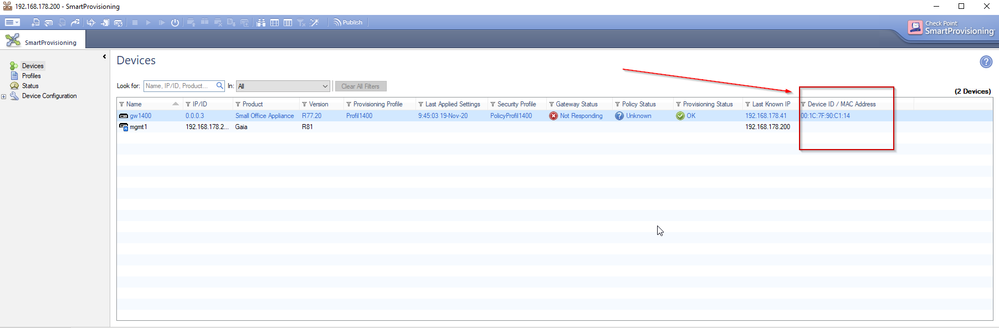
* in the second Line you have to put your Management Server Version
* in the third line management server name and credentials
* in line 16 use -local or -s <server> to specify Management Server IP or name
try the LSMcli command once before you use the whole script to see if the query result match your expectation.
>>>>>>>>>>>>> snipp
#!/bin/bash -f
source $CPDIR/tmp/.CPprofile.sh
LSMcli <mgmt-server> admin <admin-password> Show -F=nit | grep -i -P "(.*)\s(\d)+\.(\d)+\.(\d)+\.(\d+)\s.*(ROBO)" > DevList.txt
while IFS=$'\t' read -r DevName IPAddr DevProfile
do
cprid_util -server $IPAddr -verbose rexec -rcmd /bin/clish -c "show diag" > DevDiagOutput.txt
myArray=($(cat DevDiagOutput.txt | grep -Pi "HW MAC Address:\s([0-9a-f]{2}[:-]){5}([0-9a-f]{2})"))
if [[ "x${myArray[3]}" != "x" ]]
then
echo "modify robo_gateways $DevName device_id ${myArray[3]}" >> dbeditScript.txt
fi
myArray=""
done < /home/admin/DevList.txt
echo "quit -update_all" >> dbeditScript.txt
dbedit -local -f dbeditScript.txt
DevList.txt
DevDiagOutput.txt
dbeditScript.txt
>>>>>>>>>>>>>>> snapp
Hi,
for sure all of you have seen that since those old UTM devices check Point is not Reporting the MAC Address of Gateways which are in "Provisioning" Mode. Please find below a shell script which you can start over cron-job to replenish missing information.
bold marked lines have to be modified to match your environment.
* in the second Line you have to put your Management Server Version
* in the third line management server name and credentials
...;

About CheckMates
Learn Check Point
Advanced Learning

YOU DESERVE THE BEST SECURITY
