


- Products
- Learn
- Local User Groups
- Partners
- More

Scaling Check Point Automation with Arodonata
7 October @ 5pm CET / 11am EDT
AI Security Masters
LGTM: Bypassing an LLM Build Gate
When Prompt Injection Fails
What's New in Check Point SASE
The State of Ransomware Q2 2026:
This Quarter's Trends, and Their Impact on Your Defenses
CheckMates Go:
Half is Not Enough


🚀 Runs on all Check Point Gaia systems.
🎓 Referenced in sk180812
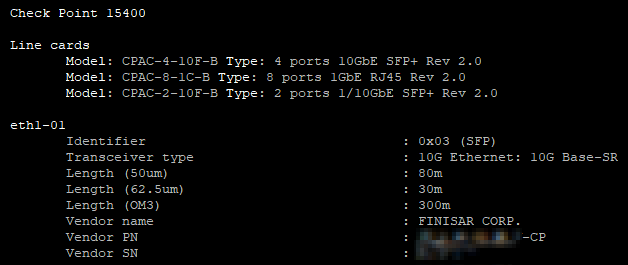
One-liner (Bash) to show the inventory of plugged transceivers, DAC cables and line cards.
In expert mode run:
echo;if [[ -f "/etc/cp-release" ]] && ! [[ `grep Embed /etc/cp-release` ]];then stat=`cpstat os`;tput bold;echo -n "$stat"|grep "Appliance Name:"|sed 's/Appliance Name://'|tr -s ' '|tr -d '\n';if [[ `echo "$stat"|grep "Maestro"` ]] && [[ `grep original_name /etc/appliance_config.xml|tr '<>' '\n'|grep "Check Point"` ]];then echo; echo -n " ";grep original_name /etc/appliance_config.xml|tr '<>' '\n'|grep "Check Point"|tr -d '\n';fi;tput sgr0;if [[ `echo "$stat"|grep Manufacturer|grep CheckPoint` ]];then echo -n " (Serial: `echo "$stat"|grep "Appliance SN"|awk '{print $NF}'`, MAC: `dmidecode -t1|grep UUID|awk '{print $NF}' FS=-|sed 's/../&:/g; s/:$//'`)";fi;echo;echo;sfps=0;tput bold;echo " Line cards";tput sgr0;if [[ `find /sys/class/net -name eth*-01 2>/dev/null` ]]; then find /sys/class/net -name eth*-01 2>/dev/null|while read line;do sv=`cat "$line/device/subsystem_vendor" 2>/dev/null`;sd=`cat "$line/device/subsystem_device" 2>/dev/null`;if [[ -n "$sv" ]] && [[ -n "$sd" ]];then grep "$sv" /etc/hw_info/linecard.lst 2>/dev/null|grep "$sd"|awk -F ',' '{print "Model: "$3" Type: "$4}'|tr -d '"'|tr -s " "|tr -d "\t"|sed "s/\bModel\b/\x1b[1;1m&\x1b[m/g;s/\bType\b/\x1b[1;1m&\x1b[m/g;s/^/\t/";fi;done;else echo -e "\n\t-";fi;echo;nics=`ls -d /sys/class/net/*/device 2>/dev/null|awk -F '/' '{print $5}'`;if [[ -n "$nics" ]];then phys=`echo "$nics"|wc -l`;echo "$nics"|while read line;do if [[ `ethtool -m $line 2>/dev/null` ]];then sfps=1;tput bold;echo " "$line;tput sgr0;etht=`ethtool -m $line 2>/dev/null|awk '/Transceiver type/ && ++count==1{sub(/Transceiver type/,"Transceiver_type")} 1'|grep 'Identifier\|Transceiver_type\|Length\|Vendor name\|Vendor SN\|Vendor PN'|sed 's/Transceiver_type/Transceiver type/'|grep -v ': 0m\|: 0km'`;vendor=`ethtool -m $line 2>/dev/null|grep 'Vendor PN'|awk '{print $NF}'`;file=`find /etc/hcp/tests -name hcp_optic_info.json 2>/dev/null|head -n1`;if [[ -n "$file" ]] && [[ -s "$file" ]] && $CPDIR/jq/jq -e . "$file" >/dev/null 2>&1;then data=`$CPDIR/jq/jq -e -r ".transceivers.CheckPoint_PartNumber[\"$vendor\"]" "$file" 2>/dev/null`;elif [[ -f /etc/xcvr_list.csv ]];then data=`awk -F',' -v pn="$vendor" '$14==pn{print $3}' /etc/xcvr_list.csv|head -n1`;[[ -z "$data" ]] && false;else data="";false;fi;if [[ $? -ne 0 ]];then echo "$etht";else echo "$etht$data"|sed "s/^[ \t]*//"|tr -d '"{},'|tr -s " "|sed "s/:/@:/"|column -t -s '@'|sed "s/^/\t/"|grep -v "TBD"$;fi;echo;fi;((phys--));if [[ $phys -eq 0 ]] && [[ sfps -eq 0 ]];then echo -e " \033[1;31mNo SFPs/DACs found! \033[m\n";fi;done;else echo -e " \033[1;31mNo network interfaces found! \033[m\n";fi;unset stat sfps phys etht line data file vendor nics sv sd;else echo -e " \033[1;31mUnsupported OS! \033[m\n";fiIntegrated with our ccc script.
🚀 Runs on all Check Point Gaia systems.
🎓 Referenced in sk180812
One-liner (Bash) to show the inventory of plugged transceivers, DAC cables and line cards.
In expert mode run:
echo;if [[ -f "/etc/cp-release" ]] && ! [[ `grep Embed /etc/cp-release` ]];then stat=`cpstat os`;tput bold;echo -n "$stat"|grep "Appliance Name:"|sed 's/Appliance Name://'|tr -s ' '|tr -d '\n';if [[ `echo "$stat"|grep "Maestro"` ]] && [[ `grep original_name /etc/appliance_config.xml|tr '<>' '\n'

Cool script. It noteworthy that it does not run on R80.30 (I know, that R80.30 is EoS!). Seems to work only on actual releases. Can you name the minimal version it runs on?


Hi Danny,
I just ran this on a 9800 running R82 in VSX mode and got this:
Check Point 9800 (Serial: <removed>, MAC: <removed>)
Line cards
No network interfaces found!
Output from 'show asset all' below if that helps
Platform: RM-40-00
Model: Check Point 9800
Serial Number: <removed>
CPU Model: Intel(R) Xeon(R) Silver 4316 CPU
CPU Frequency: 2300.001 Mhz
Number of Cores: 40
CPU Hyperthreading: Enabled
Number of disks: 2
Disk 1 Model: SAMSUNG MZQL2960HCJR-00A07
Disk 1 Capacity: 960 GB
Disk 2 Model: SAMSUNG MZQL2960HCJR-00A07
Disk 2 Capacity: 960 GB
Total Disks size: 1.92 TB
Total Memory: 65536 MB
Memory Slot 1 Size: 8192 MB
Memory Slot 2 Size: 8192 MB
Memory Slot 3 Size: 8192 MB
Memory Slot 4 Size: 8192 MB
Memory Slot 5 Size: 8192 MB
Memory Slot 6 Size: 8192 MB
Memory Slot 7 Size: 8192 MB
Memory Slot 8 Size: 8192 MB
Power supply 1 name: Power Supply #1
Power supply 1 status: Up
Power supply 2 name: Power Supply #2
Power supply 2 status: Up
LOM Status: Installed
LOM Firmware Revision: 7.18.1
TPM Status: Available
TPM Version: 2.0
Number of line cards: 2
Line card 1 model: CPAC-8-1/10F-D
Line card 1 type: 8 ports 1/10GbE Fiber Rev 1.0
Line card 2 model: CPAC-8-1/10F-D
Line card 2 type: 8 ports 1/10GbE Fiber Rev 1.0
Hi Danny,
I just ran this on a 9800 running R82 in VSX mode and got this:
Check Point 9800 (Serial: <removed>, MAC: <removed>)
Line cards
No network interfaces found!
Output from 'show asset all' below if that helps
Platform: RM-40-00
Model: Check Point 9800
Serial Number: <removed>
CPU Model: Intel(R) Xeon(R) Silver 4316 CPU
CPU Frequency: 2300.001 Mhz
Number of Cores: 40
CPU Hyperthreading: Enabled
Number of disks: 2
Disk 1 Model: SAMSUNG MZQL2960HCJR-00A07
Disk 1 Capacity: 960 GB
Disk 2 Model

 Sergei_Shir
A link to this CheckMates post was added in https://support.checkpoint.com/results/sk/sk180812
A link to this CheckMates post was added in https://support.checkpoint.com/results/sk/sk180812
; Eric_Beasley
Hi,
I get an error when running this.
There's a missing check if the "file=`find /etc/hcp/tests -name hcp_optic_info.json|head -n1`" element returns an empty result.
[Expert@CORE-GW-TE100X-01:0]# echo;if [[ -f "/etc/cp-release" ]] && ! [[ `grep Embed /etc/cp-release` ]];then stat=`cpstat os`;tput bold;echo -n "$stat"|grep "Appliance Name:"|sed 's/Appliance Name://'|tr -s ' '|tr -d '\n';if [[ `echo "$stat"|grep "Maestro"` ]] && [[ `grep original_name /etc/appliance_config.xml|tr '<>' '\n'|grep "Check Point"` ]];then echo; echo -n " ";grep original_name /etc/appliance_config.xml|tr '<>' '\n'|grep "Check Point"|tr -d '\n';fi;tput sgr0;if [[ `echo "$stat"|grep Manufacturer|grep CheckPoint` ]];then echo -n " (Serial: `echo "$stat"|grep "Appliance SN"|awk '{print $NF}'`, MAC: `dmidecode -t1|grep UUID|awk '{print $NF}' FS=-|sed 's/../&:/g; s/:$//'`)";fi;echo;echo;sfps=0;tput bold;echo " Line cards";tput sgr0;if [[ `find /sys/class/net -name eth*-01 2>/dev/null` ]]; then find /sys/class/net -name eth*-01 2>/dev/null|while read line;do grep `cat $line'/device/subsystem_vendor'` /etc/hw_info/linecard.lst|grep `cat $line'/device/subsystem_device'`|awk -F ',' '{print "Model: "$3" Type: "$4}'|tr -d '"'|tr -s " "|tr -d "\t"|sed "s/\bModel\b/\x1b[1;\t1m&\x1b[m/g;s/\bType\b/\x1b[1;1m&\x1b[m/g;";done;else echo -e "\n\t-";fi;echo;phys=`find /sys/class/net/*/device|awk -F '/' '{print $5}'|wc -l`;echo "`find /sys/class/net/*/device|awk -F '/' '{print $5}'`"|while read line;do if [[ `ethtool -m $line 2>/dev/null` ]];then sfps=1;tput bold;echo " "$line;tput sgr0;etht=`ethtool -m $line 2>/dev/null|awk '/Transceiver type/ && ++count==1{sub(/Transceiver type/,"Transceiver_type")} 1'|grep 'Identifier\|Transceiver_type\|Length\|Vendor name\|Vendor SN\|Vendor PN'|sed 's/Transceiver_type/Transceiver type/'|grep -v ': 0m\|: 0km'`;file=`find /etc/hcp/tests -name hcp_optic_info.json|head -n1`;data=`cat $file|$CPDIR/jq/jq -e -r ".transceivers.CheckPoint_PartNumber[\"$(ethtool -m $line 2>/dev/null|grep 'Vendor PN'|awk '{print $NF}')\"]"`;if [[ $? -eq 1 ]];then echo "$etht";if [[ `echo "$stat"|grep "Appliance Name"|grep "Check Point"` ]];then echo -e "\n\tSKU auto-detect failed. Manually retrieve SKU with this command:";tput bold;echo -e "\tgrep SKU $file|grep -v \"TBD\"";tput sgr0;fi;else echo "$etht$data"|sed "s/^[ \t]*//"|tr -d '"{},'|tr -s " "|sed "s/:/@:/"|column -t -s '@'|sed "s/^/\t/"|grep -v "TBD"$;fi;echo;fi;((phys--));if [[ $phys -eq 0 ]] && [[ sfps -eq 0 ]];then echo -e " \033[1;31mNo SFPs/DACs found! \033[m\n";fi;done;unset stat sfps phys etht line data file;else echo -e " \033[1;31mUnsupported OS! \033[m\n";fi

 Check Point TE100X (Serial: -REDACTED-, MAC: -REDACTED-)

 Line cards
        Model: **bleep**-51081-090 Type: 8 ports 1GbE Copper
        Model: CPAC-4-10F Type: 4 ports 10GbE SFP+

 eth1-01
parse error: Invalid numeric literal at line 2, column 0
        Identifier         : 0x03 (SFP)
        Transceiver type   : Infiniband: 1X Copper Passive
        Length (Copper)    : 1m
        Vendor name        : 10Gtek
        Vendor PN          : CAB-10GSFP-P1M
        Vendor SN          : -REDACTED-

[Expert@CORE-GW-TE100X-01:0]
I get that this isn't a supported DAC, but the it affects the script plumbing providing more useful details.
BR
Eric
Hi,
I get an error when running this.
There's a missing check if the "file=`find /etc/hcp/tests -name hcp_optic_info.json|head -n1`" element returns an empty result.
[Expert@CORE-GW-TE100X-01:0]# echo;if [[ -f "/etc/cp-release" ]] && ! [[ `grep Embed /etc/cp-release` ]];then stat=`cpstat os`;tput bold;echo -n "$stat"|grep "Appliance Name:"|sed 's/Appliance Name://'|tr -s ' '|tr -d '\n';if [[ `echo "$stat"|grep "Maestro"` ]] && [[ `grep original_name /etc/appliance_config.xml|tr '<>' @Eric_Beasley : I updated the one-liner as Check Point changed from hcp_optic_info.json to /etc/xcvr_list.csv
@Eric_Beasley : I updated the one-liner as Check Point changed from hcp_optic_info.json to /etc/xcvr_list.csv
;
Just tested it in the lab, worked fine.
[Expert@CP-GW:0]# echo;if [[ -f "/etc/cp-release" ]] && ! [[ `grep Embed /etc/cp-release` ]];then stat=`cpstat os`;tput bold;echo -n "$stat"|grep "Appliance Name:"|sed 's/Appliance Name://'|tr -s ' '|tr -d '\n';if [[ `echo "$stat"|grep "Maestro"` ]] && [[ `grep original_name /etc/appliance_config.xml|tr '<>' '\n'|grep "Check Point"` ]];then echo;echo -n " ";grep original_name /etc/appliance_config.xml|tr '<>' '\n'|grep "Check Point"|tr -d '\n';fi;tput sgr0;if [[ `echo "$stat"|grep Manufacturer|grep CheckPoint` ]];then echo -n " (Serial: `echo "$stat"|grep "Appliance SN"|awk '{print $NF}'`, MAC: `dmidecode -t1|grep UUID|awk '{print $NF}' FS=-|sed 's/../&:/g; s/:$//'`)";fi;echo;echo;sfps=0;tput bold;echo " Line cards";tput sgr0;if [[ `find /sys/class/net -name eth*-01 2>/dev/null` ]];then find /sys/class/net -name eth*-01 2>/dev/null|while read line;do grep `cat $line'/device/subsystem_vendor'` /etc/hw_info/linecard.lst|grep `cat $line'/device/subsystem_device'`|awk -F',' '{print "Model: "$3" Type: "$4}'|tr -d '"'|tr -s " "|tr -d "\t"|sed "s/\bModel\b/\x1b[1;1m&\x1b[m/g;s/\bType\b/\x1b[1;1m&\x1b[m/g;s/^/\t/";done;else echo -e "\n\t-";fi;echo;phys=`find /sys/class/net/*/device|awk -F'/' '{print $5}'|wc -l`;echo `find /sys/class/net/*/device|awk -F'/' '{print $5}'`|tr ' ' '\n'|while read line;do if [[ `ethtool -m $line 2>/dev/null` ]];then sfps=1;tput bold;echo " "$line;tput sgr0;etht=`ethtool -m $line 2>/dev/null|awk '/Transceiver type/ && ++count==1{sub(/Transceiver type/,"Transceiver_type")} 1'|grep 'Identifier\|Transceiver_type\|Length\|Vendor name\|Vendor SN\|Vendor PN'|sed 's/Transceiver_type/Transceiver type/'|grep -v ': 0m\|: 0km'`;vendor=`ethtool -m $line 2>/dev/null|grep 'Vendor PN'|awk '{print $NF}'|tr -d ' \t\r'`;data="";file=`find /etc/hcp/tests -name hcp_optic_info.json 2>/dev/null|head -n1`;if [[ -n "$file" ]] && [[ -s "$file" ]];then data=`$CPDIR/jq/jq -e -r ".transceivers.CheckPoint_PartNumber[\"$vendor\"]" "$file" 2>/dev/null`;elif [[ -f /etc/xcvr_list.csv ]];then data=`awk -F',' -v pn="$vendor" '{gsub(/[ \t\r]/,"",$14)}$14==pn{print $3}' /etc/xcvr_list.csv|head -n1`;fi;if [[ -n "$data" ]] && [[ "$data" != "null" ]];then echo -e "$etht\nCheck Point SKU : $data"|sed "s/^[ \t]*//"|tr -d '"{},'|tr -s " "|sed "s/:/@:/"|column -t -s '@'|sed "s/^/\t/"|grep -v "TBD";else echo "$etht";fi;echo;fi;((phys--));if [[ $phys -eq 0 ]] && [[ sfps -eq 0 ]];then echo -e " \033[1;31mNo SFPs/DACs found! \033[m\n";fi;done;unset stat sfps phys etht line data file vendor;else echo -e " \033[1;31mUnsupported OS! \033[m\n";fi
Standard PC (i440FX + PIIX, 1996)
Line cards
-
No SFPs/DACs found!
[Expert@CP-GW:0]#
Just tested it in the lab, worked fine.
[Expert@CP-GW:0]# echo;if [[ -f "/etc/cp-release" ]] && ! [[ `grep Embed /etc/cp-release` ]];then stat=`cpstat os`;tput bold;echo -n "$stat"|grep "Appliance Name:"|sed 's/Appliance Name://'|tr -s ' '|tr -d '\n';if [[ `echo "$stat"|grep "Maestro"` ]] && [[ `grep original_name /etc/appliance_config.xml|tr '<>' '\n'|grep "Check Point"` ]];then echo;echo -n " ";grep original_name /etc/appliance_config.xml|tr '<>' '\n'|grep "Check Point"|tr -d '\n';fi;
 Marien
Hello Guys,
FYI, I tested the last version on a 9100 but I get the following :
"
Check Point 9100 (Serial: XXXXBBXXXX, MAC: XX:XX:XX:XX:XX:XX)
Line cards
cat: /sys/class/net/eth1-01/device/subsystem_vendor: No such file or directory
cat: /sys/class/net/eth1-01/device/subsystem_device: No such file or directory
Usage: grep [OPTION]... PATTERN [FILE]...
Try 'grep --help' for more information.
find: /sys/class/net/*: No such file or directory
find: /sys/class/net/*: No such file or directory
"
There is definitely a 8 port cards 1/10G installed. The gateway is running R81.20 JHF 119
Hello Guys,
FYI, I tested the last version on a 9100 but I get the following :
"
Check Point 9100 (Serial: XXXXBBXXXX, MAC: XX:XX:XX:XX:XX:XX)
Line cards
cat: /sys/class/net/eth1-01/device/subsystem_vendor: No such file or directory
cat: /sys/class/net/eth1-01/device/subsystem_device: No such file or directory
Usage: grep [OPTION]... PATTERN [FILE]...
Try 'grep --help' for more information.
find: /sys/class/net/*: No such file or directory
find: /sys/class/net/*: No such file or directory

About CheckMates
Learn Check Point
Advanced Learning

YOU DESERVE THE BEST SECURITY
