

- Products
- Learn
- Local User Groups
- Partners
- More

What’s New in Identity and Trust?
11 November @ 5pm CET / 11am EST
What’s New in Agentic Network Orchestration
AI Security Masters
LGTM: Bypassing an LLM Build Gate
When Prompt Injection Fails
CheckMates Go:
Fun Ding


📕 Referenced in the book: Max Power Firewalls
▶️ Featured in How to use fw monitor
🎓 Supports g_fw monitor on Scalable Platforms
👍 Also available for tcpdump
One-liner (Bash) to assist running fw monitor on Check Point security gateways.
In expert mode run:
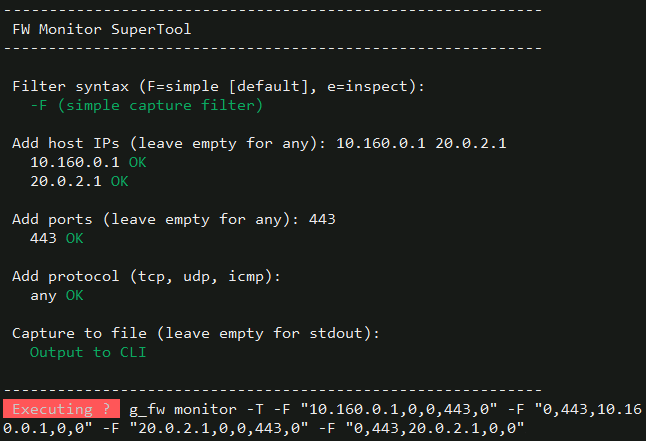
if [[ `$CPDIR/bin/cpprod_util FwIsFirewallModule 2>/dev/null` != *'1'* ]] && [[ `$CPDIR/bin/cpprod_util FwIsVSX 2>/dev/null` != *'1'* ]];then echo;tput bold;echo ' Not a firewall gateway!';tput sgr0;echo;else [[ -e /etc/profile.d/vsenv.sh ]] && source /etc/profile.d/vsenv.sh;echo;printf '%.s-' {1..60};echo;echo ' FW Monitor SuperTool';printf '%.s-' {1..60};echo;echo;tput bold;echo -n ' Filter syntax ';tput sgr0;echo -n '(F=simple [default], e=inspect): ';read m;case $m in e|E) m='e';;*) m='F';;esac;echo -n ' ';tput setaf 2;if [[ $m == 'e' ]];then echo '-e (inspect code)';else echo '-F (simple capture filter)';fi;tput sgr0;echo;v='';q='1';if [[ `$CPDIR/bin/cpprod_util FwIsVSX 2>/dev/null` == *'1'* ]];then tput bold;echo ' Available Virtual Systems';tput sgr0;vl=`vsx stat -l 2>/dev/null|awk -F: '/VSID:/{i=$2;gsub(" ","",i)}/Type:/{t=$2;sub(/^ */,"",t);sub(/ *$/,"",t)}/Name:/{n=$2;sub(/^ */,"",n);sub(/ *$/,"",n);if(i!="")printf "%s\t%s (%s)\n",i,n,t;i=""}'`;if [[ -z $vl ]];then tput setaf 1;echo ' No Virtual Systems found via vsx stat -l';tput sgr0;vi='';else echo "$vl"|while IFS=$'\t' read i d;do printf ' %3s %s\n' "$i" "$d";done;vi=`echo "$vl"|cut -f1|tr '\n' ' '`;fi;echo;tput bold;echo -n ' Select VSID ';tput sgr0;dv="${INSTANCE_VSID:-0}";echo -n "(default: $dv): ";read v;[[ -z $v ]] && v="$dv";if [[ $v != *[^0-9]* ]] && [[ -n $v ]] && { [[ $v == '0' ]] || [[ " $vi " == *" $v "* ]];};then echo -n ' VSID '$v' ';tput setaf 2;echo 'OK';tput sgr0;else echo -n ' VSID '$v' ';tput setaf 1;echo 'not found - aborting';tput sgr0;q='0';fi;echo;fi;if [[ $q == '1' ]];then tput bold;echo -n ' Add host IPs ';tput sgr0;echo -n '(leave empty for any): ';read _h;H=();case $_h in '') echo -n ' any ';tput setaf 2;echo 'OK';tput sgr0;;*) for a in $(echo $_h | tr ',;:|()#<>' ' ' | tr -s ' ');do if [[ `ipcalc -ms $a 2>/dev/null` == *'='* ]] && [[ $a == *'.'* ]];then H+=("$a");echo -n ' '$a' ';tput setaf 2;echo 'OK';tput sgr0;else echo -n ' '$a' ';tput setaf 1;echo 'Bad syntax!';tput sgr0;fi;done;if [[ ${#H[@]} -eq 0 ]];then tput setaf 1;echo ' No valid hosts - aborting';tput sgr0;q='0';fi;;esac;echo;fi;if [[ $q == '1' ]];then tput bold;echo -n ' Add ports ';tput sgr0;echo -n '(leave empty for any): ';read _p;P=();case $_p in '') echo -n ' any ';tput setaf 2;echo 'OK';tput sgr0;;*) for a in $(echo $_p | tr ',;:|()#<>' ' ' | tr -s ' ');do if [[ $a != *[^0-9]* ]] && [[ -n $a ]] && [[ $a -ge 0 ]] && [[ $a -le 65535 ]];then P+=("$a");echo -n ' '$a' ';tput setaf 2;echo 'OK';tput sgr0;else echo -n ' '$a' ';tput setaf 1;echo 'Bad syntax!';tput sgr0;fi;done;if [[ ${#P[@]} -eq 0 ]];then tput setaf 1;echo ' No valid ports - aborting';tput sgr0;q='0';fi;;esac;echo;fi;if [[ $q == '1' ]];then tput bold;echo -n ' Add protocol ';tput sgr0;echo -n '(tcp, udp, icmp): ';read _r;R=();case $_r in '') echo -n ' any ';tput setaf 2;echo 'OK';tput sgr0;;*) for a in $(echo $_r | tr ',;:|()#<>' ' ' | tr -s ' ');do case $a in tcp|TCP) R+=(6);echo -n ' '$a' ';tput setaf 2;echo 'OK';tput sgr0;;udp|UDP) R+=(17);echo -n ' '$a' ';tput setaf 2;echo 'OK';tput sgr0;;icmp|ICMP) R+=(1);echo -n ' '$a' ';tput setaf 2;echo 'OK';tput sgr0;;*) echo -n ' '$a' ';tput setaf 1;echo 'Unknown protocol!';tput sgr0;;esac;done;;esac;echo;fi;if [[ $q == '1' ]];then tput bold;echo -n ' Capture to file ';tput sgr0;read -p '(leave empty for stdout): ' _f;if [[ -n $_f ]];then if [[ $_f =~ ^[A-Za-z0-9._-]+$ ]];then tput setaf 2;echo -n ' Saving output to: ';tput sgr0;echo "/var/log/$_f";else tput setaf 1;echo " Bad filename '$_f' - using stdout instead";tput sgr0;_f='';fi;else tput setaf 2;echo ' Output to CLI';tput sgr0;fi;echo;printf '%.s-' {1..60};echo;fi;F='';if [[ $q == '1' && $m == 'F' ]];then T=();ph=("${H[@]}");[[ ${#ph[@]} -eq 0 ]] && ph=(NONE);pp=("${P[@]}");[[ ${#pp[@]} -eq 0 ]] && pp=(NONE);pr=("${R[@]}");[[ ${#pr[@]} -eq 0 ]] && pr=(0);for r in "${pr[@]}";do for h in "${ph[@]}";do for p in "${pp[@]}";do sh='0';dp='0';[[ $h != NONE ]] && sh="$h";[[ $p != NONE ]] && dp="$p";T+=("$sh,0,0,$dp,$r");sp2='0';dh2='0';[[ $h != NONE ]] && dh2="$h";[[ $p != NONE ]] && sp2="$p";T+=("0,$sp2,$dh2,0,$r");done;done;done;T=(`for x in "${T[@]}"; do echo "$x"; done | awk '!s[$0]++'`);if [[ ${#T[@]} -gt 5 ]];then tput setaf 1;tput bold;echo;echo " -F supports at most 5 filters. Your inputs would generate ${#T[@]}.";tput sgr0;echo " The -F syntax has no AND/NOT and OR's its filters, so each input";echo ' typically costs 2 slots (one per direction).';echo;tput bold;echo -n ' Switch to -e instead? ';tput sgr0;echo -n '(y/N): ';read s;case $s in y|Y|yes|YES) m='e';tput setaf 2;echo ' Switching to -e mode';tput sgr0;;*) tput setaf 1;echo ' Aborting';tput sgr0;q='0';;esac;else for x in "${T[@]}";do F+=" -F \"$x\"";done;fi;fi;if [[ $q == '1' && $m == 'e' ]];then C=();if [[ ${#H[@]} -ge 1 ]];then e='';for x in "${H[@]}";do [[ -n $e ]] && e+=' or ';e+="host($x)";done;[[ ${#H[@]} -gt 1 ]] && e="($e)";C+=("$e");fi;if [[ ${#P[@]} -ge 1 ]];then e='';for x in "${P[@]}";do [[ -n $e ]] && e+=' or ';e+="port($x)";done;[[ ${#P[@]} -gt 1 ]] && e="($e)";C+=("$e");fi;if [[ ${#R[@]} -ge 1 ]];then e='';for x in "${R[@]}";do [[ -n $e ]] && e+=' or ';e+="ip_p=$x";done;[[ ${#R[@]} -gt 1 ]] && e="($e)";C+=("$e");fi;b='';for x in "${C[@]}";do [[ -n $b ]] && b+=' and ';b+="$x";done;if [[ -z $b ]];then F=' -e "accept;"';else F=" -e \"$b, accept;\"";fi;fi;if [[ $q == '1' ]];then _run='fw monitor';command -v g_fw >/dev/null 2>&1 && _run='g_fw monitor';[[ -z $_f ]] && _run+=' -T';_run+="$F";[[ -n $_f ]] && _run+=" -o /var/log/$_f";[[ -n $v ]] && _run="vsenv $v; $_run";tput setab 1;tput setaf 7;tput bold;echo -n ' Executing ? ';tput sgr0;echo -n ' ';tput bold;echo -n "$_run";tput sgr0;read -sn1;echo;case $REPLY in '') eval "$_run";;*) echo 'Abort!';;esac;echo;fi;unset m v q vl vi dv H P R T F C ph pp pr _h _p _r _f _run a b c d e h i n p r s t x sh dh dh2 dp sp2;fiSuperTool interactively asks for all data to build up the correct syntax to run fw monitor.
FW Monitor developers: @Coby_Schmidt (LinkedIn)
FW Monitor documentation: @Uri_Lewitus (LinkedIn)
FW Monitor memory usage: sk160954
📕 Referenced in the book: Max Power Firewalls
▶️ Featured in How to use fw monitor
🎓 Supports g_fw monitor on Scalable Platforms
👍 Also available for tcpdump
One-liner (Bash) to assist running fw monitor on Check Point security gateways.
In expert mode run:
if [[ `$CPDIR/bin/cpprod_util FwIsFirewallModule 2>/dev/null` != *'1'* ]] && [[ `$CPDIR/bin/cpprod_util FwIsVSX 2>/dev/null` != *'1'* ]];then echo;tput bold;echo ' Not a firewall gateway!';tput sgr0;echo;else [[ -e /etc
Thank you Tim. I did purchase your Max Capture series last week Friday and started it yesterday. So far it is great material! I look forward to the rest, especially the fw monitor section.


This is an awesome tool to make trouble shooting a little easier. I added the last "fi;" then ran the script and got the following error. I admit I am running this in an old R77.20.87 (990173120) CP-730 device.
bash: tput: command not found
Add host IPs bash: tput: command not found
(leave empty for any):
I ran the script using the defaults and it did run with the error. Is this a shell issue?
Otherwise a great tool Thanks for taking the time to put this code together.
This is an awesome tool to make trouble shooting a little easier. I added the last "fi;" then ran the script and got the following error. I admit I am running this in an old R77.20.87 (990173120) CP-730 device.
bash: tput: command not found
Add host IPs bash: tput: command not found
(leave empty for any):
I ran the script using the defaults and it did run with the error. Is this a shell issue?
Otherwise a great tool Thanks for taking the time to put this code together.
;
This tool wasn't built for SMB appliances that run on Gaia Embedded OS.tput and several other commands / parameters used by this one-liner are only available on standard Gaia.
This is awwwwwweeeeesommmmeeee Danny thank you very much. I am new to checkpoint and this is helping me a whole lot in troubleshooting.
I am sorry, but it is not working on my side , either at R81.10 not R80.20.25 (SMBs) :
------------------------------------------------------------
FW Monitor SuperTool
------------------------------------------------------------
Add host IPs (leave empty for any): 8.8.8.8
8.8.8.8 OK
Add ports (leave empty for any): 53
53 OK
Add protocol (tcp, udp, icmp):
any OK
Capture to file (leave empty for stdout):
Output to CLI
------------------------------------------------------------
Executing ? fw monitor -T -F "0,0,0,0,0"
Ctrl-C...
Expert@HDHI220B1FW01:0]#
I am sorry, but it is not working on my side , either at R81.10 not R80.20.25 (SMBs) :
------------------------------------------------------------
FW Monitor SuperTool
------------------------------------------------------------
Add host IPs (leave empty for any): 8.8.8.8
8.8.8.8 OK
Add ports (leave empty for any): 53
53 OK
Add protocol (tcp, udp, icmp):
any OK
Capture to file (leave empty for stdout):
Output to CLI
------------------------------------------------------------
Execut
hi
not work for me (cloudguard GW R81.10 and appliance R81.10).
the output i get is:
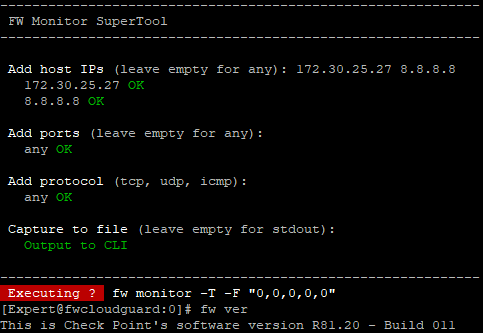
Add host IPs (leave empty for any): 172.30.25.27 8.8.8.8
172.30.25.27 OK
8.8.8.8 OK
Add ports (leave empty for any):
any OK
Add protocol (tcp, udp, icmp):
any OK
Capture to file (leave empty for stdout): test.out
Saving output to: test.out
------------------------------------------------------------
Executing ? [Expert@XXXXXXXX]#
hi
not work for me (cloudguard GW R81.10 and appliance R81.10).
the output i get is:
Add host IPs (leave empty for any): 172.30.25.27 8.8.8.8
172.30.25.27 OK
8.8.8.8 OK
Add ports (leave empty for any):
any OK
Add protocol (tcp, udp, icmp):
any OK
Capture to file (leave empty for stdout): test.out
Saving output to: test.out
------------------------------------------------------------
Executing ? [Expert@XXXXXXXX]#
@dotank2 : Tested on CloudGuard R81.20 and it works as intended:
-F simple syntax is not supported yet.
Let me know if this is a critical requirement for you.

About CheckMates
Learn Check Point
Advanced Learning

WE SECURE YOUR AI TRANSFORMATION