


- Products
- Learn
- Local User Groups
- Partners
- More

What’s New in Agentic Network Orchestration
21 October @ 5pm CET / 11am EDT
AI Security Masters
LGTM: Bypassing an LLM Build Gate
When Prompt Injection Fails
Scaling Check Point Automation with Arodonata
CheckMates Go:
Fun Ding


asy Backup Tool
| Features |
|---|
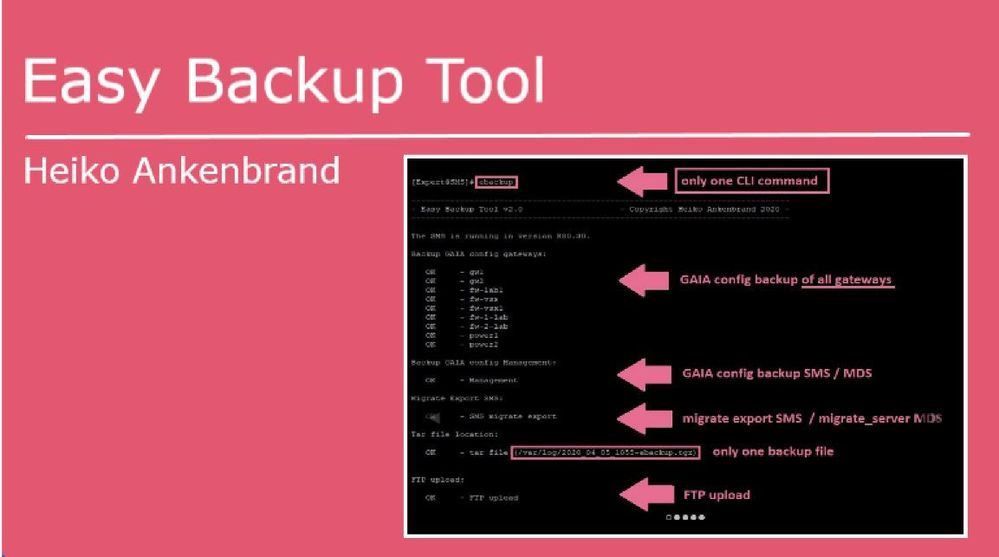
This tool creates a backup of all GAIA gateway configurations with one CLI command "ebackup":
- Only one CLI command "ebackup"
- Backup of all Gaia gateway configurations (Check Point appliances, Open Server, SMB appliances 11xx, 14xx)
- Migrate export on SMS
- Migrate-server on MDS
- Backup all files to one TGZ file
- FTP upload support backup file
- CP upload support for backup file via cprid_util
- MDS > All CMA's are read out and their gateways backuped.
- SMS > All gateways are read out and backuped.
Note:
- Tested with R80.10, R80.20 and R80.30.
- If the tool is started on a MDS, a mdsstop and mdsstart is performed during the migrate_server export.
| CLI Parameter |
|---|
| Syntax | Description |
| -s |
The option -s performs a cpstop and cpstart when the migrate export tool is executed. |
| -v |
The option -v shows the gateway OS, JHF, Kernel, Type of all gateways. |
| -l | The option -l shows all ebackup tgz files in /var/log/. |
| -d | The option -d delete all ebackup tgz files in /var/log/. |
| -no_migrate / -n | The option -no_migrate has the consequence that no migrate export is executed. |
| -port <sms port> / -p <sms port> |
The option -port <sms port> add the management server port, if it's not running on port 443. |
| -ftpserver <ftp server ip> -ftpuser <username> -ftppw <password> |
The ftp options allow to upload the tar file to a ftp server. |
| - cpupload <cp_system_ip> |
The option -cpupload performs a backup upload to a other Check Point gateway or SMS via cprid_util. |
| Example |
|---|
# ebackup -> Backup all GAIA configs from all gateways + migrate export with locale backup file (/var/log/[date]_ebackup.tgz)
# ebackup -s -> Backup all GAIA configs from all gateway + migrate export with cpstop and cpstart for migrate export
# ebackup -no_migrate -> Backup all GAIA configs from all gateway without migrate export
# ebackup -ftpserver 1.1.1.1 -ftpuser username -ftppw test123 -> Backup all GAIA configs from all gateway + migrate export with ftp upload
# ebackup -cpupload 1.1.1.1 -> Backup all GAIA configs from all gateway + migrate export with cp upload via cprid_util
|
Install Tool |
|---|
Use this auto installer script from "Spoiler" on the SMS or MDS as CLI command in expert mode:
curl_cli -k http://www.ankenbrand24.de/inst_ebackup > /tmp/inst_ebackup && chmod 770 /tmp/inst_ebackup && /tmp/inst_ebackupOr "copy and past" the following script block from "Spoiler" to your SMS or MDS (in expert mode):
cat <<EOT > /usr/bin/ebackup
#!/bin/bash
#
# Script Author  : Heiko Ankenbrand
# Script Website : https://www.ankenbrand24.de
# Script Source  : https://www.ankenbrand24.de/inst_ebackup
# License        : GNU General Public License (GPL)
#
if [[ -e /etc/profile.d/CP.sh ]]; then source /etc/profile.d/CP.sh; else echo "Unsupported Environment"; exit 1; fi
if [[ -e /etc/profile.d/vsenv.sh ]]; then source /etc/profile.d/vsenv.sh; fi
FILE_PATH="/var/log/ebackup";
mkdir \$FILE_PATH > /dev/null 2>&1;
rm /tmp/ebackup_topo > /dev/null 2>&1;
rm /tmp/ebackup_MGTIP > /dev/null 2>&1;
# rm /usr/local/bin/ebackup > /dev/null 2>&1;
rm /tmp/ebackup_mdsstatus > /dev/null 2>&1;
rm /tmp/ebackup_login > /dev/null 2>&1;
rm /tmp/ebachup_cpupload /dev/null 2>&1;
REMOTE_RM="\$FILE_PATH/202*";
rm \$REMOTE_RM > /dev/null 2>&1;
NOW=\$(date +"%Y_%m_%d_%H%M");
clear;
echo -e "\e[7m";
printf '%.s-' {1..78};echo;
echo '- Easy Backup Tool v3.0                    - Copyright Heiko Ankenbrand 2023 -';
printf '%.s-' {1..78};
echo -e "\e[0m"
SHOW_SUM="0";
MIGRATE="1";
MGPORT="443";
FTPSERVER="";
FTPPW="non";
FTPUSER="anonymous";
serv_value="99";
REMOTE_INFO_V="0";
RVER=`fwm ver | awk '{print \$8}'`;

mSITIONAL=()
while [[ \$# -gt 0 ]]
do
key="\$1"
case \$key in
    -h|--help|-\?)
       shift;
       echo;echo 'Help: ';echo;
       echo "-l, --list                 The option -l  shows all ebackup tgz files in /var/log/.";
       echo "-d, --delete               The option -d  delete all ebackup tgz files in /var/log/.";
       echo "-s, --stop                 The option -s  performs a cpstop and cpstart when the migrate export tool is executed.";
       echo "-n, --no_migrate           The option -n  has the consequence that no migrate export/ migrate_server is executed.";
       echo "-v, --version              The option -v  shows the gateway OS, JHF, Kernel, Type";
       echo "-u, --user                 The option -u  shows the conneted users on the SMS";
       echo "-p <port>, -port <port>    The option -p  <port> add the management server port, if it's not running on port 443.";
       echo "-ftpserver <ftp server ip> The ftp options allow to upload the tar file to a ftp server.";
       echo "-ftpuser <username> ";
       echo "-ftppw <password>";
       echo "-cpupload <cp system ip>   The option -cpupload performs a backup upload to a other Check Point gateway or SMS via cprid_util.";
       echo "";
       echo "Examples:";
       echo "ebackup -s -ftpserver 192.168.1.1 -ftpuser test -ftppw secret -> backup all gateways + migrate export + cpstop + ftp upload";
       echo "ebackup -s -cpupload  192.168.1.1                             -> backup all gateways + migrate export + cpstop+ ";
       echo "                                                                 backup of the tgz file to another gateway or SMS";
       echo "ebackup -n                                                    -> backup all gateways + without migrate export";
       echo;printf '%.s-' {1..78};echo;
       SHOW_SUM="0";
       exit 1;
    ;;
    -s|--stop)
       shift;
       SHOW_SUM="1";
    ;;
    -v|--version)
       shift;
       SHOW_SUM="1";
       REMOTE_INFO_V="1";
    ;;
    -u|--user)
       shift;
       SHOW_SUM="1";
       echo; cpstat mg |grep -e '|\|-' | cat; echo;
       exit 1;
    ;;
    -d|--delete)
       shift;
       SHOW_SUM="1";
       echo; echo "Delete all ebackup tgz files.";echo;
       rm /var/log/202* > /dev/null 2>&1;
       exit 1;
    ;;
    -l|--list)
       shift;
       SHOW_SUM="1";
       echo;echo -e "File \t\t\t\t\tBytes";
       printf '%.s-' {1..78};
       echo; ls -la /var/log/202* 2>&1| grep -v access|  awk '{print \$9 "\t\t" \$5}' |sed 's/\/var\/log\///'; echo;
       exit 1;
    ;;
    -port|-p)
       MGPORT="\$2";
       shift;
       shift;
       SHOW_SUM="0";
    ;;
    -ftpserver)
       FTPSERVER="\$2";
       shift;
       shift;
       SHOW_SUM="0";
    ;;
    -ftpuser)
       FTPUSER="\$2";
       shift;
       shift;
       SHOW_SUM="0";
    ;;
    -ftppw)
       FTPPW="\$2";
       shift;
       shift;
       SHOW_SUM="0";
    ;;
     -cpupload)
       CPUPLOAD="\$2";
       shift;
       shift;
       SHOW_SUM="0";
    ;;
    --no_migrate|-no_migrate|-n)
       shift;
       SHOW_SUM="0";
       MIGRATE="0";
    ;;

    *)    # unknown option
    #echo "unknown"
    POSITIONAL+=("\$1") # save it in an array for later
    shift # past argument
    SHOW_SUM="1";
    ;;
esac
done

############ Check MDS and SMS     #########
echo;

if [ "X\$MDSDIR" != "X" ]; then
     MDSSTATUS_HA=\$(mdsstat | grep -m 1 MDS | awk '{print \$8}');
     if [ \$MDSSTATUS_HA = "up"  ]; then
           mgmt_cli -r --port \$MGPORT true show version 2>&1> /tmp/ebackup_login;
           if grep -q Gaia /tmp/ebackup_login; then
               echo -n "The MDS is running in version "\$RVER;echo ".";echo;
               serv_value="1";
           else
               echo "The MDS is running but a connect to management API isn't possible.";echo;
               exit 1;
           fi
     else
         echo -n "MDS is not running. (Status > "\$MDSSTATUS_HA;echo ")";echo;
         exit 1;
     fi
else
     #Check SMS
     CPM_PID=\$(ps -efww | grep java | grep cpm.Cpm | awk '{print \$2}');
     if [ -z \$CPM_PID ]; then
           echo "The SMS is not running.";echo;
     exit 1;
     else
           mgmt_cli -r --port \$MGPORT true show version 2>&1> /tmp/ebackup_login;
           if grep -q Gaia /tmp/ebackup_login; then
               echo -n "The SMS is running in version "\$RVER;echo ".";echo;
               serv_value="0";
           else
               echo "The SMS is running but a connect to management API isn't possible.";echo;
               exit 1;
           fi
     fi
fi
if [ \$serv_value -eq 1  ]; then
   mdsenv > /dev/null 2>&1;
   mdsstat | grep CMA | awk '{print \$6}' >> /tmp/ebackup_MGTIP
   mdsstat | grep MDS | awk '{print \$6}' >> /tmp/ebackup_MDSIP
fi
############ Read gateways     #########
if  [ \$serv_value -gt 0  ]; then
       echo "Read gateways from CMA: ";echo;
       while read -r hostip;
       do
           CMASTATUS_HA=\$(mdsstat | grep CMA| grep \$hostip | awk '{print \$8}');
           CMANAME_HA=\$(mdsstat | grep CMA| grep \$hostip | awk '{print \$4}');
           if [ \$CMASTATUS_HA = "up"  ]; then
               echo "   OK     - "\$CMANAME_HA;
               CMACOUNT=\$(mgmt_cli -r --port \$MGPORT true -d \$hostip show gateways-and-servers offset 0 limit 500 details-level full --format json | \$CPDIR/jq/jq -r '.objects[] | select(.type | contains("Member","simple-gateway")) | ."ipv4-address",."name"  ' |xargs -n 2| grep -c ".");
               if [ \$CMACOUNT != 0 ]; then
                     mgmt_cli -r --port \$MGPORT true -d \$hostip show gateways-and-servers offset 0 limit 500 details-level full --format json | \$CPDIR/jq/jq -r '.objects[] | select(.type | contains("Member","simple-gateway","CpmiClusterMember", "cluster-member")) | ."ipv4-address",."name"  ' |xargs -n 2 | grep -v 0.0.0.  | sed -e "s/\$/ \$hostip/"  >> /tmp/ebackup_topo;
               fi
           else
               echo " Failed   - "\$CMANAME_HA;
           fi
       done < /tmp/ebackup_MGTIP
       echo;
else
     # read SMS gateways
     mgmt_cli -r --port \$MGPORT true show gateways-and-servers details-level full limit 500 offset 0 --format json | \$CPDIR/jq/jq -r '.objects[] | select(.type | contains("Member","simple-gateway","CpmiClusterMember", "cluster-member")) | ."ipv4-address",."name"  ' |xargs -n 2 | grep -v 0.0.0. |grep -v null | sed -e "s/\$/ x.x.x.x/" 2>&1> /tmp/ebackup_topo;
fi
######## GAIA Config save all gateways   #########
if [ ! -f /tmp/ebackup_topo ]; then
   echo "No gateways found!";
else
   echo "clish -c 'show configuration' > /var/log/g_output.txt" > /tmp/g_command.txt;
   echo "Backup GAIA config gateways:";echo;
   while read -r REMOTE_IP REMOTE_NAME REMOTE_CMA;
     do
     REMOTE_FILE="\$NOW-\$REMOTE_NAME";
     REMOTE_DATEI="\$FILE_PATH/\$REMOTE_FILE";
     mdsenv \$REMOTE_CMA > /dev/null 2>&1;
     $CPDIR/bin/cprid_util -server \$REMOTE_IP putfile -local_file /tmp/g_command.txt -remote_file /var/log/g_command.txt > /dev/null 2>&1;
     $CPDIR/bin/cprid_util -server \$REMOTE_IP -verbose rexec -rcmd /bin/bash -f /var/log/g_command.txt > /dev/null 2>&1;
     $CPDIR/bin/cprid_util -server \$REMOTE_IP getfile -remote_file /var/log/g_output.txt -local_file \$REMOTE_DATEI > /dev/null 2>&1;
     #echo -n "";
     if [ ! -f \$REMOTE_DATEI ]; then
       echo -n " Failed   - ";
       else
       if grep -q hostname \$REMOTE_DATEI; then
          echo -n "   OK     - ";
          if [ \$REMOTE_INFO_V == "1" ] ; then
            $CPDIR/bin/cprid_util -server \$REMOTE_IP putfile -local_file /usr/bin/ebackup_command -remote_file /var/log/ebackup_command.txt > /dev/null 2>&1;
            $CPDIR/bin/cprid_util -server \$REMOTE_IP -verbose rexec -rcmd /bin/bash -f /var/log/ebackup_command.txt > /dev/null 2>&1;
            $CPDIR/bin/cprid_util -server \$REMOTE_IP getfile -remote_file /var/log/g_output1.txt -local_file /tmp/ebackup_gateway_info.txt > /dev/null 2>&1;
          fi
       else
          echo -n " Failed   - ";
       fi
     fi
     echo -n \$REMOTE_NAME;
     echo -n "   ";
     if [ \$REMOTE_INFO_V == "1" ] ; then
        if [ -f /tmp/ebackup_gateway_info.txt ]; then
           REMOTE_INFO=\$(cat /tmp/ebackup_gateway_info.txt);
           echo; echo -n "           " \$REMOTE_INFO;
           rm /tmp/ebackup_gateway_info.txt;
           else
           echo; echo -n "            (no gateway information available)";
        fi
     fi
     if [ \$serv_value -eq 1  ]; then
        CMANAME_HA=\$(mdsstat | grep \$REMOTE_CMA | awk '{print \$4}');
        echo;    echo -n "            (CMA: "\$CMANAME_HA;echo -n ")";
     fi
     echo;
    done < /tmp/ebackup_topo;
fi
echo;
######## GAIA config management save     #########
echo "Backup GAIA config Management:";echo;
REMOTE_FILE="\$NOW-Management";
REMOTE_DATEI="\$FILE_PATH/\$REMOTE_FILE";
clish -c 'show configuration' > \$REMOTE_DATEI;
     if [ ! -f \$REMOTE_DATEI ]; then
       echo -n "  Failed - ";
       else
       if grep -q hostname \$REMOTE_DATEI; then
          echo -n "   OK     - ";
       else
          echo -n " Failed   - "
       fi
     fi
     echo -n "Management   ";
     /usr/bin/ebackup_command;
     if [ \$REMOTE_INFO_V == "1" ] ; then
        if [ -f /var/log/g_output1.txt ]; then
           REMOTE_INFO=\$(cat /var/log/g_output1.txt);
           echo; echo -n "           " \$REMOTE_INFO;
           rm /var/log/g_output1.txt;
        fi
     fi
     echo;echo;

############## SMS ############################
# SMS migrate export
if [ \$serv_value -eq 0  ]; then
  if [ \$MIGRATE == "1" ] ; then
    REMOTE_FILE="\$NOW-SMS-Migrate-Export";
    REMOTE_DATEI="\$FILE_PATH/\$REMOTE_FILE";
    echo;echo "Migrate Export SMS:";echo;
    if [ \$SHOW_SUM == "1" ] ;
      then
        cpstop > /dev/null 2>&1;
        echo "   OK     - cpstop";
    fi
    REMOTE_DATEI_CHK="\$REMOTE_DATEI.tgz";

    $FWDIR/bin/upgrade_tools/migrate export -n \$REMOTE_DATEI 2>&1> \tmp\ebackup_migrate ;
       if [ ! -f \$REMOTE_DATEI_CHK ]; then
           echo " Failed   - SMS migrate export";
       else
           echo "   OK     - SMS migrate export";
       fi

    if [ \$SHOW_SUM == "1" ] ;
      then
        cpstart > /dev/null 2>&1;
        echo "   OK     - cpstart";
    fi
  fi
fi
############## MDS ############################
if [ \$MIGRATE == "1" ] ; then
 if  [ \$serv_value -gt 0  ]; then
   VER=`fwm ver | awk '{print \$8}' | sed 's/R80.//g'`
   if [ \$VER -lt 30  ]; then
        ### MDS version R80, R80.10, R80.20 migrate export
        REMOTE_FILE="\$NOW-MDS-Migrate-Export";
        REMOTE_DATEI="\$FILE_PATH/\$REMOTE_FILE";
        mds/tmp/ebackup_migrateenv > /dev/null 2>&1
        echo -n "MDS migrate export (migrate export) "\$RVER;echo ":";echo;
        if [ \$SHOW_SUM == "1" ] ;then
           mdsstop > /dev/null 2>&1;
           echo "   OK     - MDS mdsstop";
        fi
        \$MDS_FWDIR/bin/upgrade_tools/migrate export -n \$REMOTE_DATEI 2>&1> /tmp/ebackup_migrate ;
        if [ ! -f \$REMOTE_DATEI_CHK ]; then
           echo " Failed   - MDS R80, R80.10, R80.20 (migrate export)";
        else
           echo "   OK     - MDS R80, R80.10, R80.20 (migrate export)";
        fi
        if [ \$SHOW_SUM == "1" ] ;then
           mdsstart > /dev/null 2>&1;
           echo "   OK     - MDS mdsstart";
        fi
   else
        ### MDS version R80.30+ migrate_server
        REMOTE_FILE="\$NOW-MDS-Migrate-Server";
        REMOTE_DATEI="\$FILE_PATH/\$REMOTE_FILE";
        mdsenv > /dev/null 2>&1;
        echo;echo -n "MDS migrate server (migrate_server) "\$RVER;echo ":";echo;
        \$MDS_FWDIR/scripts/migrate_server export -skip_upgrade_tools_check -n -v \$RVER \$REMOTE_DATEI 2>&1> /tmp/ebackup_migrate ;

            if grep -q "sk135172" /tmp/ebackup_migrate; then
                echo " Failed   - MDS R80.30+ migrate_server export (No upgrade tools package is installed refer to sk135172)";
            else
                if [ ! -f \$REMOTE_DATEI ]; then
                    echo " Failed   - MDS R80.30+ migrate_server export";
                else
                    echo "   OK     - MDS R80.30+ migrate_server export";
                fi
            fi
   fi
 fi
fi
############## TAR ############################
echo;echo "Tar file location:";echo;
REMOTE_FILE="\$NOW-ebackup";
REMOTE_DATEI="/var/log/\$REMOTE_FILE.tgz";
REMOTE_TAR="\$FILE_PATH";
# echo \$REMOTE_TAR
# echo \$REMOTE_DATEI

tar -czf \$REMOTE_DATEI \$REMOTE_TAR> /dev/null 2>&1;

     if [ ! -f \$REMOTE_DATEI ]; then
            echo " Failed   - tar file";
       else
          echo -n "   OK     - tar file (" ;
          echo -n \$REMOTE_DATEI;
          echo ")";
     fi
echo;
############## FTP ############################
if [ "X\$FTPSERVER" != "X" ]; then

   FTPDATEI="\$REMOTE_FILE.tgz";
   echo;echo "FTP upload:";echo;
   echo "
   verbose
   user \$FTPUSER \$FTPPW
   bin
   lcd /var/log
   put \$FTPDATEI
   bye
   " | /usr/bin/ftp -in \$FTPSERVER > /tmp/ebackup_ftp 2>&1;
   if grep -q 226 /tmp/ebackup_ftp; then
       echo "   OK     - FTP upload";
   else
       echo " Failed   - FTP upload (Log: /tmp/ebackup_ftp)";
   fi
   echo;
fi

############## CPUPLOAD ############################
if [ "X\$CPUPLOAD" != "X" ]; then


     #REMOTE_FILE="\$NOW-\$REMOTE_NAME";
     #REMOTE_DATEI1="\$FILE_PATH/\$REMOTE_FILE";
     CPUPLOADDATEI="\$REMOTE_DATEI";
     echo "CP upload to \$CPUPLOAD:";echo;
     echo "ls \$CPUPLOADDATEI > /var/log/g_output.txt" > /tmp/g_command.txt;
     $CPDIR/bin/cprid_util -server \$CPUPLOAD putfile -local_file /tmp/g_command.txt -remote_file /var/log/g_command.txt > /dev/null 2>&1;
     $CPDIR/bin/cprid_util -server \$CPUPLOAD putfile -local_file \$CPUPLOADDATEI -remote_file \$CPUPLOADDATEI  > /dev/null 2>&1;
     $CPDIR/bin/cprid_util -server \$CPUPLOAD -verbose rexec -rcmd /bin/bash -f /var/log/g_command.txt > /dev/null 2>&1;
     $CPDIR/bin/cprid_util -server \$CPUPLOAD getfile -remote_file /var/log/g_output.txt -local_file /tmp/ebachup_cpupload > /dev/null 2>&1;
     if [ ! -f /tmp/ebachup_cpupload ]; then
       echo " Failed   - CP upload to \$CPUPLOAD ";
       else
       if grep -q tgz /tmp/ebachup_cpupload; then
          echo "   OK     - CP upload file (\$CPUPLOADDATEI)";

       else
          echo " Failed   - CP upload to \$CPUPLOAD";
       fi
     fi
     echo;
fi


REMOTE_RM="\$FILE_PATH/202*";
rm \$REMOTE_RM > /dev/null 2>&1;
rm /tmp/g_command.txt > /dev/null 2>&1;
rm /tmp/ebackup_topo > /dev/null 2>&1;
rm /tmp/ebachup_cpupload > /dev/null 2>&1;
rm /tmp/ebackup_MGTIP > /dev/null 2>&1;
rm /tmp/ebackup_migrate > /dev/null 2>&1;
rm /tmp/ebackup_mdsstatus > /dev/null 2>&1;
rm /tmp/ebackup_login > /dev/null 2>&1;
EOT
cat <<EHA > /usr/bin/ebackup_command
#!/bin/bash
J=\`cpinfo -y all 2>/dev/null | grep JUMBO | tail -n1 | awk '{print \$3}'\`;
O=\`cat /etc/cp-release | cut -c 13- | sed 's/^ *//g' | sed 's/\s*$//g'\`;
OSM=\`uname -a | grep -c x86_64\`; [ \$OSM == 0 ] && { OSM=32; } || { OSM=64; };
K=\`uname -r | sed 's/\([0-9]\+\.[0-9]\+\)\..*/\1/'\`;
T=\`cpstat os | grep "Appliance Name" | tr -s ' ' | cut -c 17- \`;
echo "(\${O}, Kernel \${K}, \${OSM} Bit, JHF \${J}, \${T})" > /var/log/g_output1.txt ;
EHA
chmod 770 /usr/bin/ebackup;
chmod 770 /usr/bin/ebackup_command;
|
Create Cronjob |
|---|
If the ebackup tool should be executed automatically, only a cronjob has to be created.
|
More "Easy Tools" |
|---|
- Easy Backup Tool - (migrate export + all GAIA configs) -> Easy backup of all gateway GAIA configs + migrate export with one CLI command.
- Easy execute CLI commands on all gateways simultaneously -> Now you can use the new command to execute bash or clish commands on all gateway simultaneously.
- Easy execute CLI commands from management on gateways -> Easy execute CLI commands from management on gateways
- Mobile User License Tool - replaced "dtps lic" -> It displays all Secure Client, SSL VPN and Mobile Access Portal licenses in total (sum) on the SMS.
- Easy View Tool - (system infos from all gateways simultaneously) -> This toll shows you quickly an overview of status information of all your gateways with only one CLI command.
|
Version |
|---|
0.1 03-15-2020 - oneliner to show backup clish configs
0.6 03-23-2020 - GA version ebackup
0.7 03-25-2020 - add parameter -s for cpstop/cpstart
0.8 03-26-2020 - add parameter -no_migrate (no migrate export)
0.9 03-26-2020 - bug fixed (special thanks to Paul_Gademsky)
1.0 03-27-2020 - bug fixed (SMS and MDS)
1.1 03-30-2020 - add option -port
1.2 03-30-2020 - bug fixed
1.3 03-31-2020 - ftp upload function (-ftpserver, -ftpuser, -ftppw)
2.0 04-04-2020 - MDS support
2.1 04-06-2020 - bug fixed
2.2 04-07-2020 - add option -v
2.3 04-09-2020 - add option -cpupload (upload tgz file to a other Check Point gateway or SMS)
3.0 06-20-2023 - Support for R81.20
3.1 01-28-2026 - Support for R82 + R82.10 + ElasticXL
asy Backup Tool
| Features |
|---|
This tool creates a backup of all GAIA gateway configurations with one CLI command "ebackup":
- Only one CLI command "ebackup"
- Backup of all Gaia gateway configurations (Check Point appliances, Open Server, SMB appliances 11xx, 14xx)
- Migrate export on SMS
- Migrate-server on MDS
- Backup all files to one TGZ file
- FTP upload support backup file
- CP upload support for backup file via cprid_util
- MDS > All CMA's are read out
...;



Thanks for this Script.
With json and jq most often you don't need additional bash commands. So you can replace
mgmt_cli -r true show gateways-and-servers details-level full --format json | $CPDIR/jq/jq -r '.objects[] | select(.type | contains("Member","simple-gateway")) | ."ipv4-address",."name" ' |xargs -n 2 | grep -v 0.0.0. > /tmp/ebackup_topo;with
mgmt_cli -r true show gateways-and-servers details-level full --format json | $CPDIR/jq/jq -r '.objects[] | select(.type | contains("Member","simple-gateway")) | select(."ipv4-address" != "0.0.0.0") | ."ipv4-address"+" "+ ."name"' > /tmp/ebackup_topo;
Bye
Thanks for this Script.
With json and jq most often you don't need additional bash commands. So you can replace
mgmt_cli -r true show gateways-and-servers details-level full --format json | $CPDIR/jq/jq -r '.objects[] | select(.type | contains("Member","simple-gateway")) | ."ipv4-address",."name" ' |xargs -n 2 | grep -v 0.0.0. > /tmp/ebackup_topo;
with
mgmt_cli -r true show gateways-and-servers details-level full --format json | $CPDIR/jq/jq -r '.objects[] | select(.type | co
Hi @Dilian_Chernev,
That was a good point from you. 👍
Now in v1.1 the option -port <sms port> add the management server port, if it's not running on port 443.
Regards
Heiko
Hi @Dilian_Chernev,
That was a good point from you. 👍
Now in v1.1 the option -port <sms port> add the management server port, if it's not running on port 443.
Regards
Heiko
;

 Paul_Gademsky

@Dilian_Chernev @HeikoAnkenbrand
It should be fairly straight forward to do, but I'll leave that to Heiko to incorporate.
When it comes to storing the passwords for the ftp/scp/sftp on a server for a cron job, I tend to stay away from that.
My solution is to use the cprid capabilities to copy the file to a second Mgmt (HA), log server, SmartEvent server, or worse case a gateway, so that it exists in more than one location.
Just my 2 cents.
Paul G.
@Dilian_Chernev @HeikoAnkenbrand
It should be fairly straight forward to do, but I'll leave that to Heiko to incorporate.
When it comes to storing the passwords for the ftp/scp/sftp on a server for a cron job, I tend to stay away from that.
My solution is to use the cprid capabilities to copy the file to a second Mgmt (HA), log server, SmartEvent server, or worse case a gateway, so that it exists in more than one location.
Just my 2 cents.
Paul G.
;
Hi@Dilian_Chernev @Paul_Gademsky,
Check Point upload support for the backup file via cprid_util is added.😀
So you can copy the backup with the option -cpupload directly to another Check Point gateway or SMS/MDS.
Regards
Heiko
Hi@Dilian_Chernev @Paul_Gademsky,
Check Point upload support for the backup file via cprid_util is added.😀
So you can copy the backup with the option -cpupload directly to another Check Point gateway or SMS/MDS.
Regards
Heiko

Thank you for the excellent script!
I have a suggestion to add an option to send the files (export & Gaia-configuration) to a external server/location, via FTP o CIFS.
Hi @Giorgio_Giustoz ,
Now v1.3 with FTP Upload,
# ebackup -ftpserver 1.1.1.1 -ftpuser username -ftppw test123 -> Backup all GAIA configs + migrate export with upload to a ftp server.
Regards
Heiko
Hi @Giorgio_Giustoz ,
Now v1.3 with FTP Upload,
# ebackup -ftpserver 1.1.1.1 -ftpuser username -ftppw test123 -> Backup all GAIA configs + migrate export with upload to a ftp server.
Regards
Heiko
;
Hi @HeikoAnkenbrand,
I have been following this article for the last few days. This is a really good idea that you've developed here. In my opinion the script should be published in a JHF or in the next R80 version.
We use it on several management servers of our customers and it's working great now.
PS: Curl download works fine now.
Many thanks
Armin
Hi @HeikoAnkenbrand,
I have been following this article for the last few days. This is a really good idea that you've developed here. In my opinion the script should be published in a JHF or in the next R80 version.
We use it on several management servers of our customers and it's working great now.
PS: Curl download works fine now.
Many thanks
Armin
Now v1.3 with the following options:
| Syntax | Description |
| -s |
The option -s performs a cpstop and cpstart when the migrate export tool is executed. |
| -no_migrate | The option -no_migrate has the consequence that no migrate export is executed. |
| -port <sms port> |
The option -port <sms port> add the management server port, if it's not running on port 443. |
| -ftpserver <ftp server ip> -ftpuser <username> -ftppw <password> |
The ftp options allow to upload the tar file to a ftp server. |
Now v1.3 with the following options:
| Syntax | Description |
| -s |
The option -s performs a cpstop and cpstart when the migrate export tool is executed. |
| -no_migrate | The option -no_migrate has the consequence that no migrate export is executed. |
| -port <sms port> |
The option -port <sms port> add the management server port, if it's not running on port 443. |

Thank you so much for an awesome tool - this has been a gap in my toolbox for so long. The only issue I have picked up in testing is a spelling mistake in the output file, as per attachment.
Thanks again,
Ruan
Hi @Ruan_Kotze,
THX, I changed that. Is now correct.
Regards
Heiko
 Paul_Gademsky
The 1.4 version I posted has been successfully run against 3 different 1200R appliances at this point. Let me know if you have a different experience.
Paul G.
Hi @Jan_Elbers
The tool supports all SMB applications where no 0.0.0.X IP address is set in the topology.
Regards
Heiko
Hi @Jan_Elbers
The tool supports all SMB applications where no 0.0.0.X IP address is set in the topology.
Regards
Heiko

Hi @Harry_Morgan,
If the ebackup tool should be executed automatically, only a cronjob has to be created.
I described it in the article.
Regards
Heiko
Hi @Harry_Morgan,
If the ebackup tool should be executed automatically, only a cronjob has to be created.
I described it in the article.
Regards
Heiko


Thank you for this script.
One question in case of an Endpoint MGMT: is there also a opportunity to use the function of a migrate export with the syntax "--include-uepm-msi-files"?
That would great
Best regards
Moritz
Hello @HeikoAnkenbrand
now I have a second question:
after adding a test cronjob with ebackup, the topic of the job notification mail includes the users password. Is it possible to hide it?
And Im not sure if it is a typo in the script, because also in the job notification mail, I got an error message:
rm: cannot remove '/tmp/ebachup_cpupload': No such file or directory TERM environment variable not set.
Does this error occur because of "ebachup_cpupload" instead of "ebackup_cpupload". I can find it multiple times in the script.
Best regards
Moritz
Hello @HeikoAnkenbrand
now I have a second question:
after adding a test cronjob with ebackup, the topic of the job notification mail includes the users password. Is it possible to hide it?
And Im not sure if it is a typo in the script, because also in the job notification mail, I got an error message:
rm: cannot remove '/tmp/ebachup_cpupload': No such file or directory TERM environment variable not set.
Does this error occur because of "ebachup_cpupload" instead of "ebackup_cpupload
...;
Much appreciated tool. Works like a charm on a R80.40-SMS, R80.30/R77.30 gateways, and TE appliance environment.
Regards
Mutumak
Much appreciated tool. Works like a charm on a R80.40-SMS, R80.30/R77.30 gateways, and TE appliance environment.
Regards
Mutumak
;


Good day.
Hi. Great work. I am in process of replacing my ancient nightly backup script with ebackup. I would like to see a feature that just does the migrate of the SMS and skips the gateways. In my use case I have 400 appliances that don't really change all the much so I think backing up those once per week makes sense. However the with policy changes, etc. my preference is to use your script to get a migrate done nightly.
Thoughts?
Would this be something others would like to see?
Good day.
Hi. Great work. I am in process of replacing my ancient nightly backup script with ebackup. I would like to see a feature that just does the migrate of the SMS and skips the gateways. In my use case I have 400 appliances that don't really change all the much so I think backing up those once per week makes sense. However the with policy changes, etc. my preference is to use your script to get a migrate done nightly.
Thoughts?
Would this be something others would like t
...;
Hi Heiko,
great tool!
What i am missing in all backup methods/tools, is the backup of certain importand files from the device.
Management:
implied_rules.def
table.def
crypt.def
vpn_route.conf
ipassignment.conf
fwrl.conf
trac_client_1.ttm
vpn_table.def
user.def
HKLM_registry.data
Gateways (not SMB)
masters
fwkern.conf
trac_client_1.ttm
simkern.conf
sim_aff.conf
vpnkern.conf
HKLM_registry.data
/etc/rc.d/rc.local
SmsPhones.lst
dynamic_id_users_info.lst
CPprofile.sh
/opt/postfix/etc/postfix/main.cf
mta_postfix_options.cf
BR,
Bernhard
Hi Heiko,
great tool!
What i am missing in all backup methods/tools, is the backup of certain importand files from the device.
Management:
implied_rules.def
table.def
crypt.def
vpn_route.conf
ipassignment.conf
fwrl.conf
trac_client_1.ttm
vpn_table.def
user.def
HKLM_registry.data
Gateways (not SMB)
masters
fwkern.conf
trac_client_1.ttm
simkern.conf
sim_aff.conf
vpnkern.conf
HKLM_registry.data
/etc/rc.d/rc.local
SmsPhones.lst
dynamic_id_users_info.lst
CPprofile.sh
/opt/postfix/etc/postfix/

About CheckMates
Learn Check Point
Advanced Learning

YOU DESERVE THE BEST SECURITY
