- Products
- Learn
- Local User Groups
- Partners
- More
MVP 2026: Submissions
Are Now Open!
What's New in R82.10?
Watch NowOverlap in Security Validation
Help us to understand your needs better
CheckMates Go:
Maestro Madness
Before testing R80.20.25 on my 1550, i decided to upgrade the factory default image from R80.20.10 (992001365) to R80.20.20 (992001869). Since R80.20.10, we have the command
update default-image from current-image preserve-settings <yes | no> [force <yes | no>]
Explanation in CLI Guide is wrong for this command - force yes gives a immediate reboot, force no lets you decide again as a last step:
The system will now reboot.
During this boot, default image will be updated from current image. Save settings as part of the image: yes
Save license as part of the image: yes
Save SIC as part of the image: yes
Are you sure you want to continue (yes/no) ?
Only if you answer yes, the command will execute after reboot. But system logs show:
# cat /logs/update_default_image.log
2021-Apr-12-21:37:01: /logs directory was full and some files needed to be deleted. See the syslogs in /var/log/messages
2021-Apr-12-21:37:01: Checking for active partitions...
2021-Apr-12-21:37:01: Active Kernel is /dev/mmcblk1p1, active root FS is /dev/mmcblk1p3
2021-Apr-12-21:37:01: Board UID is 00:1C:7F:95:E5:05
2021-Apr-12-21:37:01: Board model is V0
2021-Apr-12-21:37:01: Creating default image from current image - R80_992001869_20_20...
tar: removing leading '/' from member names
98303+0 records in
98303+0 records out
50331136 bytes (48.0MB) copied, 9.420213 seconds, 5.1MB/s
Creating an image with the following sections:
kernel >> /storage/kern_tmp
rootfs >> /storage/rootfs.tgz
dtb >> /dev/mmcblk1p2, hardware type v0
dtb >> /dev/mmcblk1p2, hardware type v1
dtb >> /dev/mmcblk1p2, hardware type v1r
Adding file: /storage/kern_tmp
Size: 50331136, Offset: 928
Adding file: /storage/rootfs.tgz
Size: 139862607, Offset: 50332064
Error: cannot read header from file.
2021-Apr-12-21:39:12: ERROR: Could not create default image from current image - created image corrupted
Anyone seen this before ?
After removing a backup file from /storage/ this command executed successfully,
2021-Apr-14-09:42:43: /logs directory was full and some files needed to be deleted. See the syslogs in /var/log/messages
2021-Apr-14-09:42:43: Checking for active partitions...
2021-Apr-14-09:42:43: Active Kernel is /dev/mmcblk1p1, active root FS is /dev/mmcblk1p3
2021-Apr-14-09:42:43: Board UID is 00:1C:7F:95:E5:05
2021-Apr-14-09:42:43: Board model is V0
2021-Apr-14-09:42:43: Creating default image from current image - R80_992001869_20_20...
tar: removing leading '/' from member names
98303+0 records in
98303+0 records out
50331136 bytes (48.0MB) copied, 9.057451 seconds, 5.3MB/s
Creating an image with the following sections:
kernel >> /storage/kern_tmp
rootfs >> /storage/rootfs.tgz
dtb >> /dev/mmcblk1p2, hardware type v0
dtb >> /dev/mmcblk1p2, hardware type v1
dtb >> /dev/mmcblk1p2, hardware type v1r
Adding file: /storage/kern_tmp
Size: 50331136, Offset: 928
Adding file: /storage/rootfs.tgz
Size: 139865208, Offset: 50332064
Adding file: /dev/mmcblk1p2
Size: 1048576, Offset: 190197272
Adding file: /dev/mmcblk1p2
Size: 1048576, Offset: 191245848
Adding file: /dev/mmcblk1p2
Size: 1048576, Offset: 192294424
Checking image...
Image OK!
Writing image...
Wrote kernel: 50331136 bytes to offset 3584
Wrote rootfs: 139865600 bytes to offset 50334720
Wrote dtb: 1048576 bytes to offset 190200320
Wrote dtb: 1048576 bytes to offset 191248896
Wrote dtb: 1048576 bytes to offset 192297472
Done
2021-Apr-14-09:45:14: Default image updated successfully to R80_992001869_20_20
[Expert@fifteenfifty]# Writing image...
-bash: Writing: command not found
[Expert@fifteenfifty]# Wrote kernel: 50331136 bytes to offset 3584
-bash: Wrote: command not found
[Expert@fifteenfifty]# Wrote rootfs: 139865600 bytes to offset 50334720
-bash: Wrote: command not found
[Expert@fifteenfifty]# Wrote dtb: 1048576 bytes to offset 190200320
-bash: Wrote: command not found
[Expert@fifteenfifty]# Wrote dtb: 1048576 bytes to offset 191248896
-bash: Wrote: command not found
[Expert@fifteenfifty]# Wrote dtb: 1048576 bytes to offset 192297472
-bash: Wrote: command not found
[Expert@fifteenfifty]# Done
-bash: Done: command not found
[Expert@fifteenfifty]# 2021-Apr-14-09:45:14: Default image updated successfully to R80_992001869_20_20
Writing image...
-bash: 2021-Apr-14-09:45:14:: command not found
[Expert@fifteenfifty]# Wrote kernel: 50331136 bytes to offset 3584
-bash: Wrote: command not found
[Expert@fifteenfifty]# Wrote rootfs: 139865600 bytes to offset 50334720
-bash: Wrote: command not found
[Expert@fifteenfifty]# Wrote dtb: 1048576 bytes to offset 190200320
-bash: Wrote: command not found
[Expert@fifteenfifty]# Wrote dtb: 1048576 bytes to offset 191248896
-bash: Wrote: command not found
[Expert@fifteenfifty]# Wrote dtb: 1048576 bytes to offset 192297472
-bash: Wrote: command not found
[Expert@fifteenfifty]# Done
-bash: Done: command not found
[Expert@fifteenfifty]# 2021-Apr-14-09:45:14: Default image updated successfully to R80_992001869_20_20
So now after installing R80.20.25 it looks like this:
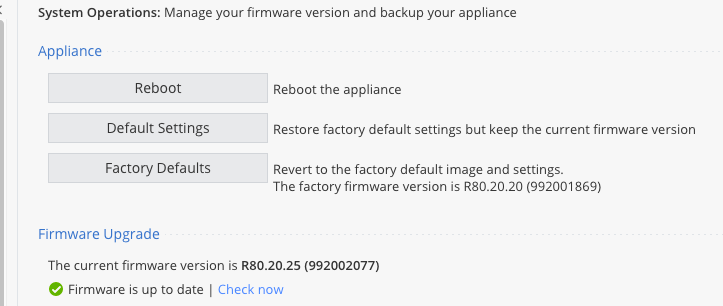
So it was a "no more space" rather than an "image corrupted" issue...
After removing a backup file from /storage/ this command executed successfully,
2021-Apr-14-09:42:43: /logs directory was full and some files needed to be deleted. See the syslogs in /var/log/messages
2021-Apr-14-09:42:43: Checking for active partitions...
2021-Apr-14-09:42:43: Active Kernel is /dev/mmcblk1p1, active root FS is /dev/mmcblk1p3
2021-Apr-14-09:42:43: Board UID is 00:1C:7F:95:E5:05
2021-Apr-14-09:42:43: Board model is V0
2021-Apr-14-09:42:43: Creating default image from current image - R80_992001869_20_20...
tar: removing leading '/' from member names
98303+0 records in
98303+0 records out
50331136 bytes (48.0MB) copied, 9.057451 seconds, 5.3MB/s
Creating an image with the following sections:
kernel >> /storage/kern_tmp
rootfs >> /storage/rootfs.tgz
dtb >> /dev/mmcblk1p2, hardware type v0
dtb >> /dev/mmcblk1p2, hardware type v1
dtb >> /dev/mmcblk1p2, hardware type v1r
Adding file: /storage/kern_tmp
Size: 50331136, Offset: 928
Adding file: /storage/rootfs.tgz
Size: 139865208, Offset: 50332064
Adding file: /dev/mmcblk1p2
Size: 1048576, Offset: 190197272
Adding file: /dev/mmcblk1p2
Size: 1048576, Offset: 191245848
Adding file: /dev/mmcblk1p2
Size: 1048576, Offset: 192294424
Checking image...
Image OK!
Writing image...
Wrote kernel: 50331136 bytes to offset 3584
Wrote rootfs: 139865600 bytes to offset 50334720
Wrote dtb: 1048576 bytes to offset 190200320
Wrote dtb: 1048576 bytes to offset 191248896
Wrote dtb: 1048576 bytes to offset 192297472
Done
2021-Apr-14-09:45:14: Default image updated successfully to R80_992001869_20_20
[Expert@fifteenfifty]# Writing image...
-bash: Writing: command not found
[Expert@fifteenfifty]# Wrote kernel: 50331136 bytes to offset 3584
-bash: Wrote: command not found
[Expert@fifteenfifty]# Wrote rootfs: 139865600 bytes to offset 50334720
-bash: Wrote: command not found
[Expert@fifteenfifty]# Wrote dtb: 1048576 bytes to offset 190200320
-bash: Wrote: command not found
[Expert@fifteenfifty]# Wrote dtb: 1048576 bytes to offset 191248896
-bash: Wrote: command not found
[Expert@fifteenfifty]# Wrote dtb: 1048576 bytes to offset 192297472
-bash: Wrote: command not found
[Expert@fifteenfifty]# Done
-bash: Done: command not found
[Expert@fifteenfifty]# 2021-Apr-14-09:45:14: Default image updated successfully to R80_992001869_20_20
Writing image...
-bash: 2021-Apr-14-09:45:14:: command not found
[Expert@fifteenfifty]# Wrote kernel: 50331136 bytes to offset 3584
-bash: Wrote: command not found
[Expert@fifteenfifty]# Wrote rootfs: 139865600 bytes to offset 50334720
-bash: Wrote: command not found
[Expert@fifteenfifty]# Wrote dtb: 1048576 bytes to offset 190200320
-bash: Wrote: command not found
[Expert@fifteenfifty]# Wrote dtb: 1048576 bytes to offset 191248896
-bash: Wrote: command not found
[Expert@fifteenfifty]# Wrote dtb: 1048576 bytes to offset 192297472
-bash: Wrote: command not found
[Expert@fifteenfifty]# Done
-bash: Done: command not found
[Expert@fifteenfifty]# 2021-Apr-14-09:45:14: Default image updated successfully to R80_992001869_20_20
So now after installing R80.20.25 it looks like this:
So it was a "no more space" rather than an "image corrupted" issue...
Leaderboard
Epsum factorial non deposit quid pro quo hic escorol.
| User | Count |
|---|---|
| 5 | |
| 2 | |
| 2 | |
| 2 | |
| 1 | |
| 1 | |
| 1 |
Tue 16 Dec 2025 @ 05:00 PM (CET)
Under the Hood: CloudGuard Network Security for Oracle Cloud - Config and Autoscaling!Thu 18 Dec 2025 @ 10:00 AM (CET)
Cloud Architect Series - Building a Hybrid Mesh Security Strategy across cloudsTue 16 Dec 2025 @ 05:00 PM (CET)
Under the Hood: CloudGuard Network Security for Oracle Cloud - Config and Autoscaling!Thu 18 Dec 2025 @ 10:00 AM (CET)
Cloud Architect Series - Building a Hybrid Mesh Security Strategy across cloudsAbout CheckMates
Learn Check Point
Advanced Learning
YOU DESERVE THE BEST SECURITY


