- Products
- Learn
- Local User Groups
- Partners
- More
MVP 2026: Submissions
Are Now Open!
What's New in R82.10?
Watch NowOverlap in Security Validation
Help us to understand your needs better
CheckMates Go:
Maestro Madness
Why do i hate the R80.20.30 CLI Reference Guide ? Three different reasons i can give:
For layout, look here:
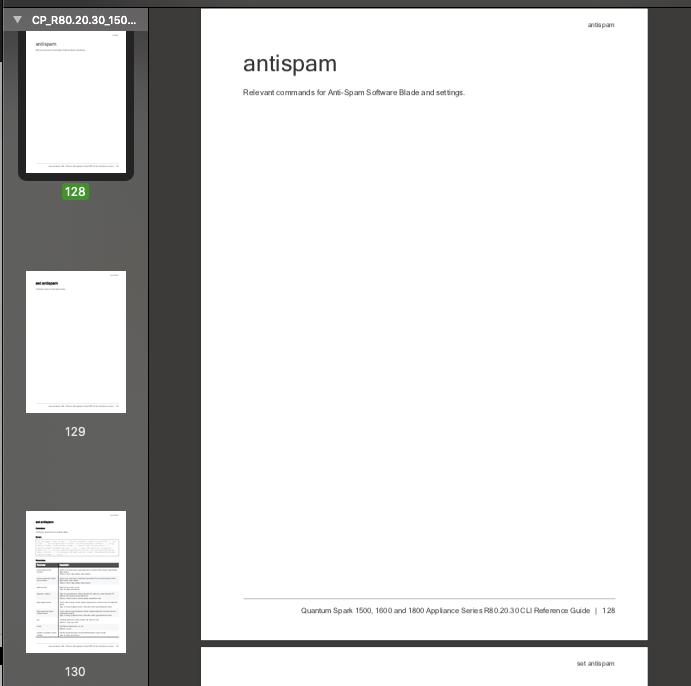
AntiSpam uses 3 pages, but only the last one has content.
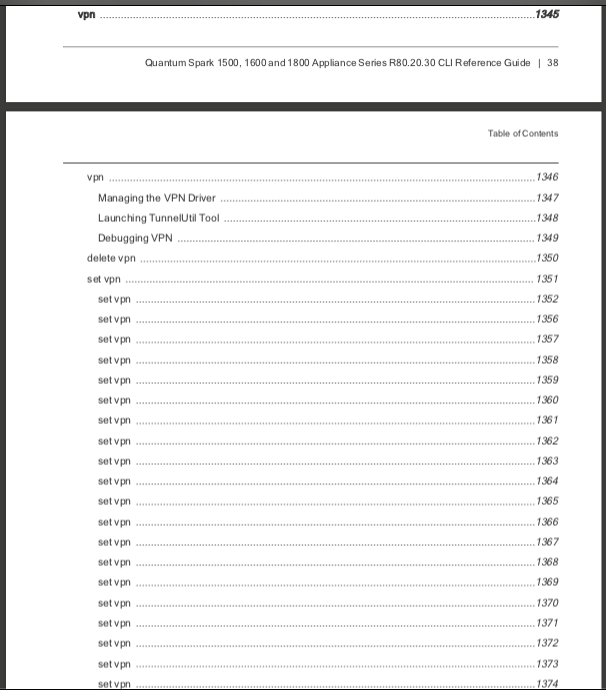
Leaving out the important part in ToC can be seen next:
set vpn
Configures existing remote VPN sites. Different commands in order of appearance:
set vpn site <site> ... (main configuration command) ---> p.1351
set vpn site <site> add remote-site-enc-dom-network-obj <remote-site-enc- dom-network-obj>
set vpn site <site> remove remote-site-enc-dom-network-obj <remote-site-enc- dom-network-obj>
set vpn site <site> remove-all remote-site-enc-dom-network-obj <remote-site-enc- dom-network-obj>
set vpn site <site> add link-selection-multiple-addrs addr <link-selection- multiple-addrs addr>
set vpn site <site> remove link-selection-multiple-addrs addr <link-selection- multiple-addrs addr>
set vpn site <site> remove-all link-selection-multiple-addrs addr <link-selection- multiple-addrs addr>
set vpn site <site> add custom-enc-phase1-enc <custom-enc-phase1-enc>
set vpn site <site> remove custom-enc-phase1-enc <custom-enc-phase1- enc>
set vpn site <site> remove-all custom-enc-phase1-enc <custom-enc-phase1- enc>
set vpn site <site> add custom-enc-phase1-auth <custom-enc-phase1-auth>
set vpn site <site> remove custom-enc-phase1-auth <custom-enc-phase1-auth>
set vpn site <site> remove-all custom-enc-phase1-auth <custom-enc-phase1-auth>
set vpn site <site> add custom-enc-phase1-dh-group <custom-enc-phase1-dh- group>
set vpn site <site> remove custom-enc-phase1-dh-group <custom-enc-phase1-dh- group>
set vpn site <site> remove-all custom-enc-phase1-dh-group <custom-enc-phase1-dh- group>
set vpn site <site> add custom-enc-phase2-enc <custom-enc-phase2-enc>
set vpn site <site> remove custom-enc-phase2-enc <custom-enc-phase2-enc>
set vpn site <site> remove-all custom-enc-phase2-enc <custom-enc-phase2-enc>
set vpn site <site> add custom-enc-phase2-auth <custom-enc-phase2-auth>
set vpn site <site> remove custom-enc-phase2-auth <custom-enc-phase2-auth>
set vpn site <site> remove-all custom-enc-phase2-auth <custom-enc-phase2-auth>
set vpn tunnel
set vpn site <site> ... (IPv6) ---> p.1382
------------
The table of content is useless, i have to browse many pages to find e.g. set vpn site <site> add link-selection-multiple-addrs.
TOC Should look something like:
set vpn site <site> p.1351
set vpn site remote-site-enc-dom-network-obj p.1356
set vpn site link-selection-multiple-addrs p.1359
set vpn site custom-enc-phase1-enc p.1362
set vpn site custom-enc-phase1-auth p.1365
set vpn site custom-enc-phase1-dh-group p.1368
set vpn site custom-enc-phase2-enc p.1371
set vpn site custom-enc-phase2-auth p.1374
set vpn tunnel (VTI) p.1377
set vpn site <site> ... (IPv6) p.1378
And now for missing content ! I have found one good example in Network Objects you create in WebGUI . These are the available network object types:
- Single IP - Represents a device with a single IP address.
- IP Range - Represents a range of IP addresses.
- Network - Represents a network.
- Domain Name - Represents a Domain.
But when we look to CLI, we first can identify commands to create IP Ranges and Networks:
add network name <name> network-ipv4-address <network-ipv4-address> { subnet-mask <subnet-mask> | mask-length <mask-length> }
For Ranges, we have two:
add address-range name <name> start-ipv4 <start-ipv4> end-ipv4 <end-ipv4> [ dhcp-exclude-ip-addr <dhcp-exclude-ip-addr> ]
add address-ipv6-range name <name> start-ipv6 <start-ipv6> end-ipv6 <end-ipv6>
And Single IP ? Missing. But we have an unknown type here:
add host name <name> [ dhcp-exclude-ip-addr { on [ dhcp-reserve-ip-addr-to- mac { on [ mac-addr <mac-addr> ] [ dns- resolving <dns-resolving> ] ipv4-address <ipv4-address> ] [ ipv6-address <ipv6-address>
This gives the same parameters as the Single IP type in WebGUI - but has an altogether different name ! Maybe we can transfer hosts into the Admin Guides instead of Single IP or mention that CLI names it as host ?
But now: How to add a Domain Name ? The R80.20.30 CLI Reference Guide only knows AD Server:
add ad-server domain <domain> .....
Could this be ? Far back (R77.20.x) CLI Guides have no trace of this command, but if we just try it does exist with a lot of params:
add domain domain <domain> name <name>
domain - For example, mysite.com
name - Network Object name
show domain
domainname - Identification string that defines a realm of administrative autonomy, authority, or control in the Internet
domains-details - Address range object
domains - Address range object
domain - Address range object
#> show domain
name domain
Site mysite.com
#> show domainname
domainname: Site
#> show domains-details
name: Site
domain: mysite.com
All these commands have been missing from CLI Guide since a long time...
Thanks for your feedback on this guide.
Check Point is engaged in a continuous effort to improve its documentation.
Please help us by sending your comments.
Thanks for your feedback.
we will work with the technical writes to improve and rearrange the guide.
Hi Guenther @G_W_Albrecht, we appreciate your feedback. As I understand, the document is optimized for web use, and when printed to a PDF, each entry web page is converted to a single paper page, causing the issue you are reporting.
There is definitely some room to improve the formatting.
One question though. Do you really have to use that word, "hate"? 🙂
I have to honestly admit that this in fact is more a kind of LOVE / HATE relationship 😉
Leaderboard
Epsum factorial non deposit quid pro quo hic escorol.
| User | Count |
|---|---|
| 5 | |
| 2 | |
| 2 | |
| 2 | |
| 1 | |
| 1 | |
| 1 |
Tue 16 Dec 2025 @ 05:00 PM (CET)
Under the Hood: CloudGuard Network Security for Oracle Cloud - Config and Autoscaling!Thu 18 Dec 2025 @ 10:00 AM (CET)
Cloud Architect Series - Building a Hybrid Mesh Security Strategy across cloudsTue 16 Dec 2025 @ 05:00 PM (CET)
Under the Hood: CloudGuard Network Security for Oracle Cloud - Config and Autoscaling!Thu 18 Dec 2025 @ 10:00 AM (CET)
Cloud Architect Series - Building a Hybrid Mesh Security Strategy across cloudsAbout CheckMates
Learn Check Point
Advanced Learning
YOU DESERVE THE BEST SECURITY