- Products
- Learn
- Local User Groups
- Partners
- More
MVP 2026: Submissions
Are Now Open!
What's New in R82.10?
Watch NowOverlap in Security Validation
Help us to understand your needs better
CheckMates Go:
Maestro Madness
Hi Team,
I have a checkpoint quantum spark 1590 locally managed firewall. I am setting up VLAN since number of devices has been approx. 500 and only one physical network is laid in the office.
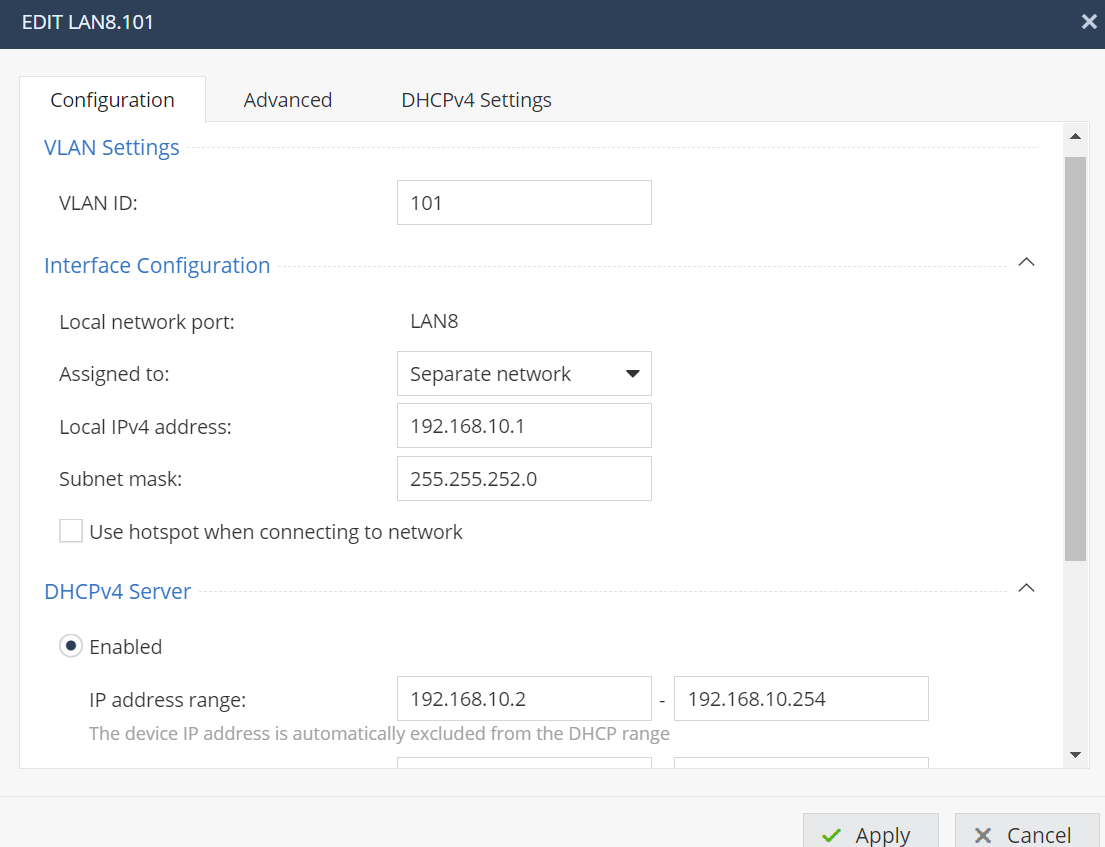
What I understood from the documentation that multiple VLANs can be setup on same physical port lets say port 8. So I created a new VLAN over Port 8 and set the following
vlan id as 101
local network port as LAN 8
Assigned to as Separate Network
Ipv4 address as 192.168.10.1
Subnet as 255.255.255.0
DHCP disabled
Now I connected a laptop with LAN 8 with static IP as 192.168.10.2 with subnet mask as 255.255.255.0. But the network is not discoverable and no internet access is being showed. (Firewall has been set as Standard)
Can any one please guide me that can multiple VLANs be setup on single physical port ...? and what I am doing wrong here...
Thanks in advance 🙂
If you assign a VLAN to a port, the device that is plugged into that port must be configured to accept VLAN tagged packets.
In other words, it's meant to be used with another switch configured with the same VLANs.
Windows machines (and likely other clients) can be set to utilize a specific VLAN tag, but it requires manual configuration.
It sounds like you just want LAN8 on a different network.
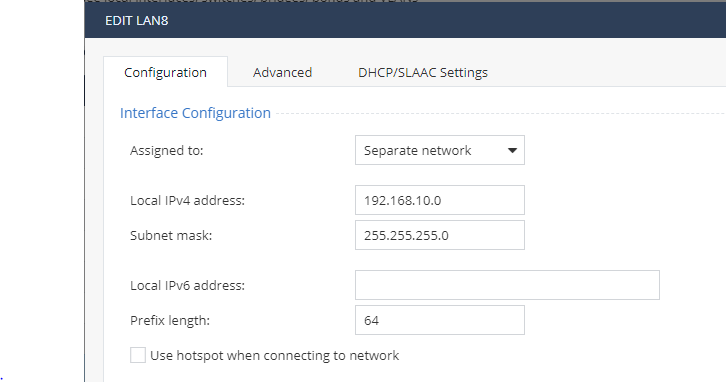
There is no need to configure a VLAN in this case, just assign the port to a different network:
Note that if you want multiple LAN ports on the same network, you will need to create a switch, define the network settings there, and then assign the relevant ports to it.
Provide screenshots showing your precise configuration on Port 8.
Note if a port has multiple VLANs associated with it, it's considered a trunk port and therefore whatever plugs in must be VLAN aware.
For any VLANs you create, you must also create explicit access rules.
I have configured a port in checkpoint 1590 where default network 192.168.1.x is working ok on port 2.
Now I want to configure VLANs (192.168.10.x 192.168.20.x 192.168.30.x .....) on single port 8 so multiple networks can work simultaneously on one single physical port 8. Below the screen shot (attached) where I have configured VLAN over port 8 and assigned IP range to VLAN with 192.168.10.1/24 and connected a laptop with CAT 6 cable on port 8. But the laptop (192.168.10.2/24) is showing unidentified network. I have also set the policies for incoming as well as outgoing network. Please note that I do not have any other managed switch apart from firewall.
Please let me know what I am doing wrong here...
If you assign a VLAN to a port, the device that is plugged into that port must be configured to accept VLAN tagged packets.
In other words, it's meant to be used with another switch configured with the same VLANs.
Windows machines (and likely other clients) can be set to utilize a specific VLAN tag, but it requires manual configuration.
It sounds like you just want LAN8 on a different network.
There is no need to configure a VLAN in this case, just assign the port to a different network:
Note that if you want multiple LAN ports on the same network, you will need to create a switch, define the network settings there, and then assign the relevant ports to it.
Leaderboard
Epsum factorial non deposit quid pro quo hic escorol.
| User | Count |
|---|---|
| 5 | |
| 2 | |
| 2 | |
| 2 | |
| 1 | |
| 1 | |
| 1 |
Tue 16 Dec 2025 @ 05:00 PM (CET)
Under the Hood: CloudGuard Network Security for Oracle Cloud - Config and Autoscaling!Thu 18 Dec 2025 @ 10:00 AM (CET)
Cloud Architect Series - Building a Hybrid Mesh Security Strategy across cloudsTue 16 Dec 2025 @ 05:00 PM (CET)
Under the Hood: CloudGuard Network Security for Oracle Cloud - Config and Autoscaling!Thu 18 Dec 2025 @ 10:00 AM (CET)
Cloud Architect Series - Building a Hybrid Mesh Security Strategy across cloudsAbout CheckMates
Learn Check Point
Advanced Learning
YOU DESERVE THE BEST SECURITY