- Products
- Learn
- Local User Groups
- Partners
- More

MVP 2026: Submissions
Are Now Open!
What's New in R82.10?
Watch NowOverlap in Security Validation
Help us to understand your needs better
CheckMates Go:
Maestro Madness
Good Morning,
I need to connect via site-to-site VPN from site A where the CP 730 appliance firewall is installed to site B where a Sophos firewall is installed that I do not manage.
The site-to-site VPN works correctly and is active.
The Requests from clients of site A that may belong to different VLANs (see the table) must be routed to site B.
| SITE A (CHECK POINT 730) TO SITE B (SOPHOS) | Destination IP Subnet |
| Source IP Subnet | |
| 192.168.1.0/24 (Site A) | 172.20.43.0/24 (Site B) |
| 192.168.10.0/24 (Site A) | 172.20.43.0/24 (Site B) |
| 192.168.201.0/24 (Site A) | 172.20.43.0/24 (Site B) |
Unfortunately I can't route them correctly.
I used Tracert and it seems that they are routed through the Internet instead of through VPN.
Can you help me to solve the problem?
Thanks and Best Regards
Gaetano
Hi Gaetano,
I assume you're using Domain based VPN. Could you share with us both encryption domain objects?
It’s a 730, which is managed locally.
And the message should have been posted in the SMB space,
But yes, let’s see precisely how you’ve configured the VPN, specifically the remote Encryption Domain.
Thank You for reply.
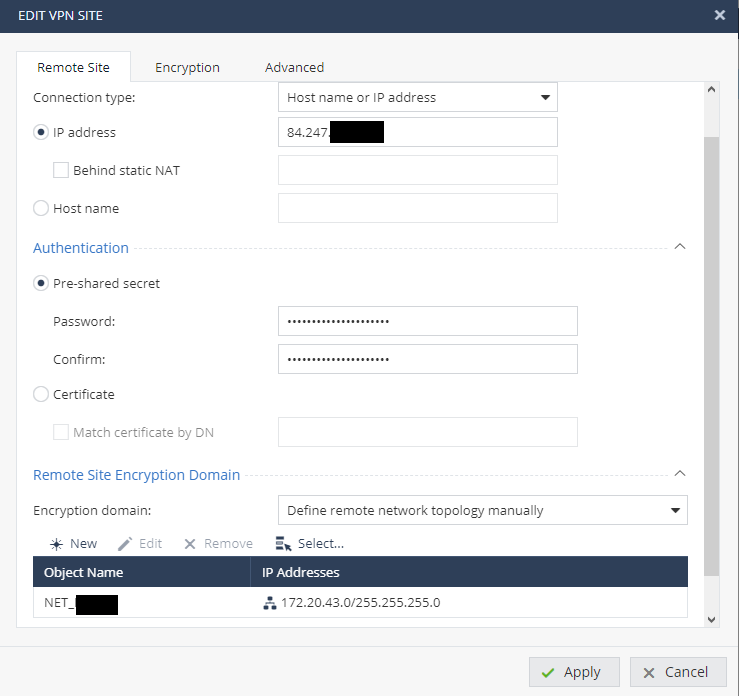
I opened the Firewall GUI and edited the VPN. Please see the picture for the vpn configuration
In the Advanced tab I don't find the encryption domain, but only in the TAB Remote site.
In Remote Site Encryption domain I have these methods:
Is the point 1) the correct configuration?
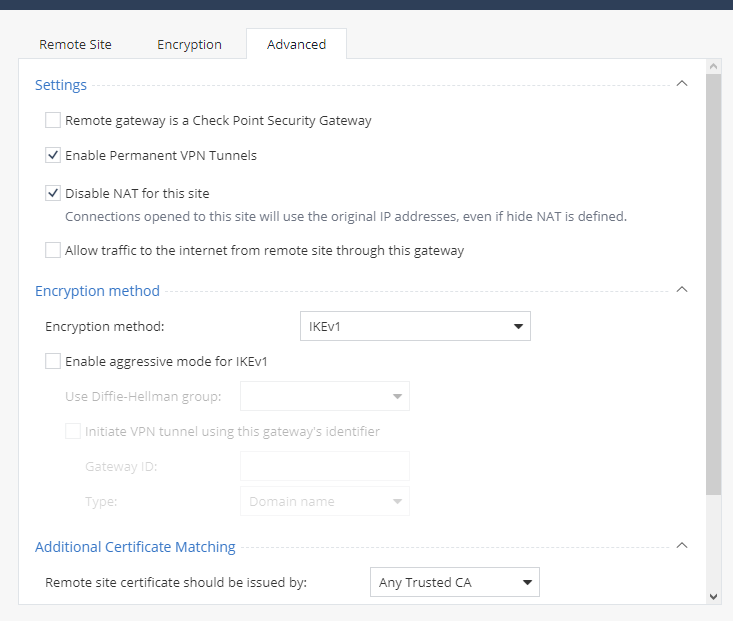
Also this is the configuration in the Advanced TAB
And this is the configuration in the TAB Encryption
I look forward to your welcome reply.
Gaetano
It was in the first screenshot at the bottom.
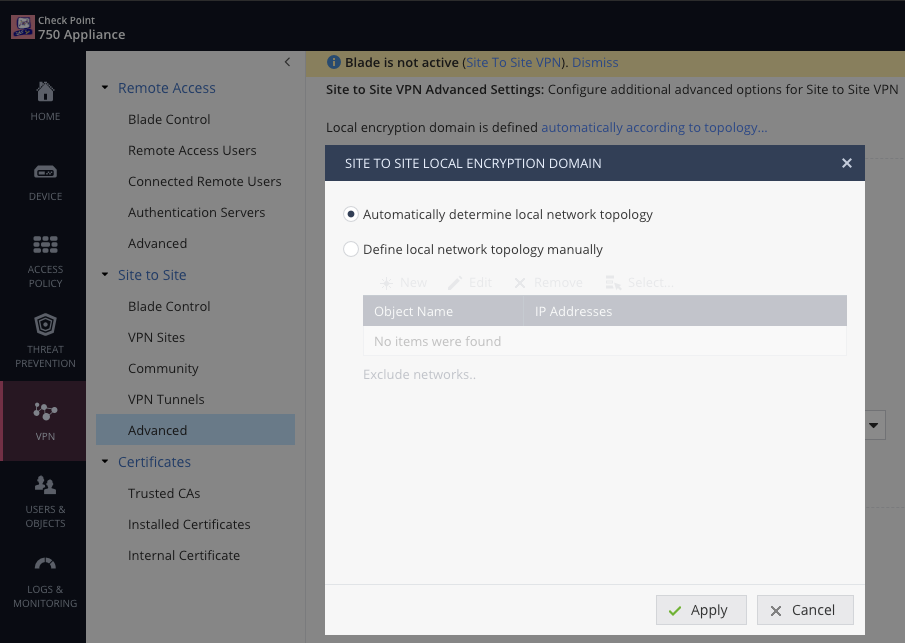
Now let's double check the local encryption domain.
Hopefully it looks something like:
There should also be a rule in Access Policy > Firewall > Policy > Incoming, Internal and VPN traffic permitting the relevant traffic, possibly with the option "Match only for encrypted traffic" enabled.
Hello,
Thank You for reply.
I have solved setting "Define local network topology manually" and adding the requested subnet.
After I have create the proper rules in "Access Policy > Firewall > Policy > Incoming, Internal and VPN traffic".
Please can you explain me what is the purpose of the option "Match only for encrypted traffic"?
Thank You and Best regards.
Gaetano
That option means the rule would apply only if the traffic went over a VPN connection.
Thank You
Leaderboard
Epsum factorial non deposit quid pro quo hic escorol.
| User | Count |
|---|---|
| 5 | |
| 2 | |
| 2 | |
| 2 | |
| 1 | |
| 1 | |
| 1 |
Tue 16 Dec 2025 @ 05:00 PM (CET)
Under the Hood: CloudGuard Network Security for Oracle Cloud - Config and Autoscaling!Thu 18 Dec 2025 @ 10:00 AM (CET)
Cloud Architect Series - Building a Hybrid Mesh Security Strategy across cloudsTue 16 Dec 2025 @ 05:00 PM (CET)
Under the Hood: CloudGuard Network Security for Oracle Cloud - Config and Autoscaling!Thu 18 Dec 2025 @ 10:00 AM (CET)
Cloud Architect Series - Building a Hybrid Mesh Security Strategy across cloudsAbout CheckMates
Learn Check Point
Advanced Learning
YOU DESERVE THE BEST SECURITY