- Products
- Learn
- Local User Groups
- Partners
- More
MVP 2026: Submissions
Are Now Open!
What's New in R82.10?
10 December @ 5pm CET / 11am ET
Announcing Quantum R82.10!
Learn MoreOverlap in Security Validation
Help us to understand your needs better
CheckMates Go:
Maestro Madness
Hi all,
I am using the default network switch1 and have Vlan 10 and 20 tagged on this switch.
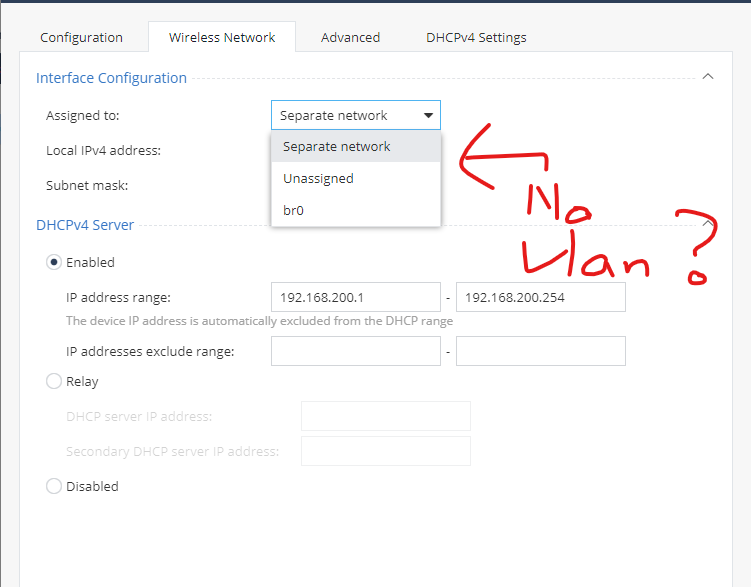
I find that I can assign an SSID to the switch1 [Native vlan1], but seems no choice for vlan 10 for 20 interfaces.
Might I know if there is any solution for this case?
Thanks.
You can’t assign the WLAN to a VLAN directly.
You create a bridge and assign both the VLAN and WLAN to it.
Um..Yes, I find that we can use the "bridge" to assign both Vlan and WLAN now.
But that seems not to work as expected.
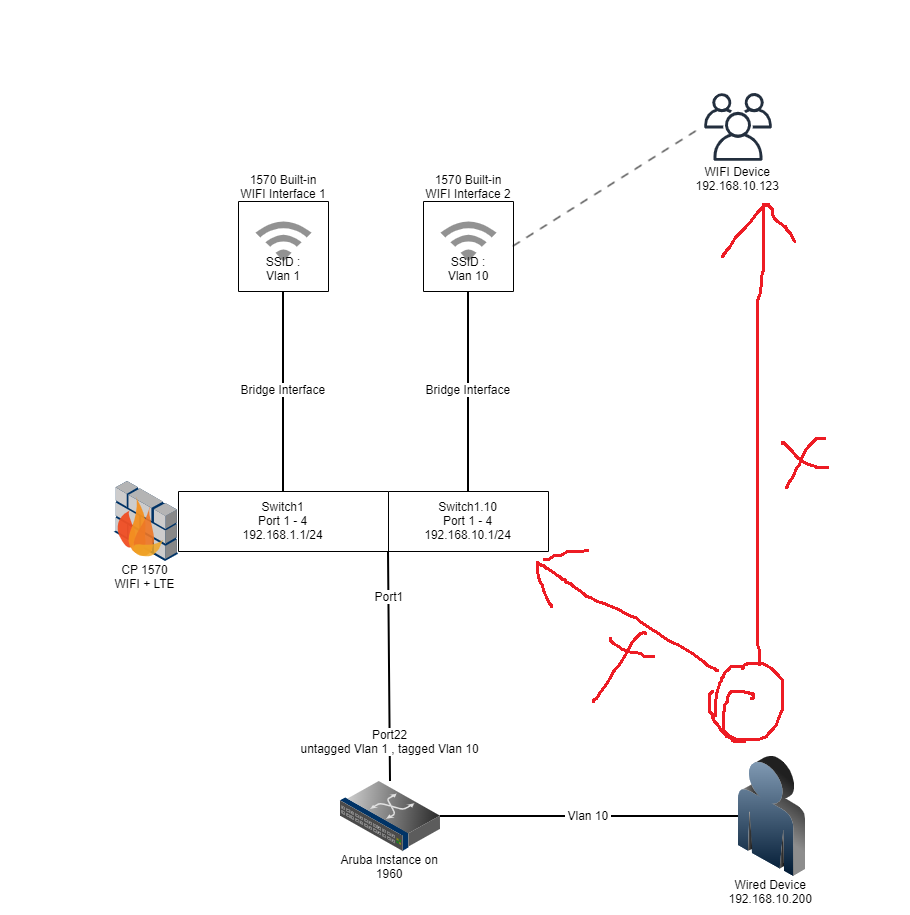
In my design, we have Port 1 - 4 as switch1 and a Native VLAN 1 WIFI SSID in the same bridge.
Then I try to create a Vlan 10 and tagged it to switch1, the switch1.10 is here now.
I try to bind the Vlan 10 SSID to switch1.10, and it works.
But the Wired users accessing Vlan 10 just can not access Checkpoint 1570 's Vlan 10 Ip address.
I do confirm the uplink port connecting to switch1 is already trunk and with suitable Vlan tagged and untagged.
And finally, I use a stupid way to temporary resolve the issue:
I assign VLAN 10 SSID to CheckPoint's Lan 6 with the same new bridge and move the original VLAN 10 Ip address to this new bridge also.
Connect the CheckPoint's Lan 6 port to the switch port that just accessed VLAN 10.
And this works like Vlan 10 working well now ... OH ShXt.
I wonder if the VLAN tag will not work for the switch that is also bridged to another interface already.
Please advise.

If you assign a numbered VLAN to a specific port, it is expected that whatever is connected to that port will communicate using VLAN tags.
Your LAN ports are untagged and will fail to communicate with the VLAN tagged port unless the client is configured to send the correct VLAN tag (which it probably isn't).
In any case, the only way to allow untagged ports to communicate to/through tagged ports (and vice versa) is through a bridge.
No, The wired users connected to the switch port what access vlan 10 already.
And it still fail to communicate with CheckPoint Vlan 10 when there is a bridge interface to bind the Checkpoint Vlan 10 interface with another interface.
Hi, Like to know something here, is it mean that, correct?
Not working scenario
1. Port 1 - 4
2. Switch configured
3. Bridge Configured
4. VLAN 1 configured
5. Not Working
Working scenario
1. Port LAN6
2. Switch configured
3. Bridge unconfigured
4. VLAN 10 configured
5. Working fine
Let's make it simple.
My wired user can not access the Checkpoint Vlan 10 interface or the VLan WIFI as below.
While I appreciate the network diagram, I believe screenshots of exactly what you've configured would help.
While I don't have the exact configuration, I have done something similar in the past and the following should work:
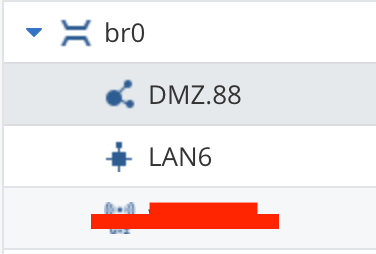
In my case, the "VLAN Tagged" port is the DMZ port (i.e. what would be connected to the Aruba in your case).
The DMZ port is not assigned to any switch or bridge.
In your case, according to your diagram, that means LAN1 should be unassigned, but LAN1.10 should be assigned to the bridge.
Thanks.
But we must keep the DMZ and the SSID VLAN 1 in the same bridge also.
Will this work for both bridges in your lab also?
Our regular (non SMB) gateways actually prevent you from using VLAN 1 since it has special meaning.
I recommend using a different VLAN number here.
But yes, you should be able to bridge the DMZ and a Wireless SSID together using a bridge.
Leaderboard
Epsum factorial non deposit quid pro quo hic escorol.
| User | Count |
|---|---|
| 4 | |
| 2 | |
| 2 | |
| 2 | |
| 1 | |
| 1 | |
| 1 |
Fri 12 Dec 2025 @ 10:00 AM (CET)
Check Mates Live Netherlands: #41 AI & Multi Context ProtocolTue 16 Dec 2025 @ 05:00 PM (CET)
Under the Hood: CloudGuard Network Security for Oracle Cloud - Config and Autoscaling!Fri 12 Dec 2025 @ 10:00 AM (CET)
Check Mates Live Netherlands: #41 AI & Multi Context ProtocolTue 16 Dec 2025 @ 05:00 PM (CET)
Under the Hood: CloudGuard Network Security for Oracle Cloud - Config and Autoscaling!Thu 18 Dec 2025 @ 10:00 AM (CET)
Cloud Architect Series - Building a Hybrid Mesh Security Strategy across cloudsAbout CheckMates
Learn Check Point
Advanced Learning
YOU DESERVE THE BEST SECURITY