- Products
- Learn
- Local User Groups
- Partners
- More
MVP 2026: Submissions
Are Now Open!
What's New in R82.10?
10 December @ 5pm CET / 11am ET
Announcing Quantum R82.10!
Learn MoreOverlap in Security Validation
Help us to understand your needs better
CheckMates Go:
Maestro Madness
I have a customer that has 4 1800 SMB appliances which is integrated with their existing Enterprise management software. They have 4 gws with site to site VPN configured.Recently,they have been facing alot of issues with their VPN connection after they migrated to the new appliances. I had raised several cases with checkpoint support and they have not been able to pin point the issue as well. It just works sometimes and then it stops working(Usually after policy installation). Checkpoint TAC support has not been able to solve the issue after countless escalation of the cases aswell. After hours of troubleshooting it just starts to work again and then we dont make changes to the gws anymore. We have done a VPN debug aswell but it has not proved fruitful.
When the gws first started to show errors with VPN i did the following to solve it:
1.Followed sk102712 to make the change about firewalls
2. on the firewall side, changed $FWDIR/conf/masters
with management IP address
The two steps above solved my VPN issue for awhile. After a few months, although the symptoms of the VPN issue was the same, the above steps didnt help me at all. So the only immediate solution for me was to make one of the gws(downtime cannot be tolerated during office hours) in standalone mode.
The customer has been complaining that he wants the standalone gw to be integrated to the management aswell so last night when i tried to install the policy, it fails midway. Funny thing is that, policy is installed(Access policy only)VPN is up,i can ping the management server's ip address from the gw and all the internal services but in the smart console it shows "connection is lost"for that specific gw, although i can ping,etc to the management server from that gw. I cant make further changes to the gw.
Note that the policy is any any accept.
So i read an SK on r81.10.x and SMB devices are supposed to work like a enterprise gateway as it inherits the code base from r81.10 GA version from enterprise appliances. So, will upgrading my management software and the gws to R81.10 help me solve this issue? Because all the configuration on the management server was working fine with the 4000 series appliances.
Would highly appreciate it if a SMB specialist could advice me on this.
Many things are different with SMB, so it could well be that the same config had worked well with 4000.
Hi,
My name is Dafna, I'm a team leader in the SMB area.
R81.10 is now available for EA. You can join our EA and upgrade your GW to R81.10.
R81.10 contains many fixes which are relevant for VPN.
Please contact me via mail to continue the process.
Thanks,
Dafna dafnam@checkpoint,com
Thanks,
Dafna
You speak of R81.10.05 for centrally managed appliances ?
R81.10.00
Hi Dafna,
I will send you an email to join the EA program. Thank you very much.
regards,
Nima
Hello,
Without some more details i am not sure what can be wrong exactly, some captures, logs, drops would be needed. Just guessing, try to the fw ctl zdebug drop filtering by the peer public ip address, check if you have drops like these:
dropped by fw_ipsec_encrypt_on_tunnel_instance Reason: No error - tunnel is not yet established;
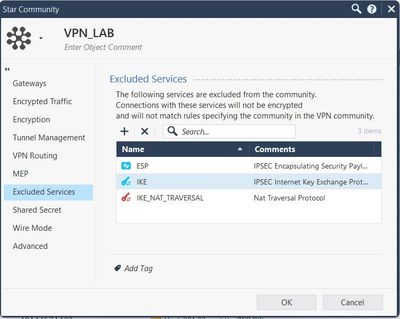
If you see that try excluding IPsec, Ike and NAT-T services from encryption in your vpn community object. In a past case for a 1800 centrally managed (like yours) vpn had outages from time to time, during the problem the firewall tried to encrypt the negotiation traffic, TAC could not explain why but the exclusion solved the problem. HTH.
Regards
Dear Daniel,
Once i push the policy to the gws, all the gws lose connection to the management server and i cant make any more changes to it. I have to literally remove ike SA's from the gws and unload the policy to make it reachable. Is there a SK that i could use to exclude NAT-T and ike services from encryption?
Hello,
To exclude services from encryption configure the vpn community as per the image below:
I think you lose connection between the management and the gateways because of the vpn problem. I usually exclude the public IP address of all the gateways from encryption so management does not need the vpn to be up. To do this, edit the crypt.def file adding all the public ip address from gateways as dst, you can check sk108600 scenario 3 for reference, it would see something like this:
#ifndef IPV6_FLAVOR #define NON_VPN_TRAFFIC_RULES (
dst=Destination_IPv4_address_1 or \
dst=Destination_IPv4_address_2 or \
dst=Destination_IPv4_address_3 or \
dst=Destination_IPv4_address_4 \
) #else #define NON_VPN_TRAFFIC_RULES 0 #endif
The correct crypt.def file depends on the version of management an gateways, for example for a R81.10 management and 1800 gateways, the file is /opt/CPSFWR80CMP-R81.10/lib/crypt.def, you can check the admin guide of management for reference.
Regards
Leaderboard
Epsum factorial non deposit quid pro quo hic escorol.
| User | Count |
|---|---|
| 4 | |
| 2 | |
| 2 | |
| 2 | |
| 1 | |
| 1 | |
| 1 |
Fri 12 Dec 2025 @ 10:00 AM (CET)
Check Mates Live Netherlands: #41 AI & Multi Context ProtocolTue 16 Dec 2025 @ 05:00 PM (CET)
Under the Hood: CloudGuard Network Security for Oracle Cloud - Config and Autoscaling!Fri 12 Dec 2025 @ 10:00 AM (CET)
Check Mates Live Netherlands: #41 AI & Multi Context ProtocolTue 16 Dec 2025 @ 05:00 PM (CET)
Under the Hood: CloudGuard Network Security for Oracle Cloud - Config and Autoscaling!Thu 18 Dec 2025 @ 10:00 AM (CET)
Cloud Architect Series - Building a Hybrid Mesh Security Strategy across cloudsAbout CheckMates
Learn Check Point
Advanced Learning
YOU DESERVE THE BEST SECURITY