- Products
- Learn
- Local User Groups
- Partners
- More
Step Into the Future of
AI-Powered Cyber Security
What's New in R82.10?
Register HereWhen the Agents Attack
A Live Look at Agentic Exposure Validation
AI Security Masters E8:
Claude Mythos: New Era in Cyber Security
CheckMates Go:
CheckMates Fest
Hi all,
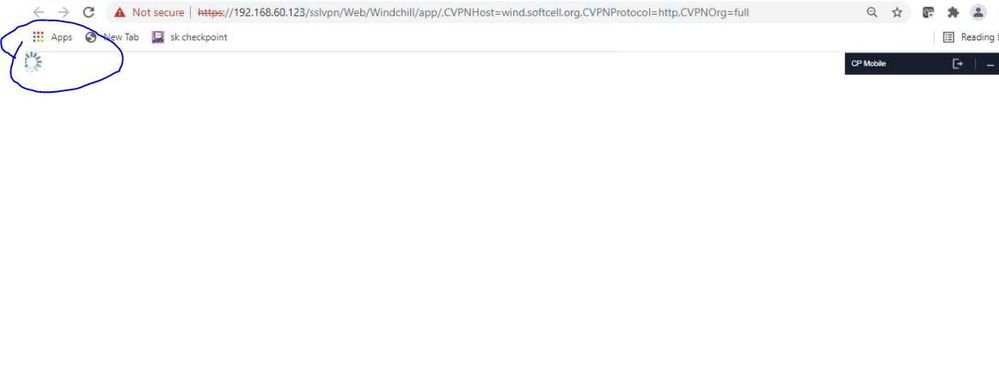
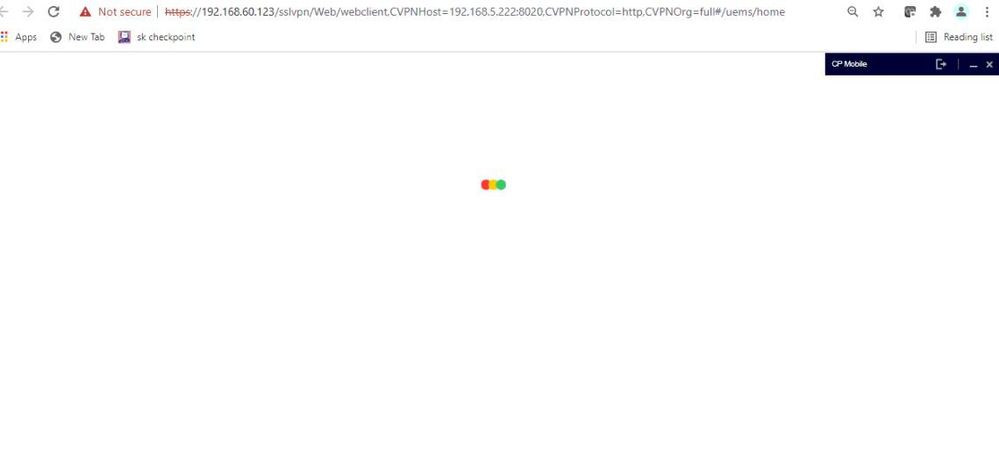
I have a web application that is not working through the SSL VPN. Internally, the web application works ok and also through a Cisco ASA SSL VPN, but when used through Checkpoint, the web application 'dashboard' doesn't display after successfully logging in.
The web server is hosted internally and has two portals, a user portal and management. Through the SSL VPN, the user portal works ok but not the management. I believe the website is using JavaScript.
The user portal and management portal are configured as separate Web Application objects with the URL pointing to the relevant portals.
I have gone through the troubleshooting guide and put the SG into debug and trace mode and had a good look through the logs but can't see any reason why the 'home' page hangs once successfully logged in. I also have access to the web servers IIS logs and they all report 200 codes.
I have tried all the options in the protection level with caching in the web application object.
I can get the management portal to work if I configure the Web Application as a 'Domino Web Access (iNotes)' type, but this seems hit and miss.
Is there anything I could search for in the logs to help identify this issue? or any 'bypasses' configured for that site to rule out IPS etc
Many thanks
Rich
Are you using reverse proxy option? Try that. If no change, I would recommend a TAC case.
Is there anything special about those web applications?
I believe we are not using the reverse proxy. We already run services through the portal, Citrix, Outlook Web Access, etc, would enabling the reverse proxy cause an issue with existing apps?
I've been doing some testing with the Web Application configured as iNotes vs not, and comparing logs. The following are from the browser's f12 tools and only shows two differences.
Working (iNotes)
<script src="https://gxxxxxx.xxxxxx.xk/sslvpn/Portal/CPPTfunctions.js"></script><script>var __CP_ENABLE_INOTES__ = true;</script>
vs
Not Working
<script src="https://gxxxxxx.xxxxxx.xk/sslvpn/Portal/CPPTfunctions.js"></script>
and also
Working (iNotes)
top.document.location.replace("ETADM001GF.SWITCHROLE?RID=" + pRoleID + "&RCHK=" + pResubChk + "&USESSION=" + pSessID);
vs
Not Working
top.__CP_PT_FUNC_replace__(document.location,"ETADM001GF.SWITCHROLE?RID=" + pRoleID + "&RCHK=" + pResubChk + "&USESSION=" + pSessID);
In the httpd.log:
Replacing (document.location.replace("ETADM001GF.SWITCHROLE?RID=" + pRoleID + "&RCHK=" + pResubChk + "&USESSION=" + pSessID)) with (__CP_PT_FUNC_replace__(document.location,"ETADM001GF.SWITCHROLE?RID=" + pRoleID + "&RCHK=" + pResubChk + "&USESSION=" + pSessID)) matched by pattern 45
What is pattern 45 and can the matching be stopped per site \ page? Or am I best just raising a TAC case?
(On a side issue, two Web Access objects configured differently, but with the same URL and published into MA only ever uses one of the objects no matter which one you select in the portal)
TIA
Rich
What translation method do you using in Web application object? If website is using any java script you should probably need host translation as a method link translation.
I have tried Path Translation and URL Translation, with every variant of Browser Caching under Protection Level. Only setting the Web Application to a 'Domino Web Access (iNotes)' type makes the website work through MA.
HI i am facing the same issue with two different application, Pages are not loading after successfully login.
Please help us with resolution.
Thanks
Hi cshekar
Our issue was to do with the application and DNS. The application had the same name internally and externally, which pointed to either the internal server or the DMZ.
Within the application there were hardcoded paths to images and other components of the application. When used over the SSL VPN, for whatever reason, some elements decided not to use the SSL VPN and then connected to the DMZ server. At this point, the application had sessions coming from both the internal and external application servers at the same time.
I never got to the bottom of why certain elements \ links would break out of the SSL tunnel, neither why setting the application as a Domino Web Access (iNotes) server got the application working.
Hello, have you fixed this issue? I am currently facing the same issue.
Leaderboard
Epsum factorial non deposit quid pro quo hic escorol.
| User | Count |
|---|---|
| 2 | |
| 2 | |
| 1 | |
| 1 | |
| 1 | |
| 1 | |
| 1 | |
| 1 | |
| 1 |
Tue 16 Jun 2026 @ 05:00 PM (CEST)
Under the Hood: Check Point SASE | Internet Access Optimization & Performance TuningThu 18 Jun 2026 @ 10:00 AM (CEST)
The Cloud Architects Series: Check Point WAF - The Next Generation of AI powered protectionTue 23 Jun 2026 @ 05:00 PM (CEST)
Under the Hood: Check Point Cloud Firewall | Securing all of your clouds: Art of the possibleTue 16 Jun 2026 @ 05:00 PM (CEST)
Under the Hood: Check Point SASE | Internet Access Optimization & Performance TuningThu 18 Jun 2026 @ 10:00 AM (CEST)
The Cloud Architects Series: Check Point WAF - The Next Generation of AI powered protectionTue 23 Jun 2026 @ 05:00 PM (CEST)
Under the Hood: Check Point Cloud Firewall | Securing all of your clouds: Art of the possibleThu 25 Jun 2026 @ 10:00 AM (PDT)
AI Security Masters E10: READY OR NOT: Securing the AI Enterprise 2/5 - AI Red TeamingAbout CheckMates
Learn Check Point
Advanced Learning
YOU DESERVE THE BEST SECURITY