- Products
- Learn
- Local User Groups
- Partners
- More

Scaling Check Point Automation with Arodonata
7 October @ 5pm CET / 11am EDT
AI Security Masters
LGTM: Bypassing an LLM Build Gate
When Prompt Injection Fails
What's New in Check Point SASE
The State of Ransomware Q2 2026:
This Quarter's Trends, and Their Impact on Your Defenses
CheckMates Go:
Half is Not Enough
Running R81.20 (i know, but it's a lab)
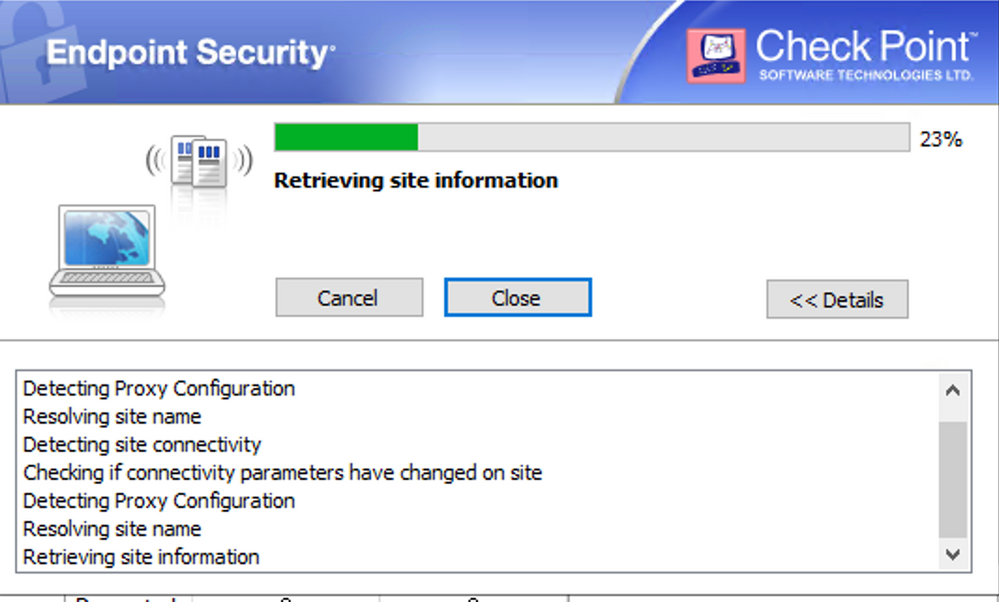
When connecting from WAN - RA VPN client connects the first time after adding the site fine. But if I disconnect and try again - stuck like this and fails with Site is not responding
Workaround is to delete the site and add again. Works till first reconnect.
Connecting and reconnecting from LAN side works just fine.
I've done the whole refresh the cert routine too.
The solution to this is here: https://support.checkpoint.com/results/sk/sk92716
How precisely are you defining the site when you connect the first time?
Note that if you use an FQDN, the IP resolved is cached and stored as part of the site definition.
just by IP address. no FQDN.
no, after reading the article - I still don't understand what values need to be configured to get this working...
Jeez is that really the only way to fix this in CP world?
Before anything else, does any of this apply to your case? Quoting from the SK @PhoneBoy mentioned:
...IP address is different from the IP address that was originally defined when creating the new VPN site, especially in scenarios where the Security Gateway is behind a NAT device, or when the Security Gateway object is defined with an internal IP address, or a Management IP address that is not reachable from the Internet.
It got fixed by nuking the old VM and starting over.
I Still get this error. even when i set my VPN IP Address into x.x.x.x, when i try to connect in second time, the IP Address back to the old ones
The solution to this is here: https://support.checkpoint.com/results/sk/sk92716
i follow this solution but still didn't solve the problem
Please start a new thread with the necessary details about your configuration.
Hi rakha,
Did you find the solution or workaround?
My customer has 7 Wan behind 7 broadband routers, the project is about migration from sophos with openvpn client to checkpoint, and he doesn't give the go till this issue not fixed
Yeah. Need to check the databases application on the smart console's app and delete the old VPN IP Address. If you're not change the VPN IP Address then it should be no problem
Leaderboard
Epsum factorial non deposit quid pro quo hic escorol.
| User | Count |
|---|---|
| 5 | |
| 1 | |
| 1 | |
| 1 | |
| 1 | |
| 1 | |
| 1 |
Thu 01 Oct 2026 @ 05:00 PM (CEST)
Under the Hood: Check Point WAF | Preventing minus-zero-day attacksTue 06 Oct 2026 @ 12:00 PM (ACDT)
Rethinking Network Security for the AI Era : Session 2 - From User, to Branch and Campus APACTue 06 Oct 2026 @ 03:00 PM (CEST)
Rethinking Network Security for the AI Era : Session 2 - From User, to Branch and Campus EMEAThu 01 Oct 2026 @ 05:00 PM (CEST)
Under the Hood: Check Point WAF | Preventing minus-zero-day attacksTue 06 Oct 2026 @ 12:00 PM (ACDT)
Rethinking Network Security for the AI Era : Session 2 - From User, to Branch and Campus APACTue 06 Oct 2026 @ 03:00 PM (CEST)
Rethinking Network Security for the AI Era : Session 2 - From User, to Branch and Campus EMEATue 06 Oct 2026 @ 02:00 PM (EDT)
Rethinking Network Security for the AI Era : Session 2 - From User, to Branch and Campus AMERAbout CheckMates
Learn Check Point
Advanced Learning
YOU DESERVE THE BEST SECURITY