- Products
- Learn
- Local User Groups
- Partners
- More

Scaling Check Point Automation with Arodonata
7 October @ 5pm CET / 11am EDT
AI Security Masters
LGTM: Bypassing an LLM Build Gate
When Prompt Injection Fails
What's New in Check Point SASE
The State of Ransomware Q2 2026:
This Quarter's Trends, and Their Impact on Your Defenses
CheckMates Go:
Half is Not Enough
Hello,
We have configured Identity Provider Authentication for remote access vpn users.
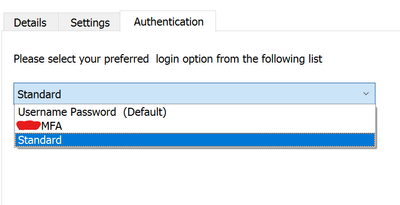
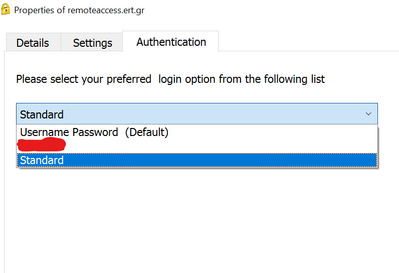
When we login with Check Point Mobile App for Windows we have the following options.
What we want is to remove the "Standard" login option.
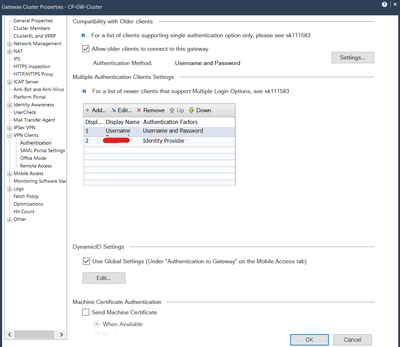
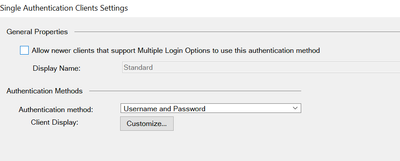
At Gateway Cluster Properties -> VPN clients -> Authentication -> Multiple Auth Clients Settings the configuration is the below.
Thank you
You can remove it from gateway properties, I cant recall what its called, I believe username/password, but will check later in the lab.
Andy
Hello,
I can remove the username/password. The MFA becomes default authentication method, but "Standard" still remains.
I can't find any tab to remove it.
Thanks
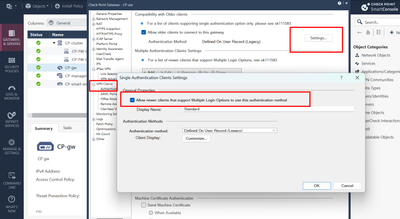
I believe this is what you need to uncheck.
Andy
Hi Andy,
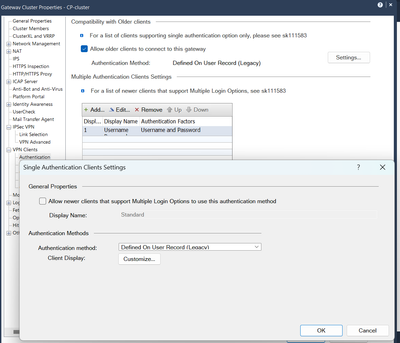
I have already done this without success. The Authentication method at your screenshot is the legacy one. We have configure it as "Username and Password", does it matter?
Thanks
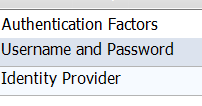
Which Authentication method is presented after choosing Standard ?
Can you please send screenshots of how thats configured? Please blur out any sensitive info. I know 100% this is possible, as I had done it before, just cant recall now exactly how...
Andy
Sure. The current one is the below.
I did uncheck the box, as below, but the "Standard" authentication method still appears at the mobile client
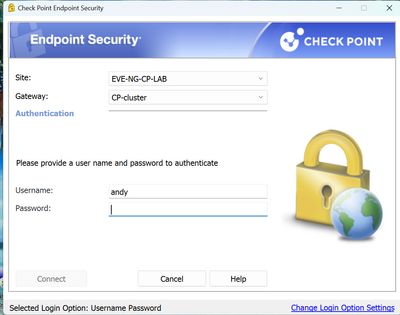
Here is what I just tested in the lab and worked fine, does NOT show standard in the list anywhere. I dont believe you would need to delete/re-create VPN site just for this, but to test that theory, you can have one user try and see result they get.
Kind regards,
Andy
Hello,
Based on your test the authentication method must be "Defined on user record (legacy)". Unfortunatelly I cannot change the authentication from "Username and password" and I will explain why.
We have connected more than one domains with the firewall. In these domains there are same sam account names (eg test@domain1, test@domain2 etc). In this case with authentication method "Defined on user record (legacy)", when a vpn user enters credentials at the Mobile app, search takes place only in one domain.
However, I tested with authentication "Username and Password" and it works only if site is recreated. It this case "Standard" authentication method is disapperared. It is ok for my case.
Thank you very much for the assistance.
In that case, maybe contact TAC and do remote session to find the best option. Its not really feasible to ask your users to delete/re-create the site. I know in the past, with one large cusotmer we have, couple of my colleagues had to do some modifications in trac.config file and push it via GPO to make things work.
Best regards,
Andy
Sure. It would be very helpful if the site has not to be recreated.
I will contact TAC and come back with solution.
Thanks
I think say if you had dozens of users, not a big deal, but if company has 100s of employees, its not a scalable "solution".
Let us know what TAC tells you.
Best regards,
Andy
Hello,
Sure, I will come back with feedback.
I more question please.
Can I restrict remote access vpn access from Capsule VPN for mobile (Android & IOS) based on username that users login?
This is because, when Identity provider authentication is selected, 2MFA is not working in R81.10. This is gonna be solved in take 113(it is not recommended right now).
Not that I know of. I would wait for jumbo to be recommended.
Andy
Leaderboard
Epsum factorial non deposit quid pro quo hic escorol.
| User | Count |
|---|---|
| 5 | |
| 1 | |
| 1 | |
| 1 | |
| 1 | |
| 1 |
Thu 08 Oct 2026 @ 11:00 AM (EDT)
Under the Hood: Check Point SASE | Zero Trust Network Access, Step by StepFri 09 Oct 2026 @ 10:00 AM (CEST)
CheckMates Live Netherlands - Sessie 49: Maak kennis met Check Point R82.20Tue 13 Oct 2026 @ 06:00 PM (IDT)
AI Security Masters: LGTM: Bypassing an LLM Build Gate When Prompt Injection FailsThu 08 Oct 2026 @ 11:00 AM (EDT)
Under the Hood: Check Point SASE | Zero Trust Network Access, Step by StepFri 09 Oct 2026 @ 10:00 AM (CEST)
CheckMates Live Netherlands - Sessie 49: Maak kennis met Check Point R82.20Tue 20 Oct 2026 @ 04:00 PM (CEST)
EMEA: Beyond the Basics: Designing Identity Awareness for Large-Scale EnvironmentsThu 29 Oct 2026 @ 11:00 AM (PDT)
Irvine, CA: Secure the Network, the App, and the Workforce: A Hybrid Mesh & SASE BriefingAbout CheckMates
Learn Check Point
Advanced Learning
YOU DESERVE THE BEST SECURITY