- Products
- Learn
- Local User Groups
- Partners
- More

AI Security Masters E7:
How CPR Broke ChatGPT's Isolation and What It Means for You
Blueprint Architecture for Securing
The AI Factory & AI Data Center
Call For Papers
Your Expertise. Our Stage
Good, Better, Best:
Prioritizing Defenses Against Credential Abuse
Ink Dragon: A Major Nation-State Campaign
Watch HereCheckMates Go:
CheckMates Fest
Hi,
We've enabled MFA with SMS provider in the Remote Access VPN of one of our end customers. Everything is working fine, but our customer wants to know if it is possible to disable the MFA for a particular User or a particular Group of Users.
Our users are internal on the Check Point Gateways, so we don't have an Active Directory server to validate the users credentials. We have the MFA configured with Username and Password + SMS Provider for all the internal users. We would like to have a particular user (Failsafe user, if the SMS Provider fails) without MFA. Is it possible?
Thanks in advance for your help.
Regards
Correct, Im pretty sure you cannot do that, unless you use one generic auth method, in which case users wont have a choice. There might be some way of doing this by modifying trac.defaults file, but I would confirm with TAC, to be certain.
Andy
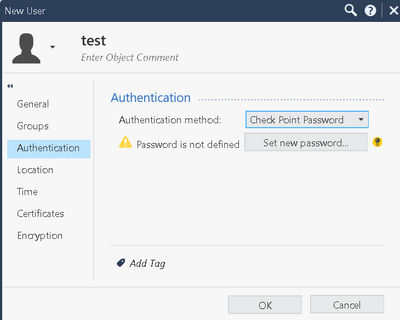
If you are not using AD to validate users and they are all local, sounds like the only way to do this would be to modify the individual user by modifying auth method once you edit the user in dashboard.
Hi the_rock,
But how can I differentiate the users that will require MFA on the VPN from users that will not need that with the auth method?
I'm not following when you say that I can achieve this with auth method.
Regards
No problem, Im simply referring to below when you edit the user in smart console.
Hi @the_rock
I know the place of the configuration on the Smart Console.
But I think that will still not help me to achieve what the end customer wants. So, let says that we have User_A and User_B, both of them local within the Gateways and with priviledges to login on the Remote Access VPN. Then, I want that the User_A only can connect on the VPN with his credentials (Username and Password) on the Authentication Profile with MFA, but not on the Authentication Profile without MFA. Also, I want that the User_B can connect in both of the Authentication Profiles with or without MFA.
I hope I explained better what we need. And sorry If I was not clear on the first place.
Regards
Message me privately, lets do remote session.
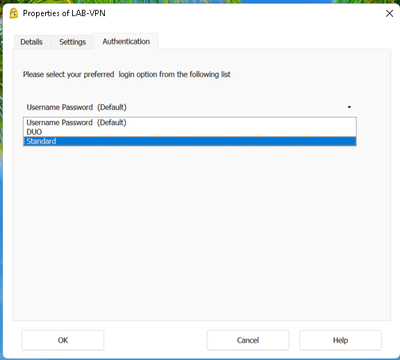
If you are referring to below setting, that has to be changed manually, UNLESS you use just one generic auth method on gateway
Hi @the_rock
That is exactly what I'm talking about. So, at the end of the day, the end users will always have the possibility to change that option, because we've two possible options for the authentication (Username/Password only, Username/Password + SMS).
As far as I known, I cannot disable that option in the VPN client of the end users. Also, I cannot avoid centrally that a end user successfully login in both authentication schemes.
Regards
Correct, Im pretty sure you cannot do that, unless you use one generic auth method, in which case users wont have a choice. There might be some way of doing this by modifying trac.defaults file, but I would confirm with TAC, to be certain.
Andy
Leaderboard
Epsum factorial non deposit quid pro quo hic escorol.
| User | Count |
|---|---|
| 4 | |
| 4 | |
| 3 | |
| 3 | |
| 3 | |
| 2 | |
| 2 | |
| 1 | |
| 1 | |
| 1 |
Tue 21 Apr 2026 @ 05:00 PM (IDT)
AI Security Masters E7: How CPR Broke ChatGPT's Isolation and What It Means for YouTue 28 Apr 2026 @ 06:00 PM (IDT)
Under the Hood: Securing your GenAI-enabled Web Applications with Check Point WAFTue 21 Apr 2026 @ 05:00 PM (IDT)
AI Security Masters E7: How CPR Broke ChatGPT's Isolation and What It Means for YouTue 28 Apr 2026 @ 06:00 PM (IDT)
Under the Hood: Securing your GenAI-enabled Web Applications with Check Point WAFThu 30 Apr 2026 @ 03:00 PM (PDT)
Hillsboro, OR: Securing The AI Transformation and Exposure ManagementAbout CheckMates
Learn Check Point
Advanced Learning
YOU DESERVE THE BEST SECURITY