- Products
- Learn
- Local User Groups
- Partners
- More

What's New in R82.10?
Watch HereWhen the Agents Attack
A Live Look at Agentic Exposure Validation
AI Security Masters E8:
Claude Mythos: New Era in Cyber Security
CheckMates Go:
CheckMates Fest
Hello,
I am experiencing an issue with my local network getting disconnected when connected to VPN. Any explanation/ fix would be much appreciated
I read about enabling split tunnelling on the VPN, would this be a possible solution? If so, could someone explain the process/how to configure this?
Thanks in advance
“Route all traffic” is a setting controlled by the administrator of the site you are connected to, generally speaking.
If the admin has defined this as something you can control, there will be a checkbox you can disable in the site definition.
There is also a setting (again controlled by the administrator) to exclude the local networks from this: exclude_local_networks_in_hub_mode
See: https://supportcenter.checkpoint.com/supportcenter/portal?eventSubmit_doGoviewsolutiondetails=&solut...
Outside of those two settings, the only way you might be able to fix this would be to manually manipulate the routing table on your client after you connect to the VPN.
“Route all traffic” is a setting controlled by the administrator of the site you are connected to, generally speaking.
If the admin has defined this as something you can control, there will be a checkbox you can disable in the site definition.
There is also a setting (again controlled by the administrator) to exclude the local networks from this: exclude_local_networks_in_hub_mode
See: https://supportcenter.checkpoint.com/supportcenter/portal?eventSubmit_doGoviewsolutiondetails=&solut...
Outside of those two settings, the only way you might be able to fix this would be to manually manipulate the routing table on your client after you connect to the VPN.
Thanks for your response, this is very helpful info. I will reach out to the admin with these suggestions and will update when the issue is resolved!
Did you try searching the community before asking? There are plenty of discussions where your question is already answered, for example https://community.checkpoint.com/t5/Remote-Access-VPN/Split-Tunnel/td-p/34675
Thats valid question and as the guys said, its all about split tunnel. So, to put it in layman's terms, it works like this:
FULL TUNNEL - works in a way where say users connect via remote access VPN, their Internet traffic will go through the firewall as well. Now, while this does protect the user, most companies prefer not to do this, as it puts more load on the firewall and they dont wish to need to put more resources to make sure Internet browsing from user side is in check with what company's policy
SPLIT TUNNEL - works in a way where users connect to access ONLY corporate resources and their Internet traffic goes via their own ISP home provider (always preferred method, regardless what vendor you use)
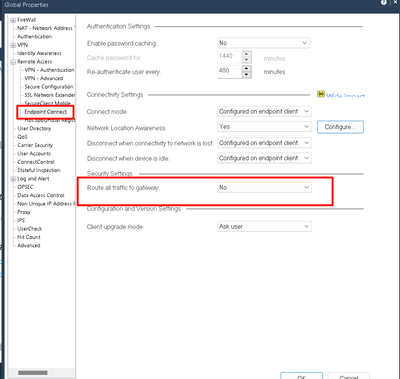
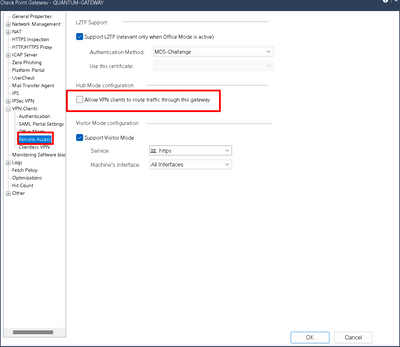
Now, as @_Val_ and @PhoneBoy mentioned, settings you need are below, I pointed them out and IF they are unchecked, it means it would be split tunnel.
If you select what I pasted, then it will do split tunnel and you wont have any issues. Let us know if you need more clarification.
Good reference article:
https://nordlayer.com/features/vpn-split-tunneling/
Cheers,
Andy
Hi Andy, I appreciate you taking the time to explain this so clearly. I have passed on this info and fingers crossed will have the issue resolved by tomorrow. Thanks again.
Check if the Remote site has the same local network (e.g.192.168.x.y) in use as you do ! Saw this with local printers that are only reachable if RA VPN is disconnected.
Leaderboard
Epsum factorial non deposit quid pro quo hic escorol.
| User | Count |
|---|---|
| 3 | |
| 2 | |
| 1 | |
| 1 | |
| 1 | |
| 1 | |
| 1 | |
| 1 | |
| 1 |
Thu 09 Jul 2026 @ 10:00 AM (CEST)
Schutz souveräner Workloads: Check Point & die AWS European Sovereign CloudThu 09 Jul 2026 @ 11:00 AM (CEST)
The Cloud Architects Series: Check Point Edge Protection SD-WAN & SASEThu 09 Jul 2026 @ 11:00 AM (EDT)
Tips and Tricks 2026 #9 - What's New with Check Point Email SecurityFri 10 Jul 2026 @ 11:00 AM (IDT)
CheckMates Live Netherlands - Sessie 48: Nieuwe Check Point Workspace SecurityTue 14 Jul 2026 @ 10:00 AM (PDT)
AI Security Masters E11: READY OR NOT: Securing the AI Enterprise 3/5 - AI Workforce SecurityThu 30 Jul 2026 @ 10:00 AM (PDT)
AI Security Masters E12: READY OR NOT: Securing the AI Enterprise 4/5 - AI GatewayThu 09 Jul 2026 @ 11:00 AM (EDT)
Tips and Tricks 2026 #9 - What's New with Check Point Email SecurityFri 10 Jul 2026 @ 11:00 AM (IDT)
CheckMates Live Netherlands - Sessie 48: Nieuwe Check Point Workspace SecurityTue 14 Jul 2026 @ 10:00 AM (PDT)
AI Security Masters E11: READY OR NOT: Securing the AI Enterprise 3/5 - AI Workforce SecurityThu 30 Jul 2026 @ 10:00 AM (PDT)
AI Security Masters E12: READY OR NOT: Securing the AI Enterprise 4/5 - AI GatewayThu 20 Aug 2026 @ 10:00 AM (PDT)
AI Security Masters E13: READY OR NOT: Securing the AI Ent 5/5 - AI Research & Threat LandscapeAbout CheckMates
Learn Check Point
Advanced Learning
YOU DESERVE THE BEST SECURITY