- Products
- Learn
- Local User Groups
- Partners
- More

Step Into the Future of
AI-Powered Cyber Security
The State of Ransomware Q1 2026
Key Trends and Their Impact
AI Security Masters E8:
Claude Mythos: New Era in Cyber Security
Blueprint Architecture for Securing
The AI Factory & AI Data Center
Call For Papers
Your Expertise. Our Stage
CheckMates Go:
CheckMates Fest
I installed the client vpn check point mobile and I wish that the internet flows through the vpn
See sk111995: You have to set Hub Mode / Route all traffic to gateway in Global Properties -> Remote Access -> Endpoint Connect -> Route all traffic to gateway -> set to "Yes"
Hello,
Hello,
once "Route all traffic to gateway" is set to YES, is the VPN domain configured in the remote access community checked, or is it treated as if the VPN domain is set to "All Internet"? In other words, if I select this option to YES and the VPN domain for remote access is set to only internal IP addresses, is all traffic still forced through the gateway, without considering the VPN domain setting?
Assuming you don't leave this as a "client decide" option to configure, you are correct.
Yeah. That is correct what Gunther has suggested. It is best way.
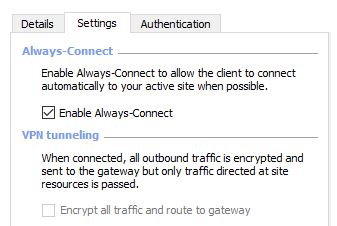
Also you can try with enabling option "VPN Tunneling" on Endpoint client agent itself. but it is manual task.
If you are using SSL VPN with Mobile access blade then follow below procedure to route all traffic to gateway.
https://community.checkpoint.com/message/12386-mobile-access-default-route
Hi,
checkpoint vpn tunneling greyed out ? How do I get this ungreyed out ?
Hi Guys,
can somebody tell me how to change this on the endpoint? we would like to turn on split tunneling only for one endpoint for testing purposes without changing this for everybody via Global Properties.
Thank You,
Basilio Alcantara
Hi Omar,
Did you get any solution? I'm facing same issue in MacOS. For Windows I already saw some workarounds however not applicable for Mac.
Hi,
Yes, you can this. Follow the below step:
Global Properties --> Remote Access --> Endpoint Connect --> Route all traffic to gateway --> set to "Yes"
Global Properties - Remote Access End Pont Connect select the following option.
Route All Traffic to GW: Configured on endpoint client
After enabling this, can't access anything outside, only internal. Do we need to enable NAT for the Office Mode subnet, in order to be able access outside?
Leaderboard
Epsum factorial non deposit quid pro quo hic escorol.
| User | Count |
|---|---|
| 3 | |
| 1 | |
| 1 | |
| 1 | |
| 1 |
Tue 19 May 2026 @ 06:00 PM (IDT)
AI Security Masters E8 - Claude Mythos: New Era in Cyber SecurityWed 20 May 2026 @ 11:00 AM (CEST)
The New DDoS Reality: Autonomy, Scale, and the Future of DefenceTue 19 May 2026 @ 06:00 PM (IDT)
AI Security Masters E8 - Claude Mythos: New Era in Cyber SecurityWed 20 May 2026 @ 11:00 AM (CEST)
The New DDoS Reality: Autonomy, Scale, and the Future of DefenceFri 29 May 2026 @ 09:00 AM (EDT)
Caracas: Executive Breakfast: Innovación en Ciberseguridad – IA y Threat IntelligenceAbout CheckMates
Learn Check Point
Advanced Learning
YOU DESERVE THE BEST SECURITY