- Products
- Learn
- Local User Groups
- Partners
- More

Step Into the Future of
AI-Powered Cyber Security
What's New in R82.10?
Register HereWhen the Agents Attack
A Live Look at Agentic Exposure Validation
AI Security Masters E8:
Claude Mythos: New Era in Cyber Security
CheckMates Go:
CheckMates Fest
Hello everyone.
I currently have a ClusterXL R81.10, on which I want to implement a security rule, for a group of remote VPN users.
I think I understand that this works by putting the group object in an Access Role (and I have done so), but the problem is that when installing policies, I get an error, for not having activated the Identity Awaraness blade.
Is it mandatory to activate the blade, to work the Access Role?
There is no other way to work the local users that I have created in the Firewall, to give permissions to remote VPN user connections?
Greetings.
Identity Awareness is required to use Access Roles, yes.
The only other way to do it is to use Legacy User Access rules, but these are only supported in "Firewall only" layers per: https://support.checkpoint.com/results/sk/sk169493
Identity Awareness is required to use Access Roles, yes.
The only other way to do it is to use Legacy User Access rules, but these are only supported in "Firewall only" layers per: https://support.checkpoint.com/results/sk/sk169493
Hello,
Thank you for your reply.
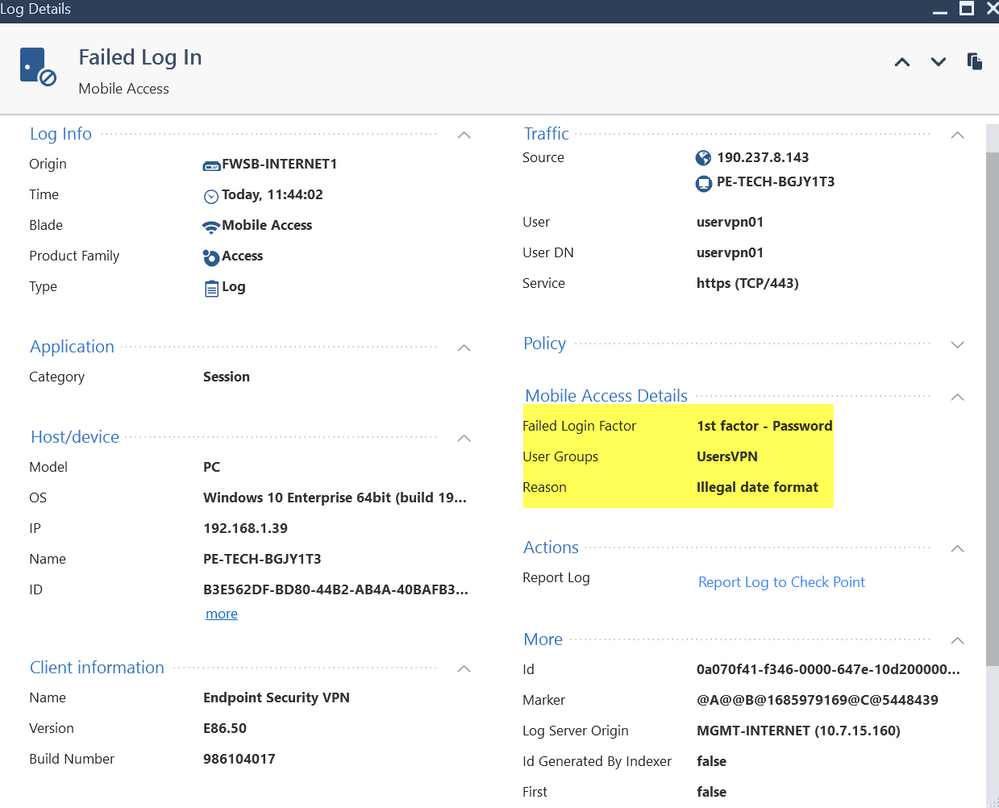
I have created a security rule, calling in the origin to a legacy object, for the connection of a remote VPN user, but it is not allowing me the connection, and it shows me the following error message.
Any idea why I get this error message and how to correct it?
The locally created group object is already inside the VPN Community, Remote Access.
Cheers.
Thats probably auth method issue on the gateway object properties.
Andy
Your rule is a "Legacy User Access" style.
As far as I know, this method only allows for a single authentication method.
This log implies you have more than one configured.
Try it with a properly configured Access Role and see if you get the same issue.
Sure, I could try it, but this demands that I activate the AI blade, right?
Yes, as stated previously.
For creating IA access roles, yes buddy.
Andy
Yes, what @PhoneBoy said is correct, because TAC told me the same in the past. If you do not want to enable IA blade, sk is the only other way to do this.
Andy
Leaderboard
Epsum factorial non deposit quid pro quo hic escorol.
| User | Count |
|---|---|
| 2 | |
| 2 | |
| 1 | |
| 1 | |
| 1 | |
| 1 | |
| 1 | |
| 1 | |
| 1 |
Tue 16 Jun 2026 @ 05:00 PM (CEST)
Under the Hood: Check Point SASE | Internet Access Optimization & Performance TuningThu 18 Jun 2026 @ 10:00 AM (CEST)
The Cloud Architects Series: Check Point WAF - The Next Generation of AI powered protectionTue 23 Jun 2026 @ 05:00 PM (CEST)
Under the Hood: Check Point Cloud Firewall | Securing all of your clouds: Art of the possibleTue 16 Jun 2026 @ 05:00 PM (CEST)
Under the Hood: Check Point SASE | Internet Access Optimization & Performance TuningThu 18 Jun 2026 @ 10:00 AM (CEST)
The Cloud Architects Series: Check Point WAF - The Next Generation of AI powered protectionTue 23 Jun 2026 @ 05:00 PM (CEST)
Under the Hood: Check Point Cloud Firewall | Securing all of your clouds: Art of the possibleThu 25 Jun 2026 @ 10:00 AM (PDT)
AI Security Masters E10: READY OR NOT: Securing the AI Enterprise 2/5 - AI Red TeamingAbout CheckMates
Learn Check Point
Advanced Learning
YOU DESERVE THE BEST SECURITY