- Products
- Learn
- Local User Groups
- Partners
- More

AI Security Masters E7:
How CPR Broke ChatGPT's Isolation and What It Means for You
Call For Papers
Your Expertise. Our Stage
Good, Better, Best:
Prioritizing Defenses Against Credential Abuse
Ink Dragon: A Major Nation-State Campaign
Watch HereCheckMates Go:
CheckMates Fest
Hello to everyone,
How can I disable sound upon connect and disconnect in VPN client?
Many users have this request and I can't find a solution 😞
Thanks in advance.
Regards
M.
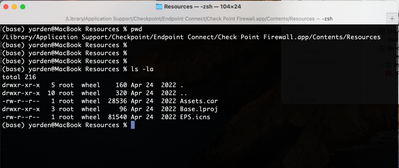
For Mac, you need to change the Endpoint Security VPN app.
This is installed under /Library/Application Support/Checkpoint/Endpoint Security/Endpoint Connect
I confirm I can see the following files (which I assume can be replaced):
Hi, the easiest way to achieve this on Windows (11 tested) is by disabling the Windows app sound for the Check Point VPN client. You can find this setting in the tray after scrolling.
Or, if you prefer, you can do it in the extended Sound > Volume mixer settings.
Also, if you want to disable the notification sounds too:
you may do this through the Notifications settings:
It looks like that although the app sound icon disappears after the client has been shut down, the setting is remembered for the next time you start it. If it survives changes in Windows, it should also survive the VPN client updates.
I hope this helps.
Thanks, I created empty files and insterted them instead of originals and it works 🙂
what about Mac? perhaps do you know the path there as well? can't figure it out
Did you open up the application bundle?
If there is a file to replace, it’d probably be in there.
You mean to go under Applications/Checkpoint app and right click> "show package contents"?
I tried so, opened every folder or sub package, didn't find anything..
do you know where to look?
or perhaps what to look for? because I tried also to search for *.wav files but no results
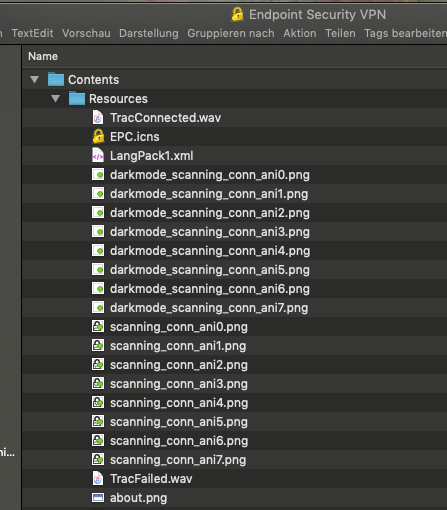
For Mac, you need to change the Endpoint Security VPN app.
This is installed under /Library/Application Support/Checkpoint/Endpoint Security/Endpoint Connect
I confirm I can see the following files (which I assume can be replaced):
Ohh bummer this was so close..
I managed to track the entire path but the files at the end do not exists, how strange
using version:
Version VPN E86.50 Build 986200708
I assume you installed “Endpoint Security VPN” instead of the full Endpoint client (which @G_W_Albrecht and I are both using).
Which means it may be somewhere else.
Something like the following might help you find the precise location:
find “/Library/Application Support/Checkpoint” -name TracConnected.wav -print
I can find both .wav files here:
This screenshot made me wonder the entire thing from scrach..
Not sure if I did it correctly but originally my app was downloaded from here
https://www.checkpoint.com/quantum/remote-access-vpn/
which do not contains the files in the mentioned above paths.
I now redownloaded the app from the app store
https://apps.apple.com/il/app/check-point-capsule-connect/id506669652
this looks like a newer and better app which
a. contains the files
b. do not make sounds by default (?) (need to further test this but seems quiet so far)
This is a VPN client intended for Mobile Phones and iPads, not for the Mac.
Having said that, M1-based Macs can run iPad apps, which is why this is working for you.
This is Endpoint Security VPN OS X flavor Mobile...
Hi, the easiest way to achieve this on Windows (11 tested) is by disabling the Windows app sound for the Check Point VPN client. You can find this setting in the tray after scrolling.
Or, if you prefer, you can do it in the extended Sound > Volume mixer settings.
Also, if you want to disable the notification sounds too:
you may do this through the Notifications settings:
It looks like that although the app sound icon disappears after the client has been shut down, the setting is remembered for the next time you start it. If it survives changes in Windows, it should also survive the VPN client updates.
I hope this helps.
Leaderboard
Epsum factorial non deposit quid pro quo hic escorol.
| User | Count |
|---|---|
| 4 | |
| 4 | |
| 3 | |
| 3 | |
| 3 | |
| 2 | |
| 2 | |
| 2 | |
| 1 | |
| 1 |
Tue 21 Apr 2026 @ 05:00 PM (IDT)
AI Security Masters E7: How CPR Broke ChatGPT's Isolation and What It Means for YouTue 28 Apr 2026 @ 06:00 PM (IDT)
Under the Hood: Securing your GenAI-enabled Web Applications with Check Point WAFTue 21 Apr 2026 @ 05:00 PM (IDT)
AI Security Masters E7: How CPR Broke ChatGPT's Isolation and What It Means for YouTue 28 Apr 2026 @ 06:00 PM (IDT)
Under the Hood: Securing your GenAI-enabled Web Applications with Check Point WAFTue 12 May 2026 @ 10:00 AM (CEST)
The Cloud Architects Series: Check Point Cloud Firewall delivered as a serviceThu 30 Apr 2026 @ 03:00 PM (PDT)
Hillsboro, OR: Securing The AI Transformation and Exposure ManagementAbout CheckMates
Learn Check Point
Advanced Learning
YOU DESERVE THE BEST SECURITY