- Products
- Learn
- Local User Groups
- Partners
- More

MVP 2026: Submissions
Are Now Open!
What's New in R82.10?
Watch NowOverlap in Security Validation
Help us to understand your needs better
CheckMates Go:
Maestro Madness
How do I route my office mode network through my site to site Ipsec tunnel to access resources in our remote offices?
By adding these networks to your RA VPN Encryption Domain !
The target networks !
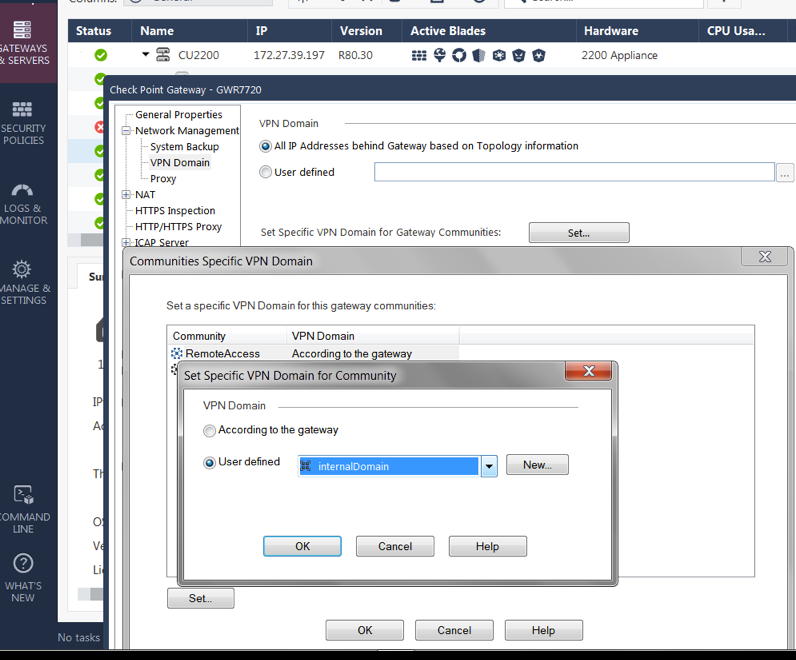
A VPN client Encryption Domain, containing all nets that should be accessible. Go into Gateway > Network Management > VPN Domain > Set specific VPN Domain for GW Communities > Select the RA Community > Set > User Defined select a Network group created for this purpose.
hi, please help - i cant find the right place where i have to configure the RA vpn domain. daniel
Addition to the screenshot: This is R80.40, so you can select between different RA VPN communities. Up to R80.30, there was only one RA VPN community where the Domain could be set...
Hi G_W_Albrecht,
I have done that you propose, but it does not work.
As RA VPN domain, I have created a group including internal networks and also internal networks from some remote peers, and it does not work.
We can reach, trough RA internal resources but no IPSEC site to site resources on remote peers.
From internal LAN, we can access them.
Hi G_W_Albrecht,
We have tried that you proposed (including internal networks from remote peers, with a S2S VPN with our cluster, on RA VPN domain) but we cannot reach them.
We can reach them from internal LAN only.
regards
Hello Juan,
It is normal that it doesn't work. I tested in my lab by creating a group with the the local and remote subnets of the VPN tunnel; and adding the group to the VPN domain of the "RemoteAccess "community. It was OK but it wasn't enough.
In order to make it work, I had to add the Office Mode subnet (CP_default_Office ...) to the local VPN domain because I was getting the following log :
'Encryption Failure: according to the policy the packet should not have been decrypted'
So I created a group with the local subnet and the Office Mode subnet to be added to the VPN domain of the local site:
Then, I had to authorize the Office Mode subnet, on the remote gateway because the packets finished in the cleanup rule of the remote gateway.
This way from the remote client (on remote access), I was able to access to a PC on the remote site through the VPN tunnel
I hope this will help
Leaderboard
Epsum factorial non deposit quid pro quo hic escorol.
| User | Count |
|---|---|
| 4 | |
| 3 | |
| 2 | |
| 2 | |
| 1 | |
| 1 | |
| 1 | |
| 1 | |
| 1 | |
| 1 |
Fri 12 Dec 2025 @ 10:00 AM (CET)
Check Mates Live Netherlands: #41 AI & Multi Context ProtocolTue 16 Dec 2025 @ 05:00 PM (CET)
Under the Hood: CloudGuard Network Security for Oracle Cloud - Config and Autoscaling!Fri 12 Dec 2025 @ 10:00 AM (CET)
Check Mates Live Netherlands: #41 AI & Multi Context ProtocolTue 16 Dec 2025 @ 05:00 PM (CET)
Under the Hood: CloudGuard Network Security for Oracle Cloud - Config and Autoscaling!Thu 18 Dec 2025 @ 10:00 AM (CET)
Cloud Architect Series - Building a Hybrid Mesh Security Strategy across cloudsAbout CheckMates
Learn Check Point
Advanced Learning
YOU DESERVE THE BEST SECURITY