- Products
- Learn
- Local User Groups
- Partners
- More

MVP 2026: Submissions
Are Now Open!
What's New in R82.10?
10 December @ 5pm CET / 11am ET
Improve Your Security Posture with
Threat Prevention and Policy Insights
Overlap in Security Validation
Help us to understand your needs better
CheckMates Go:
Maestro Madness
Hi,
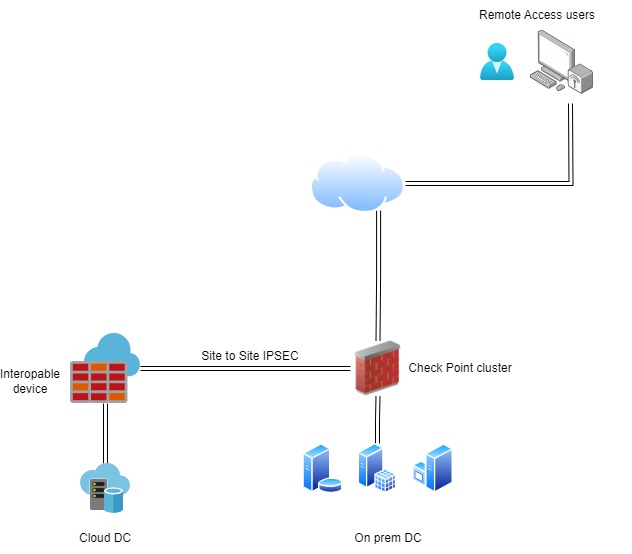
I am trying to solve an issue where i need remote access users to be able to connect to resources behind a site to site tunnel.
Remote users connect to on premises Check Point cluster (R81.20 Take26) using Check Point Mobile client and can access resources in on premises datacenter.
But they also need to access resources that is located on the other end of an site to site tunnel.
I saw the Remote Access community, but i cannot add this interopable device there. I suspect it must be an Check Point host for that.
What can be done to enable routing between these two vpn domains ?
These are gateways that directly terminate Remote Access connections.
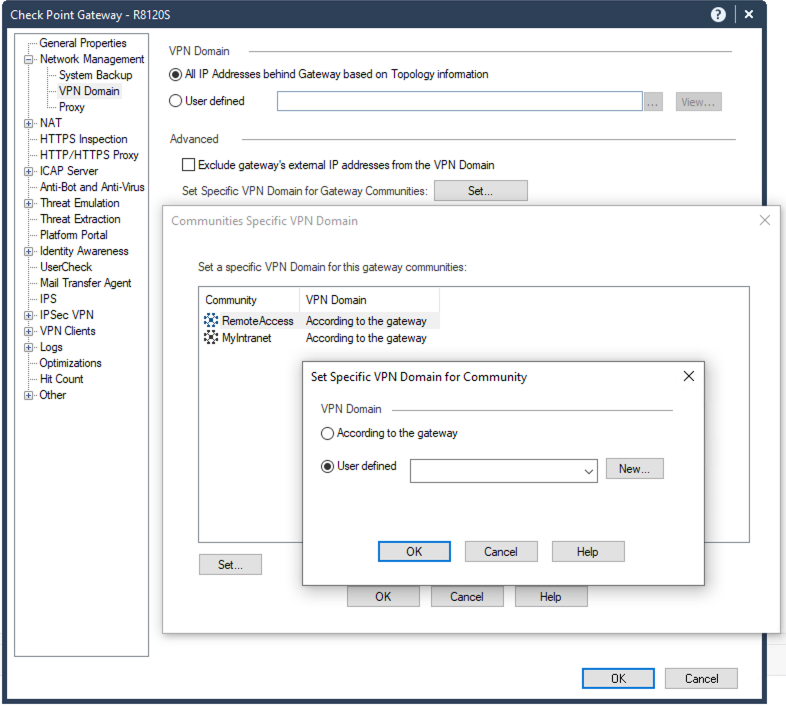
What you need to modify is the Remote Access Encryption Domain, which is modified in the Gateway object:
The object referred to here should be a group object that includes both your local IP addresses (i.e. your local encryption domain) and the remote IP addresses you wish to be accessible (i.e. the remote encryption domain).
You don't add the Interoperable Device, but you add the networks behind that device to the Remote Access Community.
Hi,
The RemoteAccess community only has two options:
Add participating gateway and Participating User Groups
So i do not know where i should add these networks ?
These are gateways that directly terminate Remote Access connections.
What you need to modify is the Remote Access Encryption Domain, which is modified in the Gateway object:
The object referred to here should be a group object that includes both your local IP addresses (i.e. your local encryption domain) and the remote IP addresses you wish to be accessible (i.e. the remote encryption domain).
Thank you Phoneboy 🙏 appreciate your help 🙂
Hello,
I tested in my lab by creating a group with the the local and remote subnets of the VPN tunnel; and adding the group to the VPN domain of the "RemoteAccess "community. It was OK but it wasn't enough.
In order to make it work, I had to add the Office Mode subnet (CP_default_Office ...) to the local VPN domain because I was getting the following log :
'Encryption Failure: according to the policy the packet should not have been decrypted'
So I created a group with the local subnet and the Office Mode subnet :
Then, I had to authorize the Office Mode subnet, on the remote gateway because the packets finished in the cleanup rule of the remote gateway.
This way from the remote client (on remote access), I was able to access to a PC on the remote site through the VPN tunnel
I hope this will help
SK 36510
Remote-Access to S2S Vpn
2.On the Checkpoint side gateway, Put the Office mode IP range into the Gateway's Encryption domain. (NOTE: If the office mode IP range is going to be sent over the tunnel, make sure the Peer expects to see this network range(policy rule, etc). If using a Hide nat, add both Office mode and NAT IPs to the Checkpoint side gateway's domain)
6.Install policy
===============
Double check,
>the S2S VPN community page: Un-check box for Disable NAT inside the community (Only if NAT is needed)
>May need to add a NO-NAT rule for the two way traffic, Office Mode IP to Peer's network and Peer's network to Office Mode.
**unless OM is hide NATing**
Leaderboard
Epsum factorial non deposit quid pro quo hic escorol.
| User | Count |
|---|---|
| 3 | |
| 2 | |
| 1 | |
| 1 | |
| 1 | |
| 1 | |
| 1 | |
| 1 |
Thu 04 Dec 2025 @ 02:00 PM (EST)
End-of-Year Event: Securing AI Transformation in a Hyperconnected World - AmericasThu 04 Dec 2025 @ 02:00 PM (EST)
End-of-Year Event: Securing AI Transformation in a Hyperconnected World - AmericasFri 12 Dec 2025 @ 10:00 AM (CET)
Check Mates Live Netherlands: #41 AI & Multi Context ProtocolTue 16 Dec 2025 @ 05:00 PM (CET)
Under the Hood: CloudGuard Network Security for Oracle Cloud - Config and Autoscaling!About CheckMates
Learn Check Point
Advanced Learning
YOU DESERVE THE BEST SECURITY