- Products
- Learn
- Local User Groups
- Partners
- More

MVP 2026: Submissions
Are Now Open!
What's New in R82.10?
Watch NowOverlap in Security Validation
Help us to understand your needs better
CheckMates Go:
Maestro Madness
Hi Checkmates,
Right now im on implementing RA VPN in customer environment, but found difficulties in configuration.. i tried some config following Admin Guide and SK but the issue still persist :
Thankyou Checkmates, looking forward the answer 🙂
Split tunnel (allowing direct access to Internet versus routing all traffic through the VPN headend) is the default.
You change this in Global Properties > Remote Access > Endpoint Connect > Route All Traffic to Gateway
There is also a setting on the client when the above setting is set to "Configured on Endpoint Client."
For access by DNS name, that generally involves:
Depending on the precise requirements for accessing the Disaster site, you may want to configure Multiple Entry Point.
See: https://sc1.checkpoint.com/documents/R81.20/WebAdminGuides/EN/CP_R81.20_RemoteAccessVPN_AdminGuide/C...
I only can understand your question 1: Full tunnel is how it usually does work, i saw nothing in the sk that could confuse anyone!
You can find split tunneling in sk167000: How to configure Split Tunnel for Office 365 and other SaaS Applications and R81.20 Remote Access VPN Administration Guide - Dynamic Split Tunneling for SaaS Using Updatable Obj...
For Q2 you may talk about IP and Site name resolved by DNS, but i never heard of a VPN between DC and DRC (???)...
Hi!
So by default the configuration is Full Tunnel right?
Thankyou, i will check it for the second link is it only applicable for 81.20 only? my customer still on 81.10
Im sorry for not clear enough about my question, for Q2 i mean like below
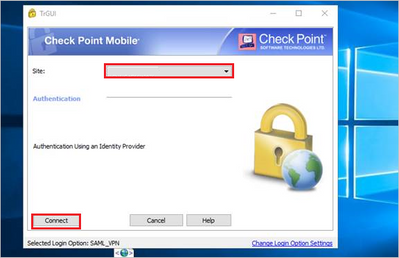
When i used IP Public Address for "site", users can connect normally. but when i was trying to change "site" access using domain like vpn.company.co.uk user cant connect. Thanks!
What does the used client DNS resolve vpn.company.co.uk to ? The IP must be known to the DNS.
Split tunnel (allowing direct access to Internet versus routing all traffic through the VPN headend) is the default.
You change this in Global Properties > Remote Access > Endpoint Connect > Route All Traffic to Gateway
There is also a setting on the client when the above setting is set to "Configured on Endpoint Client."
For access by DNS name, that generally involves:
Depending on the precise requirements for accessing the Disaster site, you may want to configure Multiple Entry Point.
See: https://sc1.checkpoint.com/documents/R81.20/WebAdminGuides/EN/CP_R81.20_RemoteAccessVPN_AdminGuide/C...
When using Office Mode (i.e with enterprise clients Endpoint Security VPN or Mobile VPN), how do you manage split DNS? If you provide your internal DNS via Office Mode (ex: DHCP), everything will be resolved via the internal DNS servers configured. How to force that public domains should be resolved via the LAN adapter (public ISP DNS servers) instead? From what I have observed and tested so far, the Checkpoint VPN adapter interface metric is lower (=0) compared to the LAN/WiFi interfaces on the computer, so has higher priority and takes precedence over the others, meaning everything will be resolved by the DNS specified via Office Mode.
I still have not found a way to manage split DNS properly (forcing public domains resolution not on the internal DNS servers) when using enterprise clients and Office mode... Any advice is welcome.
Thanks.
Leaderboard
Epsum factorial non deposit quid pro quo hic escorol.
| User | Count |
|---|---|
| 4 | |
| 3 | |
| 2 | |
| 2 | |
| 1 | |
| 1 | |
| 1 | |
| 1 | |
| 1 |
Tue 16 Dec 2025 @ 05:00 PM (CET)
Under the Hood: CloudGuard Network Security for Oracle Cloud - Config and Autoscaling!Thu 18 Dec 2025 @ 10:00 AM (CET)
Cloud Architect Series - Building a Hybrid Mesh Security Strategy across cloudsTue 16 Dec 2025 @ 05:00 PM (CET)
Under the Hood: CloudGuard Network Security for Oracle Cloud - Config and Autoscaling!Thu 18 Dec 2025 @ 10:00 AM (CET)
Cloud Architect Series - Building a Hybrid Mesh Security Strategy across cloudsAbout CheckMates
Learn Check Point
Advanced Learning
YOU DESERVE THE BEST SECURITY