- Products
- Learn
- Local User Groups
- Partners
- More

MVP 2026: Submissions
Are Now Open!
What's New in R82.10?
10 December @ 5pm CET / 11am ET
Announcing Quantum R82.10!
Learn MoreOverlap in Security Validation
Help us to understand your needs better
CheckMates Go:
Maestro Madness
Hello Everyone,
So i Need a litle help, i am setting up a SCV for Endpoint when they connect to VPN.
One of the things i need is for the SCV check for WindowsSecurityMonitor : VirusProtection, WindowsUpgrade, SpywareProtection and NetworkFirewall.
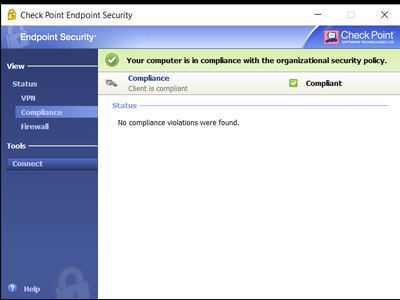
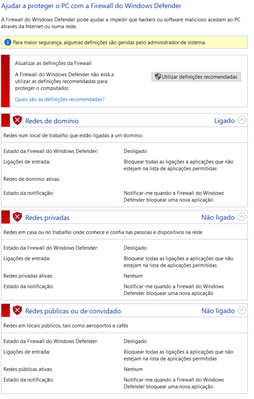
The things is when i connect with the Firewall disabled it continues to say that i am compliant with the Site. On the other end VirusProtection Works Fine.
This is the Configuration i am using.
: (WindowsSecurityMonitor
:type (plugin)
:parameters (
:VirusProtectionRequired (true)
:VirusProtectionRequiredMismatchMessage ("Please verify that your virus protection is up to date and virus scanning is on.")
:VirusProtectionInstalledPrograms ("any")
:VirusProtectionInstalledProgramsMismatchMessage ("There is no anti-virus program installed on the machine.")
:WindowsUpdateRequired (true)
:WindowsUpdateRequiredMismatchMessage ("Please make sure that windows automatic updates is turned on")
:SpywareProtectionRequired (true)
:SpywareProtectionRequiredMismatchMessage ("Please verify that your spyware protection is turned on.")
:SpywareProtectionInstalledPrograms ("any")
:SpywareProtectionInstalledProgramsMismatchMessage ("There is no anti-spyware program installed on the machine.")
:NetworkFirewallRequired (true)
:NetworkFirewallRequiredMismatchMessage ("Please verify the your network firewall is turned on.")
:NetworkFirewallInstalledPrograms ("any")
:NetworkFirewallInstalledProgramsMismatchMessage ("There is no network firewall program installed on the machine.").
Does anyone have any clue why this is happening? Is there any proccess i should monitor?
Best Regards,
Pedro Filipe
I believe you need to install Remote Access VPN client and not Endpoint Client. Look into sk175451 under "StandAlone Clients"
Make sure you do not use endpoint policy and FW blade on the Endpoint client itself.
Hello @_Val_ ,
Yes i have the FW blade on the Enpoint enable on the client. Once i turn i disable it i get the error for the Windows Firewall.
Is there anyway i have the FW Blade enabled but still checks for the windows Firewall?
Thanks
I do not think so. Once Endpoint client has a policy, it counts for a FW. Also, having two separate FWs on a client is not a good idea.
And how can i disable completely the FW Blade, since i only find a way that the users disable it. I would like to disable it globally and not giving the chance do enable/disable.
Thanks
I believe you need to install Remote Access VPN client and not Endpoint Client. Look into sk175451 under "StandAlone Clients"
Hi pfilipe, this local.scv it works for all antivirus application (trend micro, mcafee, windows defender, etc)?
Leaderboard
Epsum factorial non deposit quid pro quo hic escorol.
| User | Count |
|---|---|
| 3 | |
| 3 | |
| 1 | |
| 1 | |
| 1 | |
| 1 | |
| 1 | |
| 1 |
Fri 12 Dec 2025 @ 10:00 AM (CET)
Check Mates Live Netherlands: #41 AI & Multi Context ProtocolTue 16 Dec 2025 @ 05:00 PM (CET)
Under the Hood: CloudGuard Network Security for Oracle Cloud - Config and Autoscaling!Fri 12 Dec 2025 @ 10:00 AM (CET)
Check Mates Live Netherlands: #41 AI & Multi Context ProtocolTue 16 Dec 2025 @ 05:00 PM (CET)
Under the Hood: CloudGuard Network Security for Oracle Cloud - Config and Autoscaling!Thu 18 Dec 2025 @ 10:00 AM (CET)
Cloud Architect Series - Building a Hybrid Mesh Security Strategy across cloudsAbout CheckMates
Learn Check Point
Advanced Learning
YOU DESERVE THE BEST SECURITY