- Products
- Learn
- Local User Groups
- Partners
- More

MVP 2026: Submissions
Are Now Open!
What's New in R82.10?
10 December @ 5pm CET / 11am ET
Announcing Quantum R82.10!
Learn MoreOverlap in Security Validation
Help us to understand your needs better
CheckMates Go:
Maestro Madness
Hi,
I have a strange issue while connecting to some Azure Cloud VM when using the remote access with MFA.
There is a s2s VPN between the HQ firewall and the Azure Cloud, everything works from LAN clients to the VMs;
People connecting with Remote Access (default AD authentication), can reach the Azure VMs;
People connecting with Remote Access with MFA (Microsoft Authenticator), can't reach these VMs; All the traffic to the LAN or even to another branch office (s2s) passes.
If I change the authentication method on the same client I can reach or not the VMs, so I suppose that something happens on "Microsoft side", but I can't understand what.
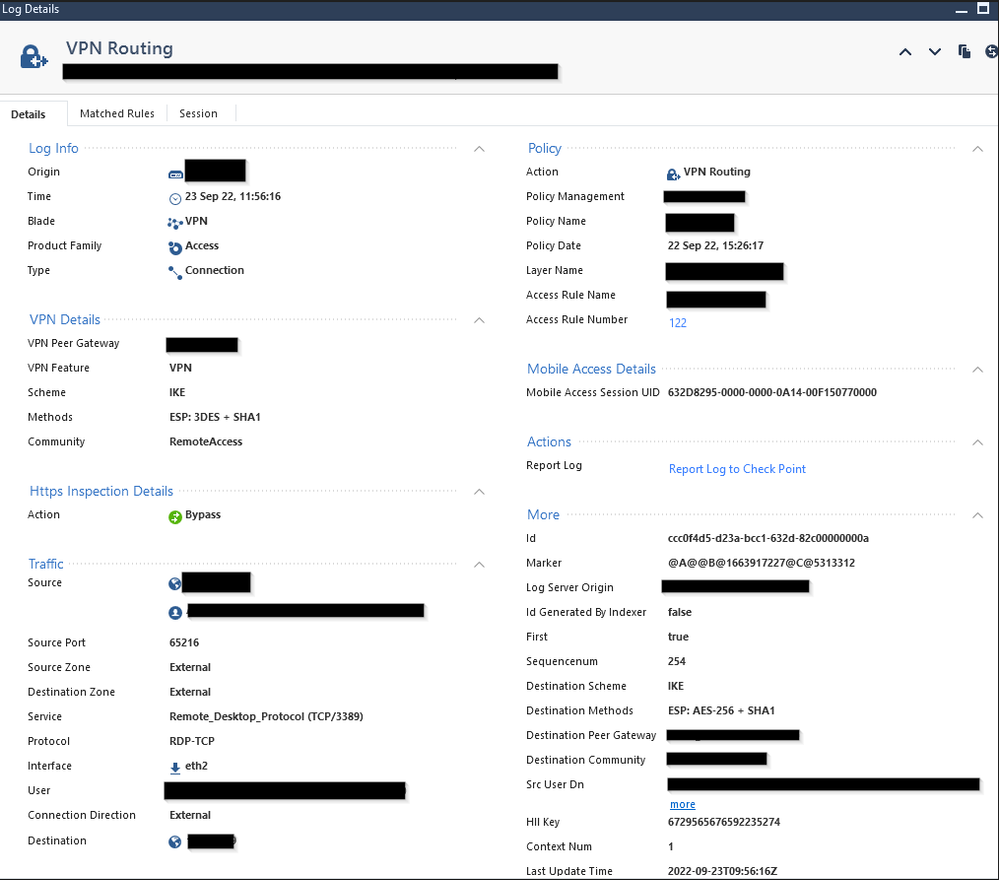
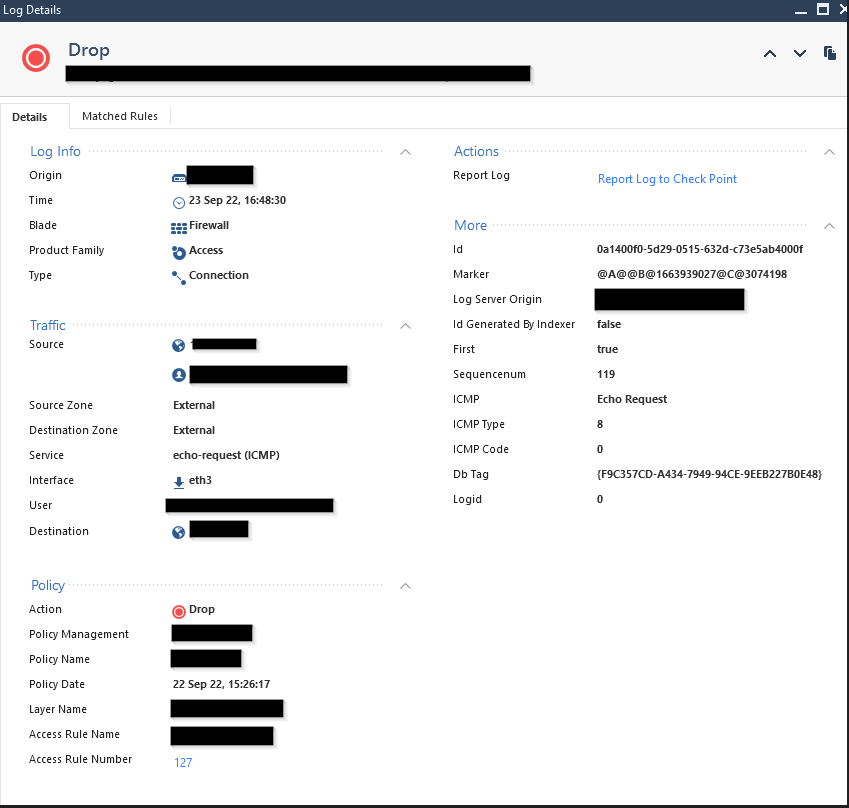
The logs on the firewall just show VPN routing when connected without MFA, and drops when using it.
Can you help me?
AD_Users@Any will only work with legacy authentication methods.\
In general, this should no longer be used.
The correct way to do this is with an Access Role.
Version/JHF level?
What are the precise rules in the Access Policy that are permitting the two groups of users?
Are they different rules?
Please provide a screen shot of log card entries for the two classes of users (masking sensitive data) and the relevant rules.
Hi PhoneBoy,
the cluster is R80.40 with two 6700 appliances, take 158
The rules are quite simple:
- Source: LAN, server_network, OfficeMode_network
- Destination: Azure_VMs_network
- VPN: Azure_VPN
- Services&App: icmp, rdp, HttpandHttps, tcp_(some custom ports)
- Action: Accept
The rule above is matched for LAN to Azure connections.
- Source: AD_Users@Any
- Destination: Azure_VMs_network
- VPN: RemoteAccess
- Services&App: icmp, rdp, HttpandHttps, tcp_(some custom ports)
- Action: Accept
The rule above is matched from VPN remote access users WITHOUT mfa, just normal AD user/psw match
- Source: Any
- Destination: Azure_VMs_network
- VPN: Any
- Services&App: Any
- Action: Drop
The rule above is matched from VPN remote access users using mfa.
AD_Users@Any will only work with legacy authentication methods.\
In general, this should no longer be used.
The correct way to do this is with an Access Role.
Thank you,
we figured out that the problem was about this group: with MFA authentication another group was triggered and since there wasn't the specific rule the traffic was not passing.
Adding a rule with the MFA group did the trick.
But if I understand well I could just use the Access Role and the user should match for both the auth methods, is it right?
Yes, assuming the Access Role covers all Remote Access users.
Do you use Office Mode for your RAS VPN connectivity? Also, cloud VM, is it part of RAS VPN site? If not, you may need to force all traffic to be routed through the central VPN GW to make it work.
Hi _Val_,
yes I do use Office Mode and no, the cloud VM is not part of the RAS VPN site.
I already tried to set the Endpoint client to force all the traffic to the gateway but it doesn't change the behavior.
What I cannot understand is the relationship between the use of the Azure MFA (or not) and the VPN routing; I suppose that the MFA should be involved in the authentication process only, but I have the feeling that since I'm also connecting to Azure VMs it might be a sort of "mismatch" of the users allowed to access it, but it would be a nonsense to me.
Leaderboard
Epsum factorial non deposit quid pro quo hic escorol.
Fri 12 Dec 2025 @ 10:00 AM (CET)
Check Mates Live Netherlands: #41 AI & Multi Context ProtocolFri 12 Dec 2025 @ 10:00 AM (CET)
Check Mates Live Netherlands: #41 AI & Multi Context ProtocolTue 16 Dec 2025 @ 05:00 PM (CET)
Under the Hood: CloudGuard Network Security for Oracle Cloud - Config and Autoscaling!About CheckMates
Learn Check Point
Advanced Learning
YOU DESERVE THE BEST SECURITY