- Products
- Learn
- Local User Groups
- Partners
- More

MVP 2026: Submissions
Are Now Open!
What's New in R82.10?
10 December @ 5pm CET / 11am ET
Announcing Quantum R82.10!
Learn MoreOverlap in Security Validation
Help us to understand your needs better
CheckMates Go:
Maestro Madness
Hi Checkmates,
I have an issue regarding my Android Phone and Harmony Mobile.
I am using my personal mobile device to conduct POC of Harmony Mobile on my previous company registering my mobile device to different Harmony Mobile Tenants for Demo.
Now I am employed to another Check Point Partner and will conduct Harmony Mobile POC the problem is every time I install the Harmony Mobile on my Mobile Device it bypass the registration for Server Address + Code and keeps connecting to the old Harmony Mobile Tenant. The problem is i dont have an access nor I remember what previous tenant my phone got registered.
troubleshooting done:
1. Delete the User Certificates for Harmony Mobile
2. Go to Settings> Applications > Harmony Mobile Protect > Delete Cache/Data
3. Find the lost tenant (cant find it nor remember it)
The only information I have for the Tenant is the following:
Dashboard ID and Server Address
Is there a way around to solve this on the Android device end without doing Factory Reset on my Mobile Device as well as raising an SR to Check Point TAC Support? Since TAC requests UCID and License Key to be able to create a new SR
The phone has to be disassociated with the old tenant on the backend.
This requires a TAC case.
I had been dealing with harmony mobile lately and this sounds like something I may had seen before. Can you send a screenshot of it please? I can dig through my emails to see if I can find something.
Andy
What screenshots do you need though?
Where its asking you to connect to the old tenant.
Its not asking me to connect to the old tenant, if i re-download the application it automatically connects to the old tenant. The part where you need to either scan qr or key in for gw address and code is bypassed
The phone has to be disassociated with the old tenant on the backend.
This requires a TAC case.
I already called the TAC team. But they need UCID and live subscription in order to support me 😞
I think in that case, your best bet is to contact your Sales person (account manager) from CP and see if they can make an exception via TAC.
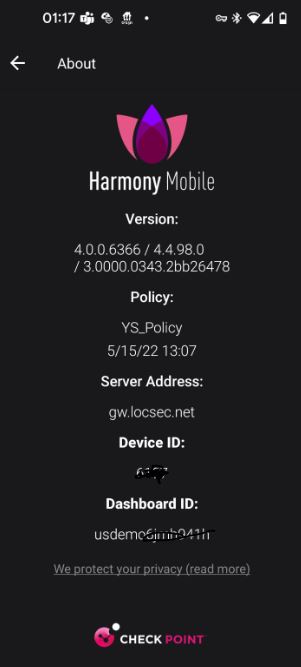
Each device that is connected to a harmony mobile dashboard is also registered on the "Harmony Mobile Gateway". that's the 'middle man' In case you accidently delete the app from your device the gateway will make sure it routs you to the original dashboard you have disconnected from when you reinstall HM app. if you want to register from your old dashboard you need to go to it and remove your device as @PhoneBoy explained. Now how would you know which dashboard your app is connecting to? that you can find from the App itself: click the top right 3 dots -> settings-> about . you will see your Dashboard ID (see screenshot). in Infinity portal switch to that tenant and remove your device from the devices tab
Fri 12 Dec 2025 @ 10:00 AM (CET)
Check Mates Live Netherlands: #41 AI & Multi Context ProtocolTue 16 Dec 2025 @ 05:00 PM (CET)
Under the Hood: CloudGuard Network Security for Oracle Cloud - Config and Autoscaling!Fri 12 Dec 2025 @ 10:00 AM (CET)
Check Mates Live Netherlands: #41 AI & Multi Context ProtocolTue 16 Dec 2025 @ 05:00 PM (CET)
Under the Hood: CloudGuard Network Security for Oracle Cloud - Config and Autoscaling!Thu 18 Dec 2025 @ 10:00 AM (CET)
Cloud Architect Series - Building a Hybrid Mesh Security Strategy across cloudsAbout CheckMates
Learn Check Point
Advanced Learning
YOU DESERVE THE BEST SECURITY