- Products
- Learn
- Local User Groups
- Partners
- More

MVP 2026: Submissions
Are Now Open!
What's New in R82.10?
10 December @ 5pm CET / 11am ET
Announcing Quantum R82.10!
Learn MoreOverlap in Security Validation
Help us to understand your needs better
CheckMates Go:
Maestro Madness
Hi,
How do we implement Azure SAML SSO for check point mobile VPN?. There are guides available for Remote Access VPN with Azure SAML SSO. But not available for mobile VPN.
Can some one help?.
Thanks,
Ramesh M.
Please specify in details, what you are trying to do, including the version and use and at least some information about the setup
That said, please look into sk171501 to see if the described issue is the one you are having.
Hi Val,
This is not related to sk171501. There is no guide available for Azure SAML SSO implementation for Mobile Access VPN Portal. How ever i see there is guide available for RA VPN.
In the Azure portal, default gallery based builit in application available for RA VPN and not available for mobile access vpn.
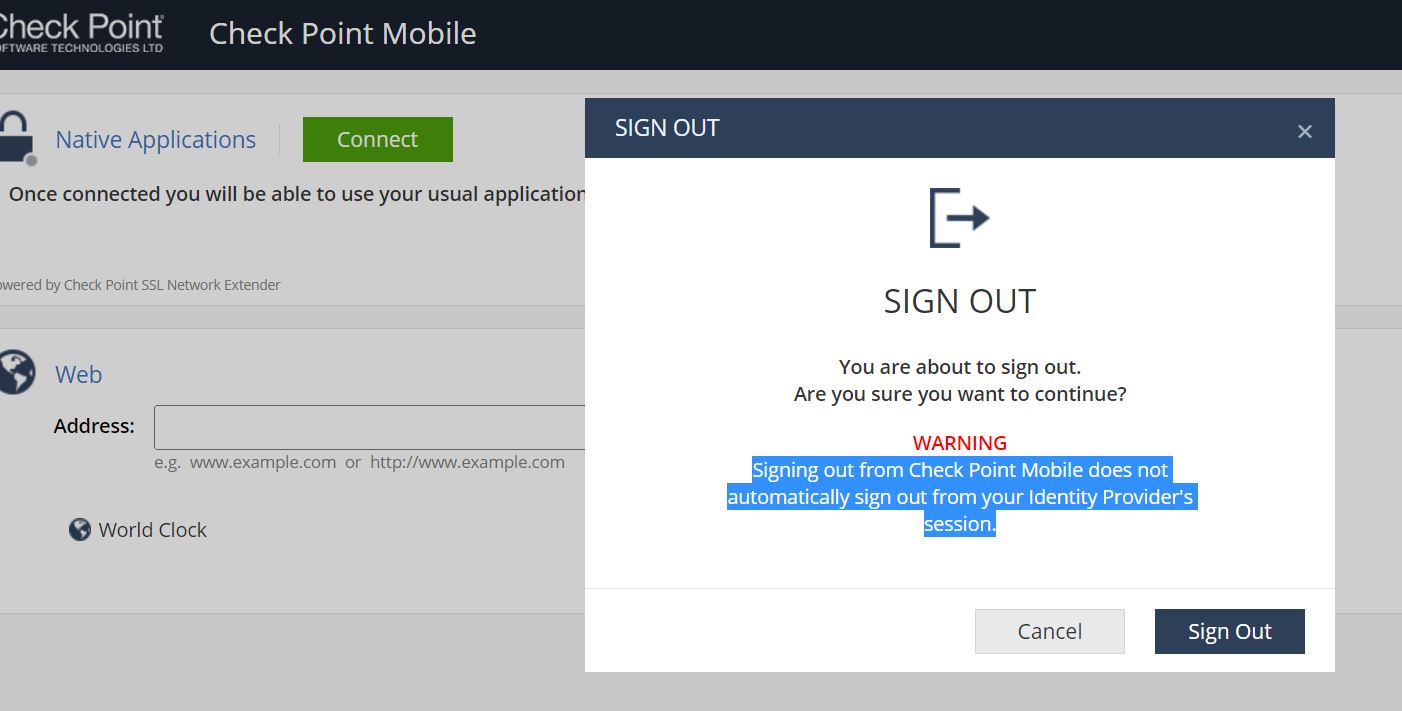
I have created a custom - non gallery application and filled in the SAML settings with Sign on and reply URL. But not sure what to fill in Logout URL. Some how, mobile Access VPN is now working with Azure MFA with SAML SSO. but when i try to log out from Mobile Access portal it says "Signing out from Check Point Mobile does not automatically sign out from your Identity Provider's session." if i close the browser and open the browser and try to relogin, it just logged in without asking MFA. It behaves like that till 60 minutes. after that it becomes normal. Not sure this related to 'logout URL' not filled in the application. dont know how to format the 'Logout URL'.
Refer the attached image. Any advise would be helpful. Thanks
@rameshm18 , I'm in the same case. Do you find a solution? Thank you in advance for your answer
The SSO session with the provider remains logged in based on the SSO providers settings. This is a massive benefit of use MFA and SSO. You are logging in on the device with the username / password / MFA. That device retains the authentication based on the SSO setting (one of my clients is 30 days). This means if they reconnect from the same device with the same user within 30 days they will no be re-prompted for anything and the VPN will connect and advise the session has been authenticated by the provider. It's GREAT for them!
I need to re-authenticate every time.
In Azure, Conditional Access, you can only type a sign-in frequency of 1 Hour.
is there a workaround for my need?
When my client disconnect his VPN, he have the information "your session is keeping in the IDP".
I have the same issue - I would like that each time a RA VPN Session is terminated, the Azure token must be released\expire immediately so that if another session is established, the whole MFA is (re)initiated.
For me the fact that Azure token is valid for minimum 60minutes is a security "red flag" because the session remains active with the IDP.
It's the same product (thus the same guide).
That assume we're talking about Check Point Mobile installed on Windows (versus Capsule VPN where this is not currently supported).
Fri 12 Dec 2025 @ 10:00 AM (CET)
Check Mates Live Netherlands: #41 AI & Multi Context ProtocolFri 12 Dec 2025 @ 10:00 AM (CET)
Check Mates Live Netherlands: #41 AI & Multi Context ProtocolTue 16 Dec 2025 @ 05:00 PM (CET)
Under the Hood: CloudGuard Network Security for Oracle Cloud - Config and Autoscaling!About CheckMates
Learn Check Point
Advanced Learning
YOU DESERVE THE BEST SECURITY