- Products
- Learn
- Local User Groups
- Partners
- More

MVP 2026: Submissions
Are Now Open!
What's New in R82.10?
10 December @ 5pm CET / 11am ET
Announcing Quantum R82.10!
Learn MoreOverlap in Security Validation
Help us to understand your needs better
CheckMates Go:
Maestro Madness
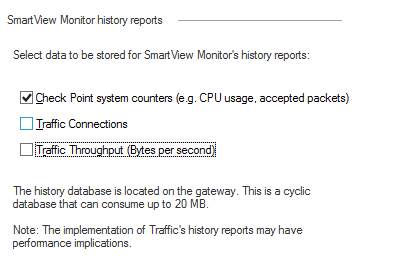
In the monitoring tab there is a warning that enabling traffic history may impact performances.

I couldn't find more details in any documentation, what type of impact are we talking about (I understand there is no precise answer to that but is it more like 1% or 20%)? I'd be also interested in the technical reasons that causes the performance impact.
Looking forward for any feedback if you enabled it in your environment as well.
Thank you
I guess this is related to SecureXL. Tim will know the exact answer.
I have often enabled these checkboxes on firewalls with less than 10% CPU usage. I didn't notice any performance impact.
In the days before SecureXL, this definitely had more of an impact.
SecureXL actually provides a lot of these statistics now, so the impact is pretty minimal.
See my response here, short answer is to go ahead and enable them:
--
Second Edition of my "Max Power" Firewall Book
Now Available at http://www.maxpowerfirewalls.com
HI Tim
What about this information sk32578 -SecureXL Mechanism, i
When SecureXL is enabled, all packets should be accelerated, except packets that match the following conditions:
"Traffic Connections" and "Traffic Throughput" counters in "Monitoring Software blade" pane (in Security Gateway object).
the sk is outdated???
Well found I didn't see this!
However I think it may be outdated indeed, I just checked on a gateway with both counters enabled and 93% of the traffic is fully accelerated with SXL path (the gateway only has firewall and monitoring blade).
It would be great if we can have an official answer on that and update the SK.
That statement is outdated, and was rectified in R77.20 and later via a change in the SecureXL accounting mechanism:
--
Second Edition of my "Max Power" Firewall Book
Now Available at http://www.maxpowerfirewalls.com
Sorry to resurrect such an old thread, but if a very high amount of traffic is fully accelerated by SecureXL and there is a very large number of concurrent connections, enabling all checkboxes on this screen can cause some strange-looking high CPU utilization on your Firewall Worker/Instances due to all the requested monitoring statistics passing back and forth between SecureXL and the Firewall Instances/Workers: sk173924: High CPU for all fw_workers when Monitoring blade is Active
Leaderboard
Epsum factorial non deposit quid pro quo hic escorol.
| User | Count |
|---|---|
| 22 | |
| 15 | |
| 7 | |
| 6 | |
| 5 | |
| 5 | |
| 4 | |
| 4 | |
| 4 | |
| 4 |
Fri 12 Dec 2025 @ 10:00 AM (CET)
Check Mates Live Netherlands: #41 AI & Multi Context ProtocolTue 16 Dec 2025 @ 05:00 PM (CET)
Under the Hood: CloudGuard Network Security for Oracle Cloud - Config and Autoscaling!Fri 12 Dec 2025 @ 10:00 AM (CET)
Check Mates Live Netherlands: #41 AI & Multi Context ProtocolTue 16 Dec 2025 @ 05:00 PM (CET)
Under the Hood: CloudGuard Network Security for Oracle Cloud - Config and Autoscaling!Thu 18 Dec 2025 @ 10:00 AM (CET)
Cloud Architect Series - Building a Hybrid Mesh Security Strategy across cloudsAbout CheckMates
Learn Check Point
Advanced Learning
YOU DESERVE THE BEST SECURITY