Welcome Back to Our Quantum Management Spotlight
We’re back with three SmartConsole features that can make your daily work faster, cleaner, and more easier - plus a quick Tip of the Day. 😊
🚀 This Month’s Spotlight - 3 Features You Should Start Using Today - September 2025
1. Top Matched Access Rules
What it is
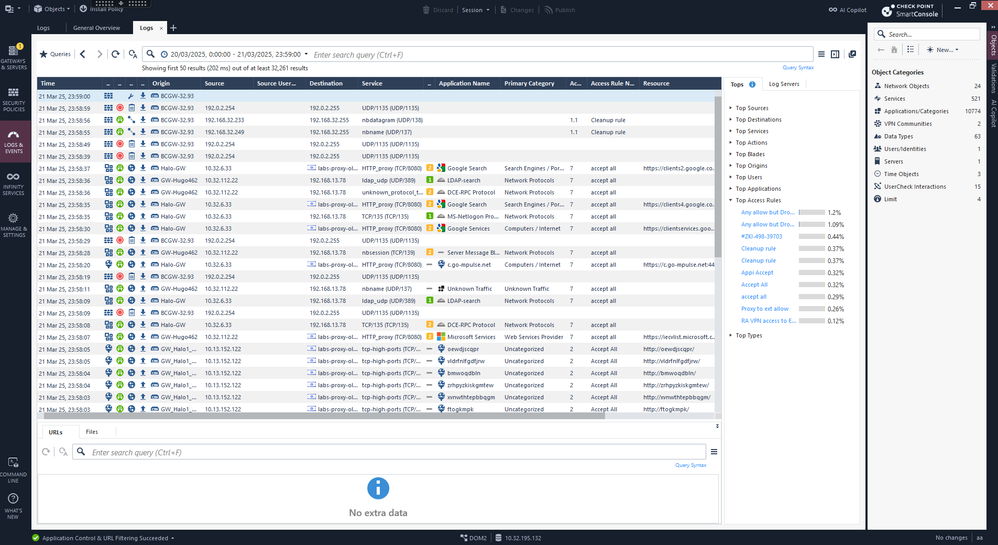
- SmartConsole now surfaces Top Matched Access Rules (and Top Log Types) as built-in statistics, so you can quickly see which rules are doing the most work - right where you manage policy and logs.
- This feature was also added to the Management API: the show-logs command now returns statistics for Top Matched Access Control Rules and Top Log Types. This makes it easy to identify rules that generate a high volume of logs, both in SmartConsole and via automation.
Use cases
- Rulebase cleanup & optimization: Quickly spot the busiest rules (“heavy hitters”) and decide whether to move them up, narrow their scope, or split overly broad rules.
- Find unused or shadowed rules: Identify rules with no hits, which may be redundant or hidden behind broader rules.
- Validate recent changes: After a policy update, check that the right rules are being triggered and that traffic flow hasn’t shifted unexpectedly.
Why you’ll love it 💛
- Clear visibility: See the busiest and least-used rules directly in SmartConsole, without switching to external reports.
- Smarter policy decisions: Use real hit data to fine-tune your rulebase, improve performance, and reduce risk.
- Confidence in changes: Validate that policy edits had the intended effect, backed by measurable statistics.
- Built-in automation: Access the same data through the Logs API to integrate checks into CI/CD pipelines or scheduled reviews.
Availability: R82.10, or R82 with Jumbo Take 36+.
2. Packet Search - Exact IP/Subnet Matching and new capabilities
What it is
- Packet Search lets you query the rulebase as if real traffic from a specific IP or subnet were traversing your policy. The results show exactly which rules would match that traffic. (This capability exists in older versions)
- Starting with R82.10 (currently in EA) and soon in older versions via jumbos, General/Packet IP search is enhanced: using quote-wrapped subnets (e.g.,
"10.10.20.0/24") improves precision by matching only the exact subnet object and excluding broader or nested groups. (New)
Use cases
- Accurate investigations: Check if a specific host or subnet is used in policy without being distracted by larger or nested groups.
- Pre-change validation: Before adding, removing, or renaming an object, confirm exactly which rules would be affected.
- Faster incident triage: Quickly list the candidate rules that could impact suspicious traffic - no need to manually scan long policies.
- Policy migration checks: Safely validate access after consolidations, merges, or policy refactors.
Why you’ll love it 💛
- Precise results: Focus on exact matches instead of digging through noisy, irrelevant results.
- Time-saver: One search shows you the rules that matter for that IP or subnet.
- Change confidence: Reduce outage risk by knowing in advance how traffic will be matched in policy.
Examples - for new capabilities:
Run searches with different modes
Exact (source):
mgmt_cli -r true show access-rulebase name "AccessTestLayer" filter "src:1.1.0.0/16" filter-settings.search-mode "packet" filter-settings.packet-search-settings.intersection-mode-src "exact" --format json | jq -r '.rulebase[].name'
Containing (source):
mgmt_cli -r true show access-rulebase name "AccessTestLayer" filter "src:1.1.0.0/16" filter-settings.search-mode "packet" filter-settings.packet-search-settings.intersection-mode-src "containing" --format json | jq -r '.rulebase[].name'
Contained_in (destination):
mgmt_cli -r true show access-rulebase name "AccessTestLayer" filter "dst:1.1.0.0/16" filter-settings.search-mode "packet" filter-settings.packet-search-settings.intersection-mode-dst "contained_in" --format json | jq -r '.rulebase[].name'
3. Shared Layers Between Policies
What it is
- Shared layers let you define a single rule layer and reuse it across multiple policy packages.
- This makes it easy to keep common logic (such as corporate baseline rules) in one place while still allowing flexibility for site-specific or domain-specific policies.
- Shared layers are installed together with the Access Control policy, so consistency is guaranteed across environments.
Use cases
- Enterprise baselines: Apply a global or corporate layer consistently across all sites - make a change once and it’s reflected everywhere.
- Delegation & separation of duties: Central teams can own and maintain the shared layer, while local admins manage their own layers - a clear handoff of responsibilities.
- Reduce drift & errors: Eliminate copy-paste; fewer discrepancies between policies mean cleaner audits and simpler troubleshooting.
Why you’ll love it 💛
- Consistency at scale: Maintain one source of truth for shared rules across your environment.
- Time savings: Update a rule once and automatically apply it across all relevant policies - minutes instead of days.
- Safer operations: Fewer mismatches between sites, simplified compliance reviews, and reduced risk of configuration errors.

Tip of the Day: Drag objects between rules 💡
You can drag & drop objects within SmartConsole to speed up edits - for example, moving an object from one rule cell to another without opening additional dialogs. This little trick can save time and make your rulebase edits feel much smoother.
These features are available today - try them out, and share your feedback in the community so we can keep improving together! QuantumMgmt‑[email protected] .
Missed our previous spotlights? Catch up here:








