- Products
- Learn
- Local User Groups
- Partners
- More

The State of Ransomware Q1 2026
Key Trends and Their Impact
Good, Better, Best:
Prioritizing Defenses Against Credential Abuse
AI Security Masters E7:
How CPR Broke ChatGPT's Isolation and What It Means for You
Blueprint Architecture for Securing
The AI Factory & AI Data Center
Call For Papers
Your Expertise. Our Stage
CheckMates Go:
CheckMates Fest
Good day, dear Checkmates
Finally, we are on our way of The Management Server R80.10-to-R80.40 migration.
Our Management Server is - Smart1- 525 appliance, no multi-domain, R80.10 JHF T279, Endpoint Policy Management is disabled.
For migrate export we used the last version of tools for R80.40 from the site – the process has finished successfully (with –exclude-uepm-postgres-db).
But before implementing import in production I wanted to check migrate import in the lab.
The lab OpenServer SMS is – R80.40 + JHF T173, 16 Gb RAM, 150 Gb HDD
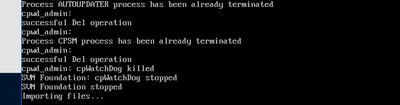
But unfortunately bumped into problem of migrate import process - the tool stuck on "Importing files….":
The log /opt/CPshrd-R80.40/log/migrate-2022.09.27_*****.log stopped here and no any changes for almost 48 hours:
So, please, can you suggest something? What can be the problem?
Thank you in advance.
That should be enough to handle the import in max 5 hours, depending on the number of rules and objects.
Open a TAC case..
Finally resolved the issue by using Clean install via CPUSE from Check_Point_R80.40_T294_Fresh_Install_and_Upgrade.tgz package. then did ./migrate import, and then installed Jumbo HF for Gaia R80.40
Database backup (600 Mb) was exported in 30 minutes.
Hello,
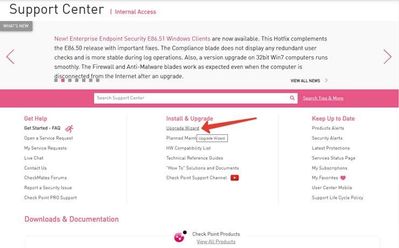
First, I downloaded Check_Point_R80.40_T294_Fresh_Install_and_Upgrade.tgz from Checkpoint site:
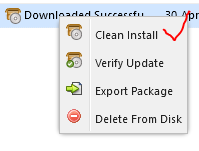
Then, I uploaded tgz to appliance via Gaia web-gui and finally used this menu in CPUse (this is "using Clean install via CPUSE from Check_Point_R80.40_T294_Fresh_Install_and_Upgrade.tgz package"):
There's a few things this could be caused by, and most of them require some internal scripts to resolve. Best to open a TAC case at this point so that the issue can be more deeply looked at.
How big is the policy, how many objects?
How much memory do you have in the open server and how many CPU's? 2 cores is the absolute minimum and 4GB as well.
A number of hours is normal but 48 hours is quite a lot.
Hi, Maarten.
Open Server has 16 Gb RAM, and 4 cores CPU
That should be enough to handle the import in max 5 hours, depending on the number of rules and objects.
Open a TAC case..
Finally resolved the issue by using Clean install via CPUSE from Check_Point_R80.40_T294_Fresh_Install_and_Upgrade.tgz package. then did ./migrate import, and then installed Jumbo HF for Gaia R80.40
Database backup (600 Mb) was exported in 30 minutes.
@Grigoriy, thanks for sharing the problem and solution. However, I have the same problem and it was not clear what you did when you said "using Clean install via CPUSE from Check_Point_R80.40_T294_Fresh_Install_and_Upgrade.tgz package".
Could you detail better? Thanks!
Hello,
First, I downloaded Check_Point_R80.40_T294_Fresh_Install_and_Upgrade.tgz from Checkpoint site:
Then, I uploaded tgz to appliance via Gaia web-gui and finally used this menu in CPUse (this is "using Clean install via CPUSE from Check_Point_R80.40_T294_Fresh_Install_and_Upgrade.tgz package"):
Leaderboard
Epsum factorial non deposit quid pro quo hic escorol.
| User | Count |
|---|---|
| 34 | |
| 10 | |
| 10 | |
| 10 | |
| 10 | |
| 8 | |
| 7 | |
| 6 | |
| 6 | |
| 6 |
Tue 12 May 2026 @ 10:00 AM (CEST)
The Cloud Architects Series: Check Point Cloud Firewall delivered as a serviceWed 13 May 2026 @ 11:00 AM (EDT)
TechTalk: The State of Ransomware Q1 2026: Key Trends and Their ImpactThu 14 May 2026 @ 07:00 PM (EEST)
Under the Hood: Presentando Check Point Cloud Firewall como ServicioTue 12 May 2026 @ 10:00 AM (CEST)
The Cloud Architects Series: Check Point Cloud Firewall delivered as a serviceAbout CheckMates
Learn Check Point
Advanced Learning
YOU DESERVE THE BEST SECURITY