- Products
- Learn
- Local User Groups
- Partners
- More

The Great Exposure Reset
24 February 2026 @ 5pm CET / 11am EST
CheckMates Fest 2026
Watch Now!AI Security Masters
Hacking with AI: The Dark Side of Innovation
CheckMates Go:
CheckMates Fest
I just unboxed my checkpoint 15400. I was about to start the first time configuration wizard and i realized the OS version is R77.30. I would like to upgrade to R80.10, how can i do this.
I also want to add that i dont have my VM built yet for management station. (its basically fresh out of the box)
Thank You
The easiest thing to do is install a new R80.10 Image on it.
The quickest way to do that is to use Blink with the appropriate image: Blink - Gaia Fast Deployment
Or you can download the appropriate ISO, install it to a USB drive with ISPmorphic, and boot off the thumb drive.
If you'll end-up using ISOmorphic, do not resize terminal window during installation: it leads to some nasty offset that makes it difficult to read the screen and act on prompts.
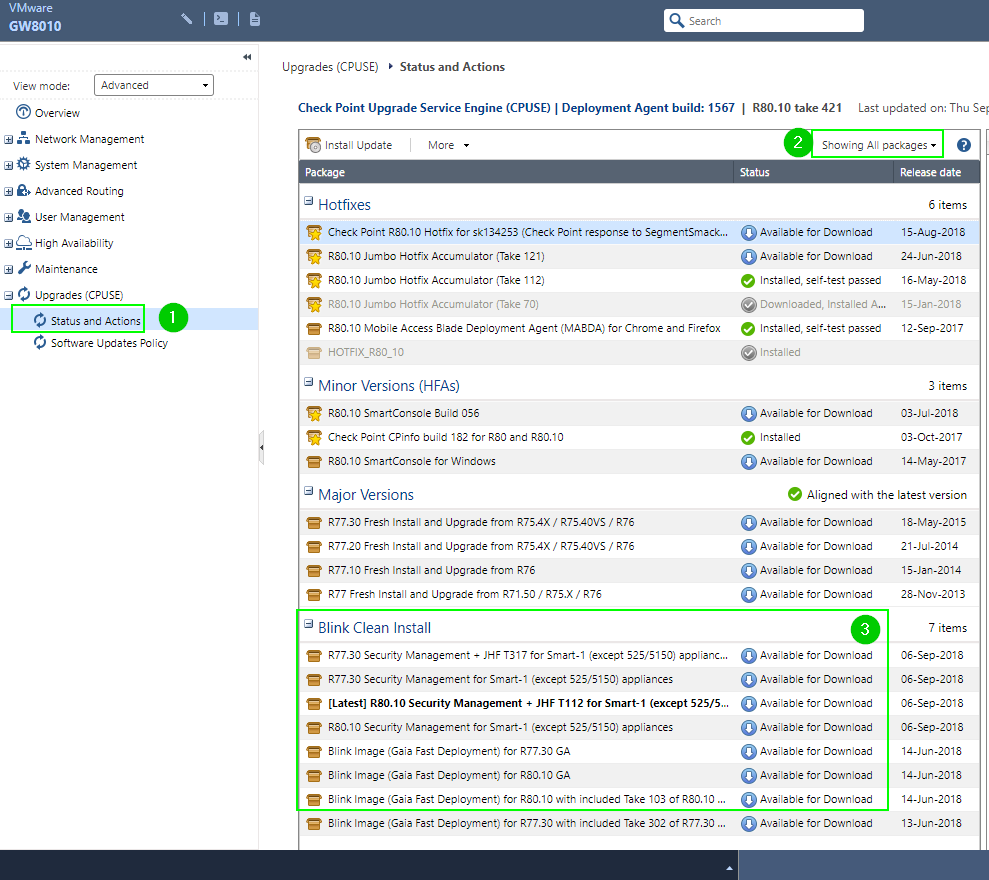
Another way is to complete the FTW, hook it up to the network with Internet access, CPUSE Fresh Install and Upgrade image and run it from WebUI.
It is possible that R80.10 is already pre-loaded and you will see it in CPUSE.
Thank you, i'll look into both (im leaning towards ISOmorphic)
For compliant reasons it cant have access to the internet
You can still use CPUSE by uploading a downloaded CPUSE image and then run the clean install.
You can use both CLI or GUI for that, uloapd the file with WinSCP or upload it in the browser, import it and then execute.
Do you have the steps for installing using CLI ? Also do i need to put the Upgrade folder to specific path in winscp ?
Thanks
The file location is only depending on the disc partition sizes, when you have enough space in the home folder, just put it there.
Before you can use the admin user for WinSCP you need to do the following in clish:
set user admin shell /bin/bash
copy the file to the machine
login with SSH to the machine, do an ls -l so you have the exact name of the file, go to clish
in clish use the following commands:
installer import local /home/admin/<uploaded file>
wait for it to finish and type:
installer install <Tab-Key>
you should see the file you have imported with 1 in front of it, now type 1 and hit enter.
It will now ask you if you are sure and want the reboot to happen at the end of the install.
Or if you want to have clear R80.10 without upgrade from R77.30, try to use LOM and mount CD with R80.10 fresh install ISO file.
By the way, when will CP start pre-installation of R80.10 on all appliances ? Once R77.30 will go out of support ?
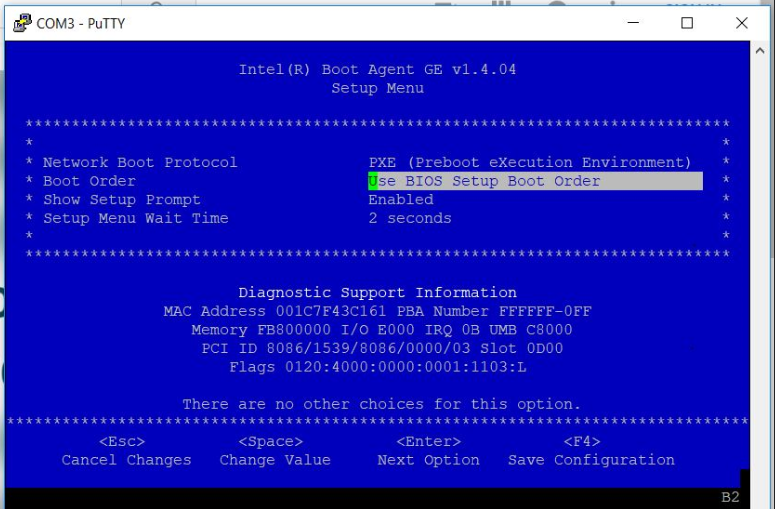
I decided to go with using the ISOmorphic tool to upgrade my OS. I did all the steps but when i went into CLI to select boot option, there was no number for booting from serial/usb. My CLI lines were distorted as i could not type serial in the "boot: ......" option.
Unfortunately i dont have a screenshot of what i'm trying to say here but i hope you understand.
I did some digging and it looked like i need to select boot option from BIOS menu. When i tried that i there was no option to boot from USB

If you've used ISOmorphic and got to the distorted screen prompt, you were already booting from USB stick, unless I am missing something.
I've recently had similar experience with stick configured for upgrade of two 5400s.
Had to navigate the screen blind to get the devices to boot from USB.
If you still have bootable Gaia on the device, I'd suggest getting into CPUSE, downloading Fresh Install image from there, either straight-up or using Blink images:

Leaderboard
Epsum factorial non deposit quid pro quo hic escorol.
| User | Count |
|---|---|
| 56 | |
| 44 | |
| 16 | |
| 14 | |
| 14 | |
| 11 | |
| 10 | |
| 10 | |
| 9 | |
| 8 |
Thu 12 Feb 2026 @ 05:00 PM (CET)
AI Security Masters Session 3: AI-Generated Malware - From Experimentation to Operational RealityFri 13 Feb 2026 @ 10:00 AM (CET)
CheckMates Live Netherlands - Sessie 43: Terugblik op de Check Point Sales Kick Off 2026Thu 19 Feb 2026 @ 03:00 PM (EST)
Americas Deep Dive: Check Point Management API Best PracticesThu 12 Feb 2026 @ 05:00 PM (CET)
AI Security Masters Session 3: AI-Generated Malware - From Experimentation to Operational RealityFri 13 Feb 2026 @ 10:00 AM (CET)
CheckMates Live Netherlands - Sessie 43: Terugblik op de Check Point Sales Kick Off 2026Thu 19 Feb 2026 @ 03:00 PM (EST)
Americas Deep Dive: Check Point Management API Best PracticesAbout CheckMates
Learn Check Point
Advanced Learning
YOU DESERVE THE BEST SECURITY