- Products
- Learn
- Local User Groups
- Partners
- More

MVP 2026: Submissions
Are Now Open!
What's New in R82.10?
Watch NowOverlap in Security Validation
Help us to understand your needs better
CheckMates Go:
Maestro Madness
Hello all,
I enabled the Syslog server on a management server, and I want to see those logs on smartview tracker, but they are not really usable because no information is showned in the line, and I didn't found any column which simply shows the syslog message, and I can't find any documentation about this.
Is that possible to simply add a column with the syslog message ?
Hi,
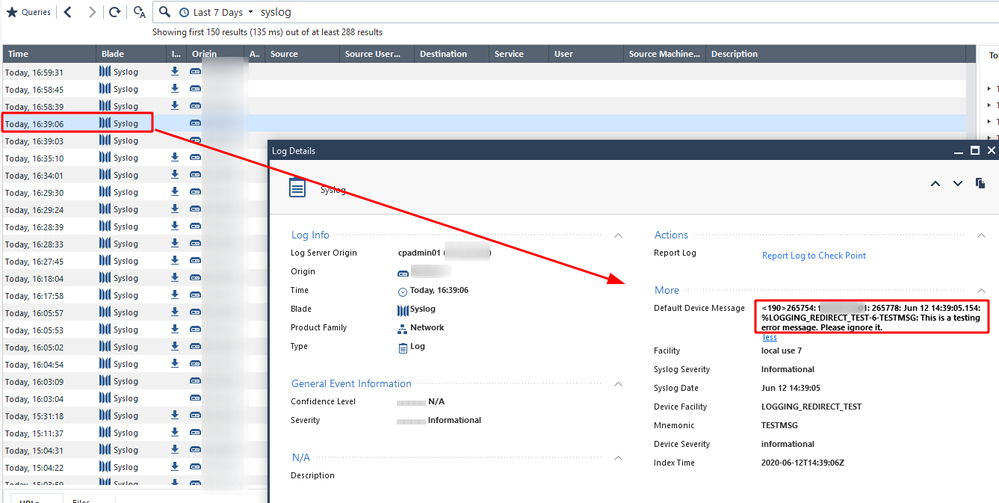
In case you did not configure any log parser, you should see the entire log message in a field called "default"_device_message".
Are you using SmartConsole? SmartView?
Hello Dan_Zada,
Thank you for replying!
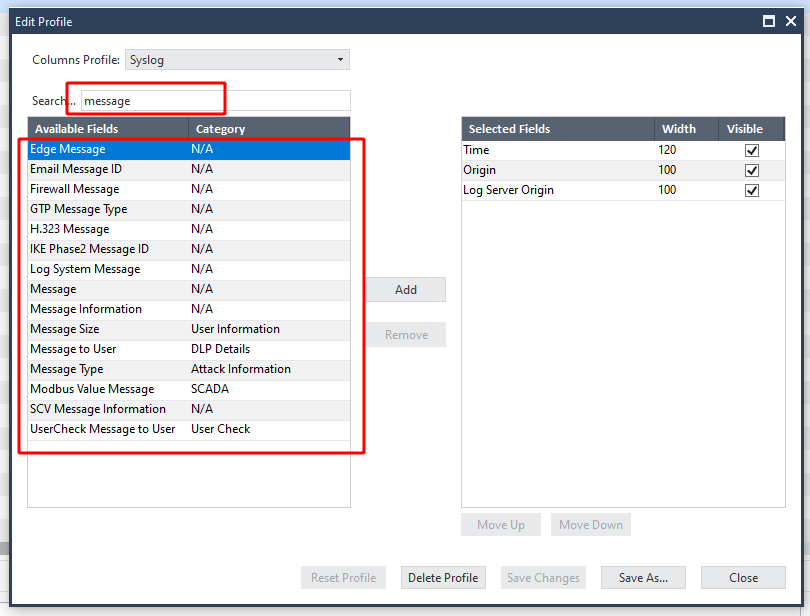
I can't find this column in the profile edititor :
I also tried to create a custom parser with the string into the "default_device_message" in the log details as following :
And it matches all logs using Eventia's simulation, but they are not tagged with the right product and so. When configuring, a parser with eventia, should the "Default Device Message" be used for parser creation ?
(The parser was installed on the smartLog server, and cpstop/cpstart was done)
Best regards.
Hi,
I'm not sure I understand the issue, so I will try to clarify few things:
1. In case no parser was applied, the entire syslog message will be parsed into "default_device_message" and the product/blade will be called "Syslog"
2. Using the Eventia Log Parser, you can configure your parser by copying a log example and map the fields to Check Point fields or to your own fields (notice that in case you are using your own fields, they will not be indexed). You can also configure what the product name will be called.
3. Once you apply those changes (using the Eventia scripts from the SK), the log server will parse the data and the fields will be populated
Thanks!
Dan.
Hello Dan, and thank you for your answere.
My parser don't work and the syslog messages are still showed in the "Default Device Message" field, Is there a way to show the column "Default Device Message" in smarv view (without having to open each log line), in order to have a real log view ?
I can't find a way to show this column.
Best regards,
Leaderboard
Epsum factorial non deposit quid pro quo hic escorol.
| User | Count |
|---|---|
| 19 | |
| 16 | |
| 7 | |
| 5 | |
| 5 | |
| 5 | |
| 4 | |
| 4 | |
| 4 | |
| 4 |
Tue 16 Dec 2025 @ 05:00 PM (CET)
Under the Hood: CloudGuard Network Security for Oracle Cloud - Config and Autoscaling!Thu 18 Dec 2025 @ 10:00 AM (CET)
Cloud Architect Series - Building a Hybrid Mesh Security Strategy across cloudsTue 16 Dec 2025 @ 05:00 PM (CET)
Under the Hood: CloudGuard Network Security for Oracle Cloud - Config and Autoscaling!Thu 18 Dec 2025 @ 10:00 AM (CET)
Cloud Architect Series - Building a Hybrid Mesh Security Strategy across cloudsAbout CheckMates
Learn Check Point
Advanced Learning
YOU DESERVE THE BEST SECURITY