Representational State Transfer (REST) APIs
Web service APIs that follow the practices of the REST architectural constraints are called RESTful APIs. It is the mechanism that allows for systems to access, manipulate , delete , change and add resources on an application via web services. The Security Management API is a HTTP-based RESTful API.
In general HTTP-based RESTful APIs are defined as follows:
- Using standard HTTP methods (e.g., OPTIONS, GET, PUT, POST, and DELETE)
- Called via a base URL such as "https://<MGMT_SRV>/web_api/"
- An internet content type that tells the client how to format the requests in the body (payload) to the server
To keep int simple we are in the Check Point Security Management API only relying on the standard HTTP method called POST to send API calls. In the body (payload) we are using a JavaScript Object Notation (JSON) style format.
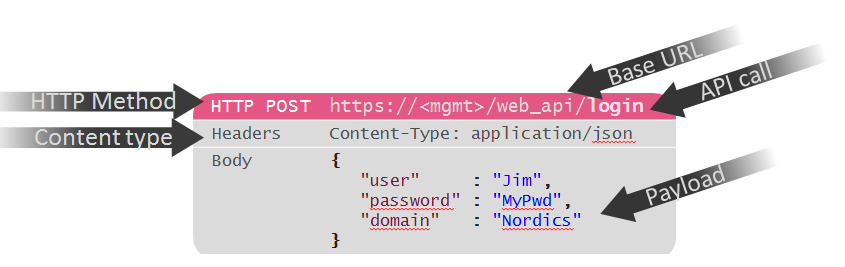
JavaScript Object Notation (JSON)
JSON is a textual representation defined by a small set of governing rules in witch data is structured, making it:
- Easy for humans to read and write.
- Easy for machines to parse and generate.
JSON specification states that data can be structured in either of the two following compositions
- A collection of name/value pairs, know as object
- An ordered list of values, known as array
Where name is just a string, value must be of type
- string, number, object, array, null or Boolean
- Boolean values are true or false
An object is represented as a pair of curly bracket, { and } surrounding zero or more name/value pairs
- A single colon : follows each name separating the name from the value
- The name/value pairs are separated by commas ,
- White-space can be inserted between any pair of tokens.
{ }
{"name" : "New Layer 1"}
{“user“ : “Jim", “password“ : “MyPwd“}
An array is represented as pair of square bracket , [ and ] surrounding zero or more values
- The order of the values are significant. Thus creating an ordered list of values
- The values are separated by commas ,
- White-space can be inserted between any pair of tokens.
[ ]
["First", "Second", "Third"]
- Arrays can be used as values in an object
{ "tags" : ["First", "Second", "Third"]}
Because objects and arrays can nest. Trees and other complex data structures can be represented
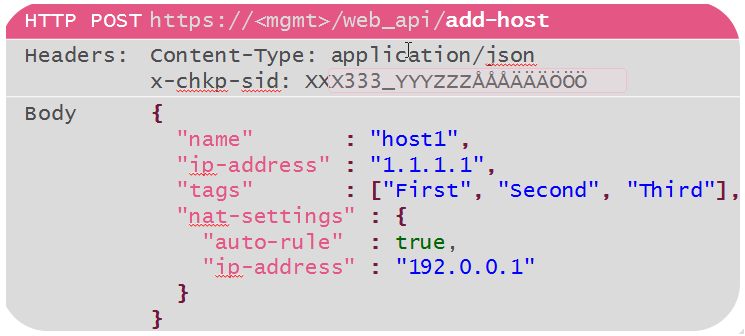
mgmt_cli executable converts CLI commands to HTTP-based RESTful API calls.
In addition to sending API calls formatted as HTTP-based POST requests using JSON format in the body (payload) via a web service. R&D have created an portable executable called mgmt_cli that runs on Windows and Linux. This executable translates the CLI commands issued toward the executable into HTTP-based RESTful API calls and sends them encrypted over HTTPS to the management server.
Using the mgmt_cli the above API call would look something like the following:
mgmt_cli add host name “host1” ip-address “1.1.1.1” tags.1 "First" tags.2 "Second" tags.3 "Third" nat-settings.auto-rule “true” nat-settings.ip-address "192.0.0.1"
mgmt_cli -r true -f json add host name "host1" ip-address "1.1.1.1" tags.1 "First" tags.2 "Second" tags.3 "Third" nat-settings.auto-rule "true" nat-settings.ip-address "192.0.0.1"
As you can see an JSON object using the mgmt_cli is crated using name/value pairs. (For example name “host1”)
Wile a JSON array used as values in a object is created using name.1 "value" name.2 "value" name.3 "value". (For example tags.1 "First" tags.2 "Second" tags.3 "Third")
If you would like to add a tag into an array with existing tags you can in mgmt_cli type name.add "value" For example:
mgmt_cli -r true set host name host1 tags.add "Fourth"
Operational Flow of the Security Management API
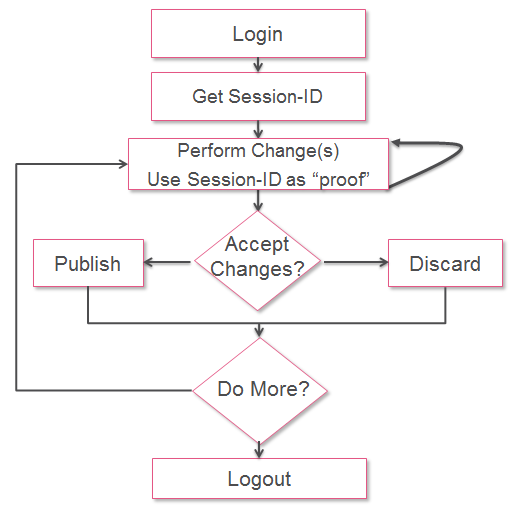
The operational flow is exactly the same for the API as it is for the GUI Login > Get Session > Do changes > Publish > Logout







 !
!