- Products
- Learn
- Local User Groups
- Partners
- More

MVP 2026: Submissions
Are Now Open!
What's New in R82.10?
10 December @ 5pm CET / 11am ET
Announcing Quantum R82.10!
Learn MoreOverlap in Security Validation
Help us to understand your needs better
CheckMates Go:
Maestro Madness
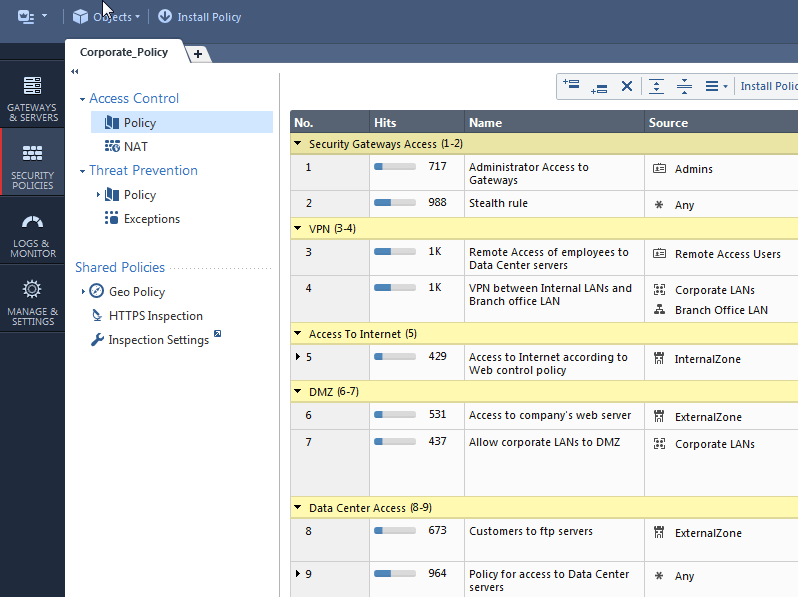
The "hits" and "comments" columns used to be visible by default. After installing SmartConsole they disappeared. How do I bring them back?
The new design of R80 SmartConsole has reduced the screen real estate for the many columns in the security policies. Therefore, Hits and Comments columns are now hidden by default.
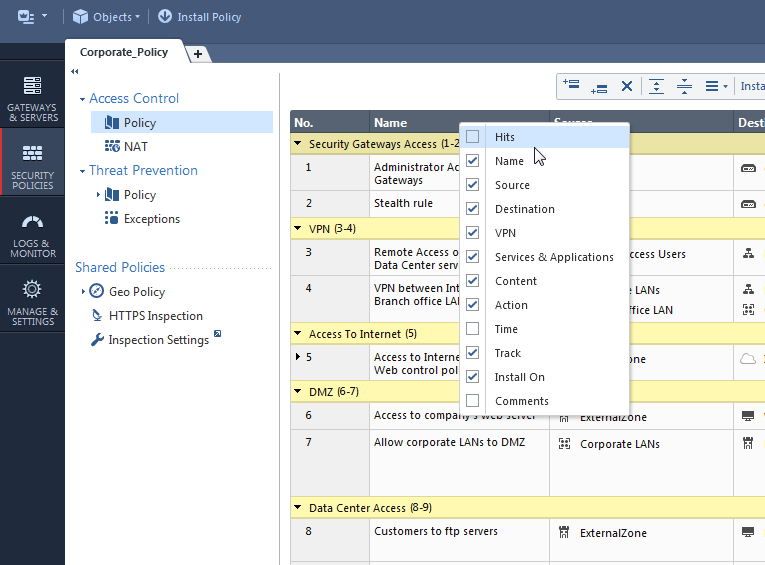
You can easily bring them back by right-clicking the column names and selecting them:


Your display settings get saved on your local computer. So between shutdowns of SmartConsole you will see the same columns in the same positions that you left them.
Please notice though that these settings are saved separately per policy.
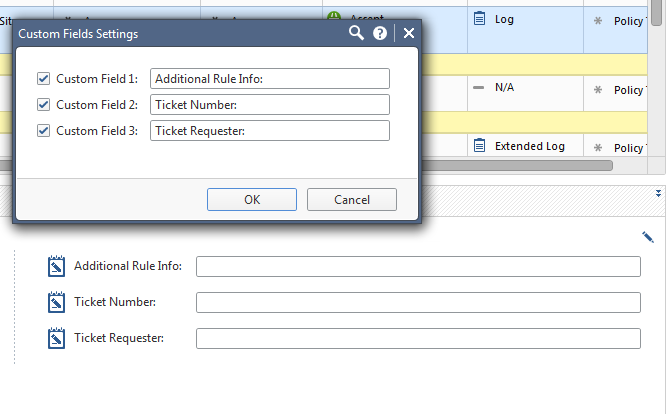
Another change is the Summary pane in R80 SmartConsole. The summary pane shows the name, hits, comments of each rule as well as 3 custom fields which you can change their titles, to provide extra information for each rule.


The new design of R80 SmartConsole has reduced the screen real estate for the many columns in the security policies. Therefore, Hits and Comments columns are now hidden by default.
You can easily bring them back by right-clicking the column names and selecting them:


Your display settings get saved on your local computer. So between shutdowns of SmartConsole you will see the same columns in the same positions that you left them.
Please notice though that these settings are saved separately per policy.
Another change is the Summary pane in R80 SmartConsole. The summary pane shows the name, hits, comments of each rule as well as 3 custom fields which you can change their titles, to provide extra information for each rule.


Rightclick on the headline will give you a context menu where you can select/disselect specific columns.
Hitcount and comment are not activated by default.
Problem: You have to change it in every single policy package and once you have to install a new smart console all changes are gone, because these changes are stored on client side.
Does someone know if there is a possibility to change the column settings default in smartconsoles access control policy?
Sorry Tomer, I did not expect that your initial question was an introduction. ![]()
yeah i figured it will SEO it better... I will use the "assumed answered" button the next time
Hello All,
I have a question about R81.10 smart console .When I have added comments associated with a specific rule in the the customs fields of the R81.10 summary pane . After publish and install the particular policy ,the added comments in the customs fields setting for that particular rule is showing in all rules of the whole policies in that domain , which should not be .I am wondering why this happening if any thing added in custom fields setting it should reflect for that particular rule not for whole policy.
Hi
Could it be that the preview pane at the bottom (Summary tab) is not refreshing, or do you see the issue in the actual rulebase?
Would it be possible to send a screenshot?
Thanks
Good Morning ,
Thank you for quick response, I discussed with my diamond support Engineers and they are investing on this.
Best Regards,
Farid Hashmi
Good Morning ,
Thank you for quick response, I discussed with my diamond support Engineers and they are investigating about this.
Best Regards,
Farid Hashmi
Leaderboard
Epsum factorial non deposit quid pro quo hic escorol.
| User | Count |
|---|---|
| 22 | |
| 15 | |
| 7 | |
| 6 | |
| 5 | |
| 5 | |
| 4 | |
| 4 | |
| 4 | |
| 4 |
Fri 12 Dec 2025 @ 10:00 AM (CET)
Check Mates Live Netherlands: #41 AI & Multi Context ProtocolFri 12 Dec 2025 @ 10:00 AM (CET)
Check Mates Live Netherlands: #41 AI & Multi Context ProtocolTue 16 Dec 2025 @ 05:00 PM (CET)
Under the Hood: CloudGuard Network Security for Oracle Cloud - Config and Autoscaling!About CheckMates
Learn Check Point
Advanced Learning
YOU DESERVE THE BEST SECURITY