- Products
- Learn
- Local User Groups
- Partners
- More
MVP 2026: Submissions
Are Now Open!
What's New in R82.10?
10 December @ 5pm CET / 11am ET
Announcing Quantum R82.10!
Learn MoreOverlap in Security Validation
Help us to understand your needs better
CheckMates Go:
Maestro Madness
Hello!
I am trying to stand up a site-to-site VPN tunnel to a 3rd party device that requires a data cap be set on Phase 2 renegotiation. I am following along sk108600, Scenario 6 for Simplified VPN, and need to use GuiDBEdit to set this parameter.
This environment is managed by MDS so I am running GuiDbEdit in MDS mode as per the procedure in sk13009.
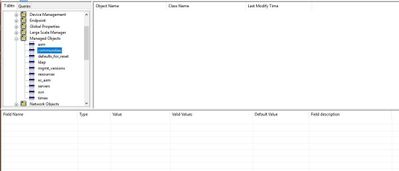
When I open and log in to the database, according to sk108600, I need to use the left hand table to navigate to Tables > Managed Objects > communities. When I do that, and select the "communities" table, there are no objects found. There are 4 other VPN communites configured in SmartConsole for this MDS context, and countless others for other MDS contexts, but none of them are showing up in GuiDbEdit in this table.
Am I looking in the wrong place? Is there another table specific to MDS environments that I should be looking in? I tried searching for the parameter and no entries were found.
I appreciate any help that you can provide.
Thanks,
Dave

Hi,
Are you using the DbEdit to connect to the IP of the CMA where the gateway/community is created ?
What version is your MDS running, R77.30 or R80.x ?
Running R80.30.
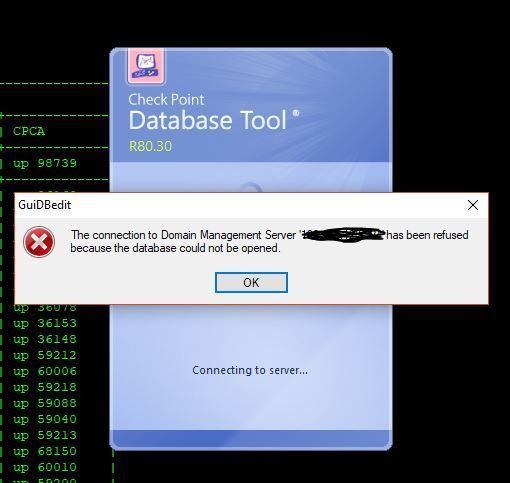
If I try to connect to the IP of the CMA for that domain, I get this error message.
Thanks,
Dave
I have been using GuiDBedit lots of times on a domain, and you need to connect to the Domain IP to see the correct data. Are you sure:
Hi Maarten, appreciate your suggestions. My answers are below:
Hi,
By coincidence, I happen to encounter the same error, while trying to access a CMA's IP which is running on R80.30.
I've opened GuiDbEdit from R77.30 and it worked, not surprised tho..
So I ended up opening a case with CP TAC and we were able to resolve this.
Turns out, sk13009 is incorrect. In that SK, the procedure states to run GuiDbEdit executable with the "/mds" switch when connecting to MDS contexts or servers. However, when I tired just running GuiDbEdit without the "/mds" switch, I was able to open the CMA by IP. Check Point is going to get that SK updated.
Gotta love it! Thanks everyone for jumping in with suggestions!
-Dave
Hello Dave
Apparently, sk13009 is correct. You should use the "/mds" flag only when connecting with MDS IP address to see the objects that are stored in the MDS database. While to review the database of Security Management server or CMA (Domain Management Server), "/mds" should not be used.
Hello,
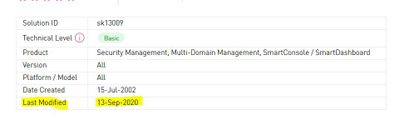
Yes, the sk is now correct, after it was updated and corrected yesterday, Sep 13, 2020.
Leaderboard
Epsum factorial non deposit quid pro quo hic escorol.
| User | Count |
|---|---|
| 22 | |
| 15 | |
| 11 | |
| 7 | |
| 6 | |
| 5 | |
| 4 | |
| 4 | |
| 4 | |
| 4 |
Fri 12 Dec 2025 @ 10:00 AM (CET)
Check Mates Live Netherlands: #41 AI & Multi Context ProtocolTue 16 Dec 2025 @ 05:00 PM (CET)
Under the Hood: CloudGuard Network Security for Oracle Cloud - Config and Autoscaling!Fri 12 Dec 2025 @ 10:00 AM (CET)
Check Mates Live Netherlands: #41 AI & Multi Context ProtocolTue 16 Dec 2025 @ 05:00 PM (CET)
Under the Hood: CloudGuard Network Security for Oracle Cloud - Config and Autoscaling!Thu 18 Dec 2025 @ 10:00 AM (CET)
Cloud Architect Series - Building a Hybrid Mesh Security Strategy across cloudsAbout CheckMates
Learn Check Point
Advanced Learning
YOU DESERVE THE BEST SECURITY